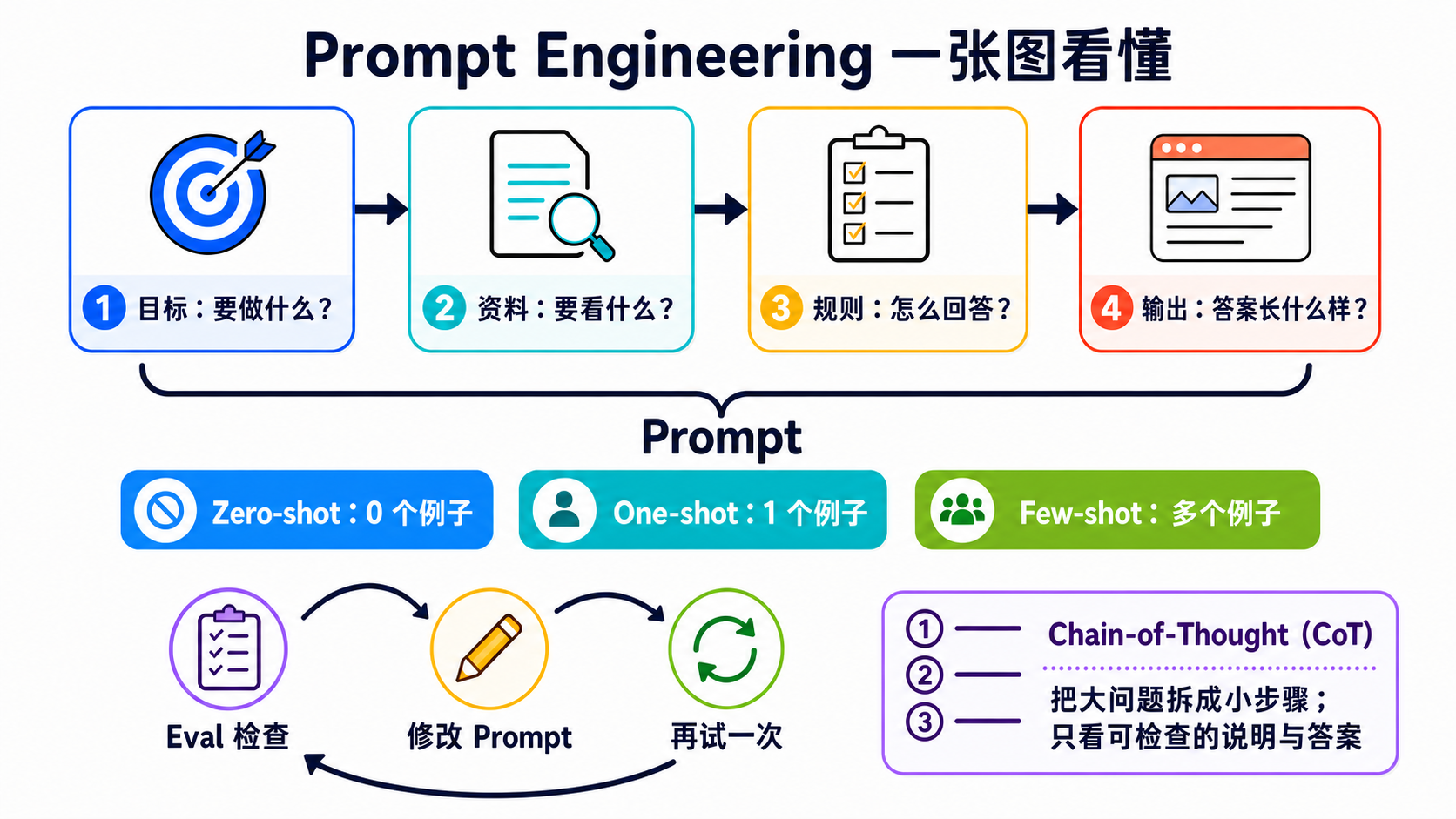
Stage 2 — Prompt 设计(Prompt Engineering)
⏱ 时间估算:1-2 周(约 5-12 小时)
👋 从 Stage 1 来的:好,你会调用 API 了——这 5-12 小时:写出可重用的结构化 prompt、用 few-shot 跟 chain-of-thought 解难题、用 eval 量化 prompt 改善幅度。直接从这里开始的:先确认你会调用 LLM API、会用 token 算成本——做不到请先回 Stage 1。
💡 用语不熟(prompt / few-shot / CoT / system prompt⋯)→ 翻
resources/glossary.zh-Hans.md。
📌 学习目标
走完这个阶段后你会: - 写出结构化 prompt(角色 + 任务 + 格式 + 示例) - 应用 few-shot prompting,并知道什么时候有用 - 在推理任务上使用 chain-of-thought(CoT) - 反复迭代修改一个 prompt 并衡量改善 - 看出什么时候 prompt 已经到极限了(这时你需要 tool / agent)
🚪 进入条件
你应该已经: - 会调用 LLM API(Stage 1) - 会解析 / 遍历 API 响应
📚 必修阅读
- anthropics/prompt-eng-interactive-tutorial ⭐⭐⭐⭐⭐ ★ 35k+ — Anthropic 官方互动教程、9 章 Jupyter notebook(basic / intermediate / advanced + appendix),含 playground 跟 answer key。用 Claude 3 Haiku(最便宜)跑得起来、Stage 2 的 canonical 动手教材。也是 anthropics/courses 5 course umbrella 的 module 2,想看更广(含 API Fundamentals / Real World Prompting / Eval / Tool Use)直接看 umbrella
- anthropics/courses — Real World Prompting ⭐⭐⭐⭐ ★ 21k+ — 同 umbrella 的 module 3,“真实情境下怎么用 prompting”:chatbot / legal / financial / coding 案例 walk-through。看完 #1 再来看 #2
- Anthropic Prompt Engineering Guide — 官方 docs、配合上面 #1 一起读
- OpenAI Prompt Engineering — OpenAI 观点
- dair-ai Prompt Engineering Guide — 学术风,深入
- Anthropic — Prompting Best Practices — 直接清楚
🛠 动手练习
🦙 本 stage 默认用 Ollama gemma4:e4b(成本考量、$0/run)。Prompt engineering 对小 model 更有教学价值——小 model 对 prompt 质量敏感、能让你看清楚 system prompt / few-shot / CoT / refinement 各自带来多少改善。每个练习都有 Path A(Ollama、默认)+ Path B(Anthropic、选择性)。
💰 Stage 2 预算估算(全 4 练习各跑 3-5 次):全本机 = $0、全 haiku ≈ $0.20、全 sonnet ≈ $0.60。Few-shot 分类任务的 12 calls × 5 reps ≈ $0.30 haiku / $0.90 sonnet。完整预算见
examples/README.zh-Hans.md#推荐-llm-清单。完整 3 路 trade-off 见
examples/README.zh-Hans.md。
练习 1:System Prompt
同样的 user message,三个不同的 system prompt。观察人格 / 输出格式怎么变。
📋 起手码 — Path A(本机 Ollama gemma4:e4b、默认)(复制到 practice_1.py)
# 需要:pip install openai
# 前置:ollama pull gemma4:e4b && ollama serve
import sys, json
if hasattr(sys.stdout, "reconfigure"):
sys.stdout.reconfigure(encoding="utf-8", errors="replace")
from openai import OpenAI
client = OpenAI(base_url="http://localhost:11434/v1", api_key="ollama")
# 同一个 user message、3 个不同 system prompt
SYSTEM_PROMPTS = {
"严肃律师": "你是严谨的合约律师。回答要精准、引用法条编号、避免任何主观形容词。",
"幼儿园老师": "你是温柔的幼儿园老师、要对 5 岁小孩说话。用比喻、口语、少于 80 字。",
"JSON 机器": "你只回 JSON。schema: {\"answer\": string, \"confidence\": float}",
}
USER_MSG = "请帮我解释什么是租赁合约。"
outputs = {}
for label, system in SYSTEM_PROMPTS.items():
# Note: Ollama 把 system 放 messages 第一笔(不像 Anthropic 用 system= 参数)
r = client.chat.completions.create(
model="gemma4:e4b",
max_tokens=200,
messages=[
{"role": "system", "content": system},
{"role": "user", "content": USER_MSG},
],
)
outputs[label] = r.choices[0].message.content
print(f"\n--- [{label}] ---")
print(outputs[label])
# === 自我验证 ===
json_output = outputs["JSON 机器"]
assert "{" in json_output and "}" in json_output, "JSON 机器版输出应该含 JSON braces"
try:
parsed = json.loads(json_output.strip().split("\n")[-1] if "\n" in json_output else json_output)
assert "answer" in parsed, "JSON schema 应包含 answer 栏位"
except json.JSONDecodeError:
pass # 容许 model 回 JSON 含解释文字、最后一笔才是 JSON
print(f"\n✅ 练习 1 通过 — 同一个问题、3 種人格 / 格式 / 语气")
print("💡 观察:律师长、老师短、JSON 机器一定是 {...}")
--- [严肃律师] ---
依民法第 421 条...
--- [幼儿园老师] ---
租赁合约就像借玩具给朋友、讲好什么时候还、要付多少糖果...
--- [JSON 机器] ---
{"answer": "租赁合约是当事人约定一方以物租与他方使用...", "confidence": 0.85}
📋 起手码 — Path B(Anthropic API、选择性)(复制到 practice_1_anthropic.py)
# 需要:pip install anthropic
import sys, json
if hasattr(sys.stdout, "reconfigure"):
sys.stdout.reconfigure(encoding="utf-8", errors="replace")
import anthropic
client = anthropic.Anthropic()
SYSTEM_PROMPTS = {
"严肃律师": "你是严谨的合约律师。回答要精准、引用法条编号、避免任何主观形容词。",
"幼儿园老师": "你是温柔的幼儿园老师、要对 5 岁小孩说话。用比喻、口语、少于 80 字。",
"JSON 机器": "你只回 JSON。schema: {\"answer\": string, \"confidence\": float}",
}
USER_MSG = "请帮我解释什么是租赁合约。"
outputs = {}
for label, system in SYSTEM_PROMPTS.items():
# Anthropic 用 system= 参数(不放 messages 內)
msg = client.messages.create(model="claude-haiku-4-5", max_tokens=200,
system=system, messages=[{"role": "user", "content": USER_MSG}])
outputs[label] = msg.content[0].text
print(f"\n--- [{label}] ---")
print(outputs[label])
# 同样的 JSON assert(schema 跨 backend 通用)
json_output = outputs["JSON 机器"]
assert "{" in json_output and "}" in json_output
print(f"\n✅ 练习 1 通过(Anthropic)")
练习 2:Few-Shot
挑一个分類任务。先用 0-shot 跑,再用 3-shot 跑。量一下准确率差多少。
📋 起手码 — Path A(本机 Ollama gemma4:e4b、默认)(复制到 practice_2.py)
# 需要:pip install openai
# 前置:ollama pull gemma4:e4b && ollama serve
import sys
if hasattr(sys.stdout, "reconfigure"):
sys.stdout.reconfigure(encoding="utf-8", errors="replace")
from openai import OpenAI
client = OpenAI(base_url="http://localhost:11434/v1", api_key="ollama")
# 中文情緒分類(正面 / 负面 / 中立)
TEST_SET = [
("这部电影超赞、看完想再看一次!", "正面"),
("剧情无聊、演员演技尴尬。", "负面"),
("这是一部 2019 年的电影。", "中立"),
("我不确定喜不喜欢、可能再想想。", "中立"),
("第一集很不错但第二集就崩了。", "负面"),
("看完心情很好、推荐!", "正面"),
]
FEW_SHOT_EXAMPLES = """范例:
input: 这家餐厅的牛排好吃到让我哭出来。
output: 正面
input: 服务生态度很差、我再也不会来了。
output: 负面
input: 这家店位于新北市三重区。
output: 中立
"""
def classify(text: str, *, use_few_shot: bool) -> str:
prefix = FEW_SHOT_EXAMPLES + "\n" if use_few_shot else ""
prompt = f"{prefix}input: {text}\noutput:"
r = client.chat.completions.create(
model="gemma4:e4b",
max_tokens=10,
messages=[{"role": "user", "content": prompt}],
)
return r.choices[0].message.content.strip().splitlines()[0]
def evaluate(use_few_shot: bool) -> tuple[int, int]:
correct = 0
for text, label in TEST_SET:
pred = classify(text, use_few_shot=use_few_shot)
ok = label in pred
print(f" {'✓' if ok else '✗'} [{label}] {text[:30]}... → '{pred}'")
if ok:
correct += 1
return correct, len(TEST_SET)
print("=== 0-shot ===")
c0, n = evaluate(use_few_shot=False)
print(f"正确 {c0}/{n} = {c0/n:.0%}")
print("\n=== 3-shot ===")
c3, _ = evaluate(use_few_shot=True)
print(f"正确 {c3}/{n} = {c3/n:.0%}")
# === 自我验证 ===
assert c3 >= c0, f"预期 3-shot 不比 0-shot 差、实际 {c3} < {c0}(小 model 样本小、跑几次比较)"
print(f"\n✅ 练习 2 通过 — 0-shot {c0}/{n}、3-shot {c3}/{n}(本机 $0)")
print("💡 观察:'中立' 在 0-shot 容易被误判成正面或负面、3-shot 后改善明显")
print("💡 小 model(gemma4:e4b)通常 0-shot 表现比 Claude 差更多、所以 few-shot 改善幅度更大")
📋 起手码 — Path B(Anthropic API、选择性)(复制到 practice_2_anthropic.py)
# 需要:pip install anthropic
# 把 starter Path A 的 client 跟 classify() 改成:
import anthropic
client = anthropic.Anthropic()
def classify(text: str, *, use_few_shot: bool) -> str:
prefix = FEW_SHOT_EXAMPLES + "\n" if use_few_shot else ""
msg = client.messages.create(
model="claude-haiku-4-5",
max_tokens=10,
messages=[{"role": "user", "content": f"{prefix}input: {text}\noutput:"}],
)
return msg.content[0].text.strip().splitlines()[0]
# 其余 TEST_SET / FEW_SHOT_EXAMPLES / evaluate() 跟 Path A 一样
练习 3:CoT
挑一个数学文字题,比较: - 纯 prompt - 纯 prompt + “Let's think step by step” - 纯 prompt + 一个展示 CoT 的范例
📋 起手码 — Path A(本机 Ollama gemma4:e4b、默认)(复制到 practice_3.py)
# 需要:pip install openai
# 前置:ollama pull gemma4:e4b && ollama serve
import sys, re
if hasattr(sys.stdout, "reconfigure"):
sys.stdout.reconfigure(encoding="utf-8", errors="replace")
from openai import OpenAI
client = OpenAI(base_url="http://localhost:11434/v1", api_key="ollama")
QUESTION = "小明有 3 颗苹果。他给了小華 1 颗、又从媽媽那边拿到 5 颗、然后吃了 2 颗。请问现在剩几颗?"
ANSWER = 5 # 3 - 1 + 5 - 2 = 5
COT_EXAMPLE = """范例:
Q: 一只鸡有 2 只脚。3 只鸡跟 1 个人共有几只脚?
A: 让我一步一步算。3 只鸡 × 2 只脚 = 6 只脚。1 个人有 2 只脚。總共 6 + 2 = 8 只脚。答案是 8。
"""
def ask(prompt: str) -> str:
r = client.chat.completions.create(
model="gemma4:e4b",
max_tokens=300,
messages=[{"role": "user", "content": prompt}],
)
return r.choices[0].message.content
def extract_number(text: str) -> int | None:
nums = re.findall(r"-?\d+", text)
return int(nums[-1]) if nums else None
# A. 纯 prompt
out_a = ask(QUESTION); ans_a = extract_number(out_a)
# B. + Let's think step by step
out_b = ask(QUESTION + "\nLet's think step by step."); ans_b = extract_number(out_b)
# C. + CoT example
out_c = ask(COT_EXAMPLE + "\n\nQ: " + QUESTION + "\nA:"); ans_c = extract_number(out_c)
for label, out, ans in [("A 纯 prompt", out_a, ans_a), ("B +step-by-step", out_b, ans_b), ("C +CoT example", out_c, ans_c)]:
print(f"\n--- [{label}] 答案={ans} {'✓' if ans == ANSWER else '✗'} ---")
print(out[:200])
# === 自我验证 ===
correct = sum(1 for a in (ans_a, ans_b, ans_c) if a == ANSWER)
assert correct >= 1, f"3 種 prompt 至少要 1 種答对、实际 {correct}/3"
# 小 model 对 CoT 依賴性更高、放宽条件:B 或 C 至少 1 对(vs Anthropic Path B 要求严格)
assert ans_b == ANSWER or ans_c == ANSWER, "B (step-by-step) 或 C (CoT example) 至少一種要答对 — CoT 对小 model 是基本功"
print(f"\n✅ 练习 3 通过 — {correct}/3 答对(本机 $0)")
print(f"💡 观察小 model:A 纯 prompt 通常答错、B/C 加 CoT 后明显改善——比 Claude 更能凸显 CoT 重要性")
📋 起手码 — Path B(Anthropic API、选择性)(复制到 practice_3_anthropic.py)
把 Path A 的 client + ask() 改成:
import anthropic
client = anthropic.Anthropic()
def ask(prompt: str) -> str:
msg = client.messages.create(model="claude-haiku-4-5", max_tokens=300,
messages=[{"role": "user", "content": prompt}])
return msg.content[0].text
练习 4:Iterative Refinement
拿一个模糊的 prompt,refine 5 次。把每一轮记下来。观察哪些改动会提升质量。
📋 起手码 — Path A(本机 Ollama gemma4:e4b、默认)(复制到 practice_4.py)— 这题没有“对错”、重点是观察过程
# 需要:pip install openai
# 前置:ollama pull gemma4:e4b && ollama serve
import sys
if hasattr(sys.stdout, "reconfigure"):
sys.stdout.reconfigure(encoding="utf-8", errors="replace")
from openai import OpenAI
client = OpenAI(base_url="http://localhost:11434/v1", api_key="ollama")
# 5 个 iteration、每一轮 prompt 都比前一轮更具体
PROMPTS = {
"v1 模糊": "写一段介紹 ReAct 的文字。",
"v2 加目标读者": "写一段介紹 ReAct 的文字、给写过 Python 的软体工程师看。",
"v3 加格式": "写一段介紹 ReAct 的文字、给写过 Python 的软体工程师看。100 字以內、用一个段落。",
"v4 加 example 要求": "写一段介紹 ReAct 的文字、给写过 Python 的软体工程师看。100 字以內、用一个段落、结尾举一个具体例子(譬如查天气)。",
"v5 加禁忌": "写一段介紹 ReAct 的文字、给写过 Python 的软体工程师看。100 字以內、用一个段落、结尾举一个具体例子(譬如查天气)。不要用「賦能」「驅动」「智能」这類空泛词彙。",
}
outputs = {}
for label, prompt in PROMPTS.items():
r = client.chat.completions.create(
model="gemma4:e4b",
max_tokens=200,
messages=[{"role": "user", "content": prompt}],
)
text = r.choices[0].message.content
outputs[label] = text
print(f"\n--- [{label}] ({len(text)} chars) ---")
print(text)
# === 自我验证 ===
v1_len, v5_len = len(outputs["v1 模糊"]), len(outputs["v5 加禁忌"])
banned_words = ("賦能", "驅动", "智能")
v5_has_banned = any(w in outputs["v5 加禁忌"] for w in banned_words)
assert v5_len > 0, "v5 必須有输出"
assert not v5_has_banned, f"v5 应该避免禁忌词、实际含: {[w for w in banned_words if w in outputs['v5 加禁忌']]}"
print(f"\n✅ 练习 4 通过 — v5 长度 {v5_len}、无禁忌词(本机 $0)")
print(f"💡 观察:v1 ({v1_len} chars) 通常比 v5 ({v5_len} chars) 「鬆」、加约束会逼 prompt 收斂")
print("💡 用 gemma4:e4b 跑这题特别有感——小 model 对 prompt 质量极敏感、5 轮 refine 的差距会比 Claude 更明显")
📋 起手码 — Path B(Anthropic API、选择性)(复制到 practice_4_anthropic.py)
把 Path A 的 client + 循环內 `client.chat.completions.create(...)` 改成:
import anthropic
client = anthropic.Anthropic()
# 循环內:
msg = client.messages.create(model="claude-haiku-4-5", max_tokens=200,
messages=[{"role": "user", "content": prompt}])
text = msg.content[0].text
进阶做法:把这 5 轮输出全存进 csv、Stage 7 练习 2 会教怎么把这变成 eval harness 量化“prompt 改善了多少”。
🎯 精选项目
dair-ai/Prompt-Engineering-Guide
| 字段 | 内容 |
|---|---|
| Stars | ★ 60k+ |
| License | MIT |
| 推荐度 | ⭐⭐⭐⭐⭐ |
教什么:从基础到进阶(CoT、ToT、ReAct、RAG)的端到端 prompt engineering。学术风但实用。
适合谁:当参考用。先大致扫过一次,需要某个技巧时再回来查。
f/awesome-chatgpt-prompts
| 字段 | 内容 |
|---|---|
| Stars | ★ 130k+ |
| License | CC0 |
| 推荐度 | ⭐⭐⭐ |
教什么:上百个角色型 prompt。"Act as a [角色]..."的模式。
适合谁:卡关时找灵感。不要照抄——把模式拿出来改写。
PromptingGuide.ai
教什么:跟 dair-ai GitHub 同样的内容,但做成网站、有可以跑的示例。
适合谁:手机阅读。
microsoft/prompt-engine
| 字段 | 内容 |
|---|---|
| 推荐度 | ⭐⭐⭐ |
教什么:管理大量 prompt 的 TypeScript library(模板、对话历史)。
适合谁:开始要在 production 管很多 prompt 时。
microsoft/promptflow
| 字段 | 内容 |
|---|---|
| Stars | ★ 10k+ |
| 推荐度 | ⭐⭐⭐ |
教什么:可视化 prompt 设计 + 评估工具。
适合谁:以 prompt 为主、需要 eval 的团队型应用。
GoogleCloudPlatform/generative-ai
| 字段 | 内容 |
|---|---|
| 推荐度 | ⭐⭐⭐ |
教什么:Google Cloud 的 prompting cookbook(notebook,PaLM/Gemini 为主)。
适合谁:用 Google 技术栈时的跨厂商观点。
Anthropic Cookbook — Prompt patterns
Stage 1 已经提过。这里特别推 misc/prompt_caching.ipynb 跟 multimodal/ 系列 notebook,会教进阶 prompting 模式。
stanfordnlp/dspy
| 字段 | 内容 |
|---|---|
| 语言 | Python |
| Stars | ★ 34k+ |
| License | MIT |
| 推荐度 | ⭐⭐⭐⭐⭐ |
教什么:把 prompt 当 code 写——定义 signature 跟 module、用 compiler / teleprompter 自动优化 prompt,不用手刻 f-string。Stanford NLP 出品,是 Stage 2 → Stage 3 的桥。
适合谁:跑完 dair-ai 的指南、开始问“我要怎么把 prompt 规模化(不是再多 hard-code)”的人。
备注:是 framework 不是 tutorial,学习门槛比 prompt-engineering-guide 高。建议搭配官方 tutorial 网站 dspy.ai 一起读。
NirDiamant/Prompt_Engineering
| 字段 | 内容 |
|---|---|
| 语言 | Python / Jupyter |
| Stars | ★ 7k+ |
| License | NOASSERTION(自定义条款,研究 / 非商用为主,使用前读条款) |
| 推荐度 | ⭐⭐⭐⭐ |
教什么:22 种 prompt engineering 技巧的可执行 Jupyter notebook(zero-shot → CoT → ReAct → constitutional),2025 年的更新内容,比 dair-ai 更动手。
适合谁:偏好“边跑边学”的人。每个技巧都有独立 notebook,挑感兴趣的看。
🔭 进阶:prompt → context → harness 三层 engineering
LLM-powered system 的工程实践可以拆成 3 层 stack。这不是 1 次 call vs N 次 call 的区别,而是每一层工程的对象 不一样:
- Prompt Engineering(本 stage)= 工程 送进模型的那段字符串
- Context Engineering(Stage 6)= 工程 每次 call 时,context window 里装什么信息——动态组装 RAG retrieve 结果、memory、tool definitions、对话 history
- Harness Engineering(Stage 7)= 工程 模型外围的执行与控制层——agent loop、retry、sandbox、observability、deployment 等所有非 LLM 代码
→ 三层 正交:一次 call 的 RAG app 也在做 context engineering(重点是组 context,不是 call 几次);50 次 call 但没做 retrieval 的 chatbot 仍然只是在做 prompt engineering。
这条路线里的完整三层 lineage:
| Discipline | 工程“什么” | 在哪一 stage 完整学 |
|---|---|---|
| 1. Prompt Engineering | 送进 LLM 的字符串本身(system prompt / few-shot / format) | 本 stage(Stage 2) |
| 2. Context Engineering | context window 里装什么信息(RAG / memory / tool defs / history) | Stage 6 — Context Engineering:RAG 与 Memory |
| 3. Harness Engineering | 模型外围的执行与控制层(agent loop / retry / sandbox / observability) | Stage 7 — Multi-Agent · Production 化 |
💡 Karpathy 2025-06:context engineering 是把 刚好对下一步有用的信息 填进 context window 的精细艺术。
💡 Simon Willison / Addy Osmani:“coding agent = LLM + harness”;harness = 所有不是 model 本身的代码。OpenAI 也在 2026-02 使用了 "Harness Engineering" 这个说法。
这个 stage 不用学完后两层,这里只是给你一个方向。等你进入 Stage 6 / 7,会发现它们是在接着这条 lineage 往上走。
延伸阅读(不必修、未来想深挖时看):
Meirtz/Awesome-Context-Engineering(★ 3k+)——从 prompt engineering 一路推到 production agent 的 surveyWindy3f3f3f3f/how-claude-code-works(★ 2.4k+)——Claude Code 内部解析,含 context engineering 章节
✅ 进 Stage 3 前的自我检查
你能不能: - [ ] 写一个有 system message + user message + 3 个示例 message 的 prompt(few-shot) - [ ] 示范 CoT 在某个推理任务上提升准确率 - [ ] 反复 refine 一个 prompt 5 次,每一版都留下记录 - [ ] 看出 prompt 不是对的工具的时候(这时要用 tool use)
如果可以 → 进 Stage 3 — Tool Use & Agent 入门。这是最重要的一个阶段——prompt 不要急着跳过去,但也不要卡在这里。