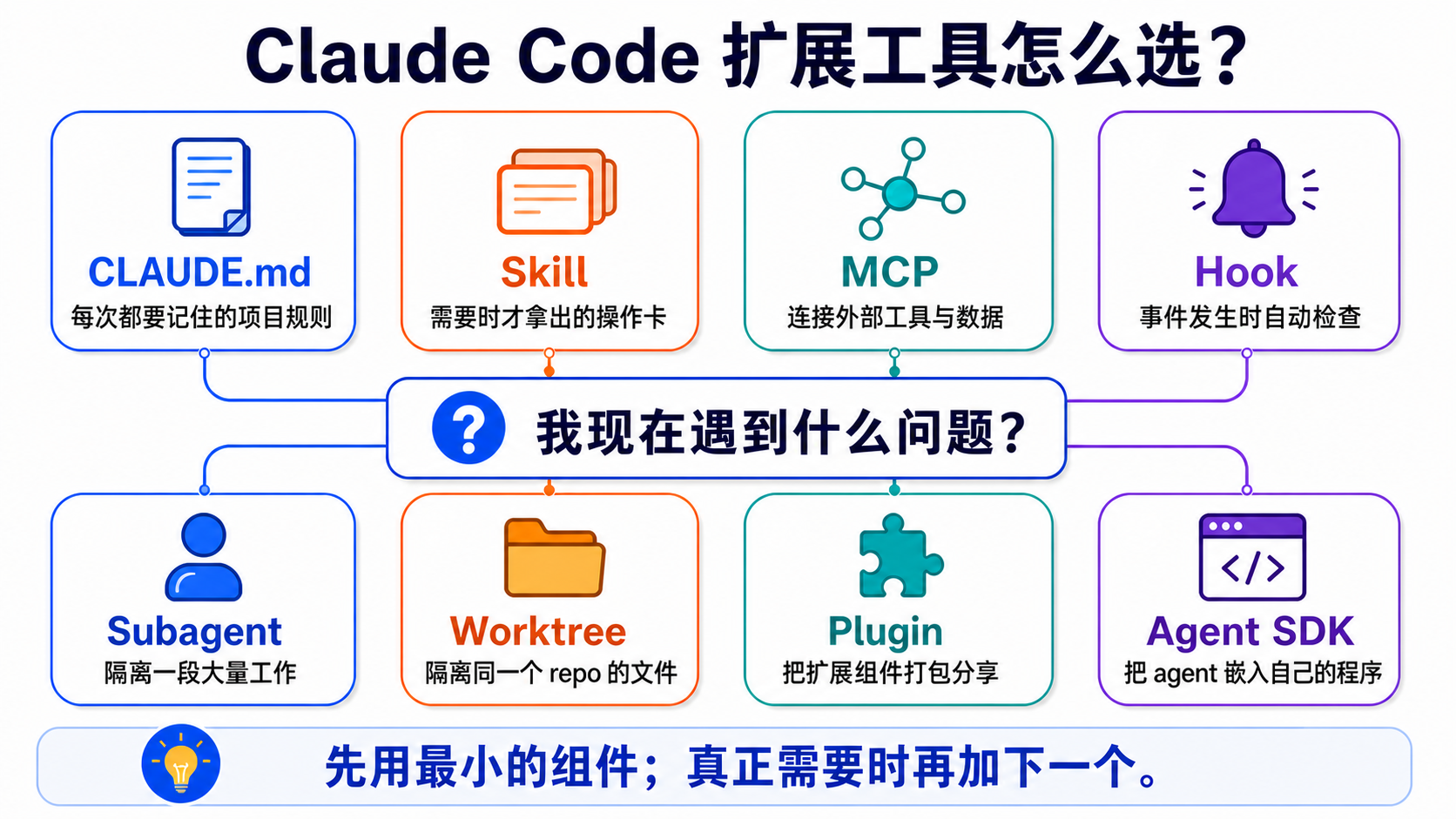
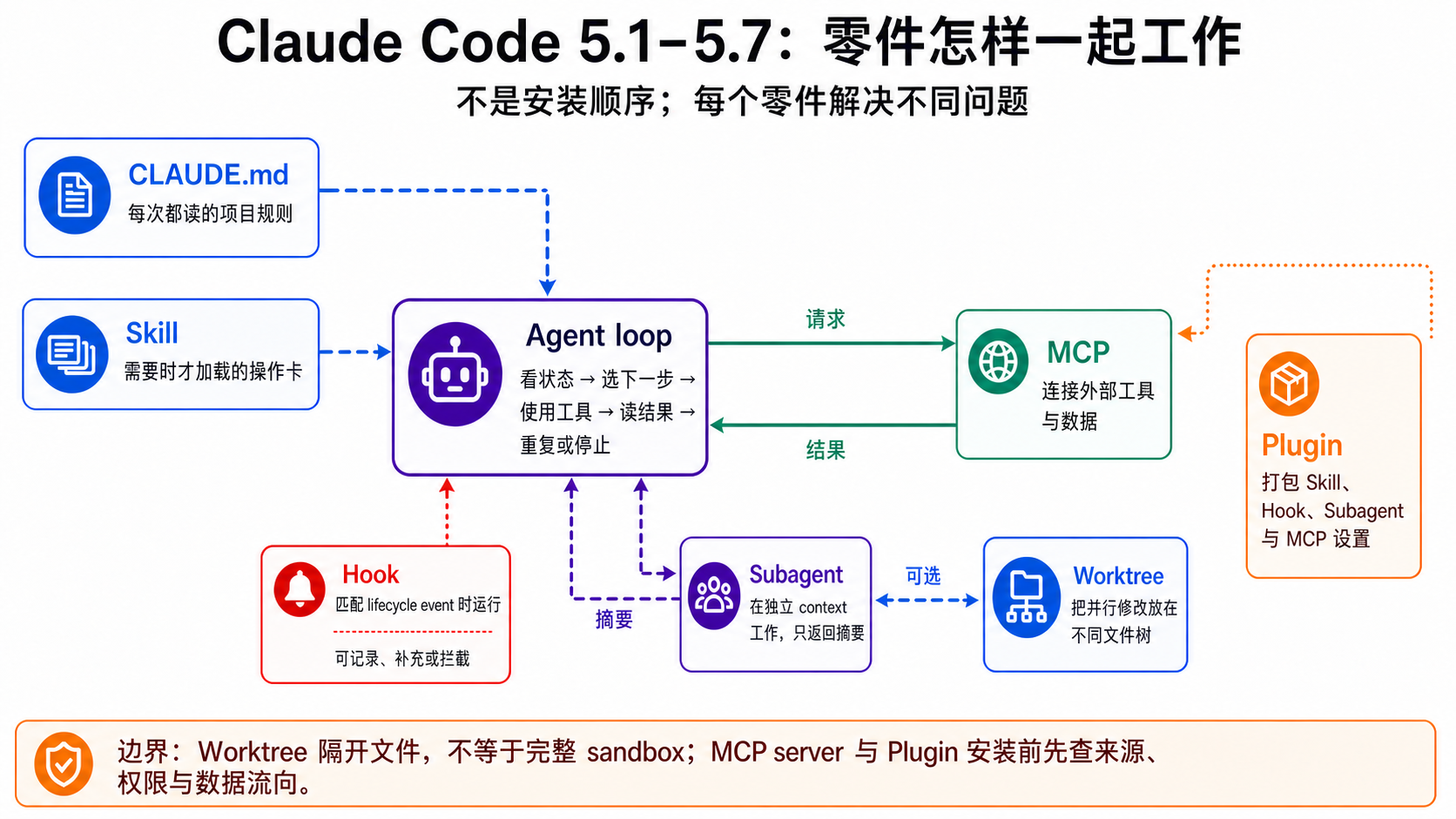
跳转至

Stage 5 — Claude Code 生态系(Claude Code Ecosystem)⭐⭐

繁體中文 | 简体中文 | English

时间估算:3-4 周(约 15-25 小时)

🚪 进入条件(共用 hub、依 track 不同):Track A(CLI Power User) 从 A1-A2 过来、会用 Python + 跑过基本 CLI 即可、从 5.1/5.2 起步;Track B(Agent Builder) 建议先完成 Stage 3(tool use)+ Stage 4(agent frameworks)再进、把整个 stage 当“Claude Code 内部怎么运作”深读。不确定走哪条 → 看下面 📌 的两轨说明。

💡 整个 stage 围绕 4 个关键词(MCP / Skills / Plugins / Marketplace)展开 → 不熟先翻 resources/glossary.zh-Hans.md 5

👥 共用 hub:本 stage 是 Track A(CLI Power User)+ Track B(Agent Builder)两条路径的共用中心。Stage 5 跟 Stage 8 — Agent Interfaces 是 curriculum 的两个 hub。

📌 这个 stage 两条轨都用: - Track A(CLI Power User):A2 用 5.1(Claude Code 基础);A3 用 5.2(MCP) + 选择性用到 5.3(Skills)5.4(Plugins)(A3 的 动手练习 CLI-12 会教把 CLAUDE.md 跟 commands 打包成 plugin)。读的角度是“怎么用 Claude Code 把工作做好”。 - Track B(Agent Builder):把整个 stage 当“Claude Code 内部怎么运作”的深度学习,从 5.1 完整走到 5.4。

🗺️ Claude Code 属于哪种 agent 型态?→ resources/agent-paradigms.zh-Hans.md Type 1(IDE-coupled)+ Type 2(Terminal pair-programmer);想看完整 5 种 paradigm 对照也从这份开始。

⚠️ 想用本地 LLM?这个 stage 不是那条路线。 Claude Code 需要 Anthropic API / OAuth,不能直接改接 Ollama 或本地 endpoint。离线、隐私数据或不想用 API 额度时,请看 resources/cookbook.zh-Hans.md Recipe 6,用 OpenCode / goose / Aider / Hermes 这类支持 BYO LLM 的 CLI agent。

📋 本章组成:6 个子章(5.1 基础 / 5.2 MCP / 5.3 Skills / 5.4 Plugins / 5.5 Subagents / 5.6 Claude Code Source 解剖),每个子章都有“学习目标 → 必修阅读 → 动手练习 → 精选 Projects” → 章末 自我检查。注意:Harness Engineering(Agent 执行系统设计)的学科级概念会在 Stage 7 系统整理;本章 5.6 把 Claude Code 当作案例,观察一个成熟 agent 工具如何处理工具、记忆、配置、权限与执行流程。 🔑 关键名词:见 resources/glossary.zh-Hans.md 5

Stack 一览

由上往下,每一层都建立在底下那一层上:

Claude Code Ecosystem Stack

每一层各自加上一种能力: - API + SDK:用程序访问 LLM - Tool Use:让 LLM 调用你定义的 function - MCP:标准化协议,让任何 LLM host 都能使用任何 tool server - Skills:Claude Code 的行为包,可以封装 MCP tool - Plugins:把 Skills、hooks、commands、MCP 设置打包成一个单位发布

这个阶段有 4 个子章节,请按顺序做——每一节都建立在前一节之上。

5.1 Claude Code 基础 3-5 天 (安装、slash commands、CLAUDE.md)
5.2 MCP — 协议层 5-7 天 (写你的第一个 MCP server)
5.3 Skills — 行为层 5-7 天 (写你的第一个 SKILL.md)
5.4 Plugins 与 Marketplaces 5-7 天 (打包并发布)

跑完这个阶段,你会能扩充 Claude Code、写自己的 MCP server、发布一个 plugin marketplace。


🗺️ 7-Layer Architecture Map(先看这张图、再读 5.1-5.6)

📋 这节是什么:把 Claude Code 的 7 个 primitive(MCP / Skills / Plugins / Subagents / Hooks / Slash commands / CLI)对应到 7 个架构层 + 3 个工程学 discipline——进 5.1-5.6 之前先看一次,知道接下来在学什么层;学完回头看,就是 synthesis。分层是教学选择,不是 absolute 真理

Claude Code 7-Layer Architecture Map

📊 上图:Claude Code 7 个架构层 + 3 个工程学 discipline 整合视图。

每层 1 句白话 + Claude 的版本

Layer 是什么 Claude 的版本 谁管 学在
L7 Interface 用户和 agent 交谈入口 claude-code CLI / Desktop Harness Engineering Stage 5.1
L6 Workflow 固定可复用流程模板 Skills(SKILL.md)+ Slash commands + Plugins(打包 Skills / hooks / commands、属 packaging) Prompt Engineering Stage 5.3 / 5.4
L5 Coordination 多 agent 分工合作 Subagents + Agent team + Background Harness Engineering Stage 5.5
L4 Memory / Context 跨对话 / 跨 session 记事情 History / /compact / Memory hooks Context Engineering Stage 6
L3 Control Plane tool 执行前 / 后拦截 / validation / 阻挡 Hooks(PreToolUse / PostToolUse 等) Harness Engineering Stage 5.1 hooks 段
L2 Tool Use LLM 调用外部 function 的 protocol Anthropic Tool Use(input_schema Tool design Stage 3
L2.5 Tool Provider 把外部 API 包成 tool 给 Layer 2 用 MCP servers(Notion / Gmail / Slack) Context Engineering + Tool Stage 5.2
L1 Foundation LLM 本体(system prompt 直接送达这一层) Anthropic API Prompt Engineering Stage 1 + Stage 2

3 工程学 Discipline overlay(核心 insight)

Prompt / Context / Harness 是不同层的 discipline——学会其中一个,不会自动会另一个:

Discipline 负责哪些 layer 1 句话 学在
Prompt Engineering L1 + L6 "送进 LLM 的字符串怎么设计" Stage 2
Context Engineering L4 + L2.5 "context window 装什么信息" Stage 6
Harness Engineering L3 + L5 + L7 "LLM 外面的 runtime scaffolding" Stage 7 §Harness Engineering

💡 MCP 的特殊位置:MCP 严格说是 Context Engineering(feed context source)+ Tool design(协议规范)跨层东西,不纯归任一 discipline——所以图里用 Layer 2.5 标明。

跨 CLI vendor mini-comparison(2026-05 snapshot)

只有 Claude Code 有完整 7-layer stack;其他 CLI 大多停在 single-agent + 简化版:

Claude Code OpenAI Codex Gemini CLI
L5 Coordination(multi-agent) ✅ Subagents ❌ single-agent
L3 Control Plane(Hooks) ✅ Hooks
L2.5 Tool Provider(MCP) ✅(已支持 MCP) ✅(需手动装 MCP server)
L6 Workflow(Skills) ✅ SKILL.md AGENTS.md(context only) GEMINI.md(context only)

→ 细看 resources/cli-agents-guide.zh-Hans.md


5.1 — Claude Code 基础

Claude Code 是什么(先定位)

Claude Code = 跑在你 terminal 里的 Claude agent——有完整 file system / shell / git / 子进程 access、可以自主完成多步骤工作(读文件 → 改文件 → 跑 test → commit → 发 PR)。

跟其他 Claude 界面差别:

界面 跑在哪 能做什么 用法
claude.ai(web) 浏览器 纯对话 + 上传文件、无 file system 操作 偶尔聊一下、ask 一个问题
Claude API(programmatic) 你的 server / script LLM call、自己包 agent loop 写 production system
Claude Agent SDK 你的 Python / TS 环境 完整 agent runtime + tool use + 多 session 写 production agent system
Claude Code本节 你的 terminal 完整 OS-level agent(file / shell / git / subprocess)+ skill / plugin / subagent 生态 日常工作主力工具

进 5.2-5.6 之前你会在这节学到 4 个 Claude Code 核心结构:CLAUDE.md(记忆层)/ slash commands(控制层)/ ~/.claude/ 目录(设置层)/ settings.json(行为层)。

学习目标

完成本节后你会: - 讲得出 Claude Code 跟 claude.ai / API / SDK 各自的角色(“为什么用 CLI 不用 web”) - 安装 Claude Code、配置认证、跑第一个有 file access 的 session - 用 8-10 个常用 slash command 控制 Claude Code 行为 - 写一份项目级 CLAUDE.md 设置 baseline 行为 - 认得 ~/.claude/ 目录结构(skills / agents / plugins / settings.json 各放哪)

必修阅读

  1. Anthropic — Claude Code Quickstart — 官方安装指南
  2. Anthropic — CLAUDE.md best practices — 怎么写项目 memory
  3. Anthropic — Slash Commands — 官方完整 slash command 列表
  4. Anthropic — Settingssettings.json 完整 schema + env var
  5. KimYx0207/Claude-Code-x-OpenClaw-Guide-Zh — 简中入门指南

🛠️ 要写好 CLAUDE.md? 先看 Stage 7.5 核心 Harness Engineering 原则(多 source 整理) 建概念、再用下面 2 个 prompt 动手。

📋 CLAUDE.md 设计 prompts(依 5 原则)

写 / 改 CLAUDE.md 时直接复制贴上:

Prompt 1 — Audit 你现有的 CLAUDE.md

我有一个 CLAUDE.md(在 [贴路径]),请依下面 5 个 harness engineering 原则 audit:

1. Legibility — 用 markdown header 分区吗?conventions 写具体("2-space indent")还是模糊("format properly")?
2. Progressive Disclosure — < 200 行吗?有用 `@-import` 或 `.claude/rules/<topic>.md` 拆分吗?
3. System of Record — CLAUDE.md 是否当 entry map、实际内容指向 `docs/` + `.coord/`?还是把所有规则塞同一档?
4. Taste Invariants — 规则可验证吗("run `make lint` before commit")?还是「follow best practices」这种空话?
5. Transparency — 有要求 agent show planning step 吗?还是预期它默默做完?

每条给 PASS / FAIL / PARTIAL + 原因 + 改进建议。总分 X/5、最该先修哪条。

Prompt 2 — 生成新的 CLAUDE.md(依 5 原则)

我要为一个 [描述项目,例如:Python data analysis monorepo / 学术论文 repo / Next.js app] 写 CLAUDE.md。请依下面 5 个 harness engineering 原则生成:

- **< 200 行**
- 当 **entry map**,把实际 conventions 用 `@-import` 引外部 docs 或 `.claude/rules/<topic>.md`
- 每条规则**可验证**(不要「follow best practices」这种空话)
- 加 **1-2 个 transparency rule**(例如「edit > 50 lines 前先 show plan」)
- 标明哪些内容该放 CLAUDE.md、哪些该分到 `.claude/rules/<topic>.md`

输出:
1. 完整 CLAUDE.md 内容
2. 建议的 `.claude/rules/` 目录切法(topic 列表)
3. 1 个示范 `.claude/rules/<topic>.md`(任选一个 topic)

建议流程:写 CLAUDE.md 前用 Prompt 2 生成、写完用 Prompt 1 audit。

常用 slash commands(10 个必学)

Command 用途 何时用
/help 列出所有可用 command 不知道有什么指令时
/clear 清空对话历史(保留 system context) session 太长、想重启逻辑
/compact 自动摘要对话、释放 context window context 接近用满
/plan 进入 plan mode(read-only、先规划才动手) 大改动前先让 Claude 列计划
/model 切换 model(Sonnet / Haiku / Opus) 改成更便宜 model 省 token
/agents 列 / 管理 subagent(5.5) 看哪些 subagent 可用、debug
/plugin install <name>@<marketplace> 安装 plugin(5.4) 加新功能
/permissions 看 / 改当前 session 权限 太多 permission prompt 想精简
/resume 恢复前次 session 接续昨天工作
/bg 把当前 session 背景化(移到 agent view) 想同时跑多任务、见 5.5

完整列表见上方 Slash Commands 官方文件

~/.claude/ 目录结构(先有 mental map)

~/.claude/ ← 全局 user-level
├── settings.json ← 全局行为(env / hooks / permissions / model 预设)
├── settings.local.json ← 机器特定(不入 git)
├── CLAUDE.md ← 全局 baseline(每个 session 都加载)
├── skills/<name>/SKILL.md ← user-level skills(5.3)
├── agents/<name>.md ← user-level subagents(5.5)
├── plugins/ ← 已安装的 plugin(5.4)
├── hooks/ ← user-level hook scripts
└── jobs/<id>/ ← background sessions 状态(5.5 background agent)

<project-root>/.claude/ ← project-level(随 repo)
├── settings.local.json ← project 行为(含 permissions)
├── skills/<name>/SKILL.md ← project-level skills(优先级高于 user-level)
├── agents/<name>.md ← project-level subagents
├── commands/<name>.md ← project-level slash command
└── hooks/ ← project-level hook

<project-root>/CLAUDE.md ← project baseline(每个 session 都加载)

优先顺序(冲突时谁赢):project > user > built-in default。

动手练习

  • 练习 1:第一个 session — 安装、认证、cd 到 repo、跑 claude → 问“summarize this codebase”→ 观察怎么读文件
  • 练习 2:CLAUDE.md — 写 repo 根目录 CLAUDE.md(role / context / 不能做的事 / 怎么做事 / 常用指令),对照“没 CLAUDE.md”跟“有 CLAUDE.md”的行为差别
  • 练习 3:5 个 slash commands — 在一个 session 内依序用 /help /plan /compact /model /agents,观察各自做什么
  • 练习 4:目录探索ls ~/.claude/ + cat ~/.claude/settings.json、看自己 user-level 设置长什么样

精选 Projects

Project 适合谁 为什么推荐 / 备注
anthropics/claude-code ⭐ 官方 ⭐⭐⭐⭐⭐ 追踪新版本 / 看 release notes / 回报 bug Claude Code 官方 repo、issues + releases + inline 范例
Anthropic — Claude Code 官方文档 ⭐⭐⭐⭐⭐ 任何 reference 查询 真正的 canonical reference——上面 5 条必修阅读都从这里来
hesreallyhim/awesome-claude-code ⭐⭐⭐⭐ 想看社区有什么(slash commands / skills / hooks 范例) 较广泛的资源清单(目前正在重整)
KimYx0207/Claude-Code-x-OpenClaw-Guide-Zh ⭐⭐⭐⭐ 中文读者要逐步教学 简中入门导读

5.2 — MCP(Model Context Protocol)⭐ 基础

MCP 是什么(先定位)

MCP = “让 LLM 用任何外部工具 / 数据”的开放协议。在 MCP 之前每个 LLM 厂商都得自己定义 tool 规格、每个工具供应商都得为每个 LLM 写一份接法。MCP 把这层标准化——写一次 MCP server、Claude / Codex / Cursor / 任何支持 MCP 的 host 都能用。

MCP 三个抽象

抽象 是什么 范例
Tools LLM可以调用的 function read_file(path) / query_db(sql) / send_slack(channel, msg)
Resources LLM可以读的数据源 file:///path/file.md / postgres://db/users
Prompts server 预定义的 prompt 样板 一份“review code”的 prompt template

多数 MCP server 主要用 Tools 抽象——Resources 跟 Prompts 用得少。

MCP vs Tool Use vs Skill vs Plugin

  • Tool Use(Stage 3):你 in-process 写的 function 给 LLM 调用
  • MCP本节):把 tool 标准化成 server / client 协议、跨 host / 跨 LLM 可用
  • Skill(5.3):行为层 — 教 Claude“遇到 X 用哪个 MCP tool
  • Plugin(5.4):把 MCP + Skill + 其他打包散布

核心区分:MCP 是“能力”(让 LLM 能做什么)、Skill 是“行为”(什么时候用什么能力)。

学习目标

  • 解释 MCP 的三个抽象(Tools、Resources、Prompts)
  • 把现成的 MCP server 接上 Claude Desktop 或 Claude Code
  • 用 Python 写一个最小的 MCP server,提供 1-2 个 tool
  • 区分 MCP server vs Tool Use vs Skills vs Plugins

必修阅读

  1. Anthropic — Introducing MCP — 最初发表,概念总览
  2. MCP Specification — 实际的协议规格
  3. Complete Guide to MCP in 2026 — 实践导读

动手练习

  • 练习:MCP client — 安装 modelcontextprotocol/servers/filesystem,从 Claude Desktop 连上去。看着 Claude 读你的文件。
  • 练习:MCP server — 写一个 Python MCP server,提供一个 tool(例如“换算温度”)。从 Claude Code 连过去。step-by-step 怎么做resources/cookbook.zh-Hans.md 2
  • 练习:MCP in production — 在同一个 Claude session 里同时连 2-3 个 MCP server,看它们互相搭配。

精选 Projects(spec / SDK / 范本参考)

💡 找日常工具的 MCP(Notion / Obsidian / Excel / Postgres / Playwright / Figma 等)?resources/mcp-skills-catalog.zh-Hans.md——按 14 个分类整理 62 个常用 MCP server / Skill,每个都附 stars / license / 适合谁。下表保留的是“写自己 MCP server 时的 reference”性质的官方 server / SDK。

Project 适合谁 为什么推荐 / 备注
modelcontextprotocol/servers ⭐ 官方 ⭐⭐⭐⭐⭐ 练习 1 接 server、之后当参考 20+ 官方 MCP server(filesystem / git / github / sqlite / time / fetch / memory / sequential-thinking),★ 85k+、MIT、TS+Python。everythingfilesystem source 理解协议运作。安装:npx -y @modelcontextprotocol/server-filesystem /pathpip install mcp-server-fetch
modelcontextprotocol/python-sdk ⭐⭐⭐⭐⭐ 练习 2 写自己 MCP server 官方 Python SDK、pip install mcp 即装、MIT。跟着官方 quickstart 跑
modelcontextprotocol/typescript-sdk ⭐⭐⭐⭐ 喜欢 TS 的人 Python SDK 的 TypeScript 版、MIT
wong2/awesome-mcp-servers ⭐ 目录 ⭐⭐⭐⭐⭐ 自己写前先找有没有现成的 150+ 社区 MCP server 目录,按 search / code / cloud / communication / finance 分类。投稿走 mcpservers.org
punkpeye/awesome-mcp-servers ⭐⭐⭐⭐ 跟 wong2 交叉比对 另一份 MCP server 目录、组织方式不同、通常更新更实时
github/github-mcp-server ⭐⭐⭐⭐ 想看 production-grade MCP server source GitHub 官方维护、真正 production 在跑的范例
21st-dev/magic-mcp ⭐⭐⭐ 做完练习 2 找灵感 会生成 UI 组件的非平凡 MCP server、★ 4.8k+、NOASSERTION。看 MCP 不只能做数据抓取
yamadashy/repomix ⭐⭐⭐⭐⭐ 喂整个 codebase 给 LLM ★ 24k+、MIT。把 repo 打包成单个 AI-friendly 文件,带 MCP server mode + tree-sitter 压缩(约 70% token 节省)+ secretlint 过滤敏感信息。Claude Code / Codex 的 daily-driver 工具。

5.3 — Skills(Claude Code 的行为层)⭐ Claude Code 生态最关键的一层

Skill 是什么(先定位)

Skill = 一个 markdown 文件.claude/skills/<name>/SKILL.md),告诉 Claude“遇到某情境 → 走某流程”。Claude 每次 inference 前扫所有可用 skill 的 description frontmatter、看是否匹配当前情境、匹配就把 SKILL.md 自动加载到 context

🛠️ 要写好 SKILL.md? 两条路: - 路 A:用 Anthropic 官方 skill-creator skill 自动产生(5.3.x 之后安装段落会教),它会自动产 frontmatter + 子目录结构、是 Anthropic 维护的 canonical 工具。 - 路 B:用下面 SKILL.md 设计 prompts 自己写——先看 Stage 7.5 核心 Harness Engineering 原则 建概念、再用 prompt 动手。

两条不冲突:skill-creator 给结构、5 原则 prompt 给内容质量检查。

📋 SKILL.md 设计 prompts(含 skill-creator 替代)

写 / 改 SKILL.md 时直接复制贴上:

Prompt 1 — Audit 你现有的 SKILL.md

我有一个 SKILL.md(在 [贴路径]),请依下面 5 个 harness engineering 原则做 audit。每条给「PASS / FAIL / PARTIAL」+ 1 行原因 + 1 行改进建议:

1. Legibility — description 写清楚「何时触发」吗?tool param 命名一致吗?
2. Progressive Disclosure — SKILL.md < 200 行吗?细节是否放 `references/` 而不是塞主档?
3. System of Record — `references/` 是 single source、主档不重复吗?
4. Taste Invariants — success criteria 是否写死可验证、不是「尽量好」这种主观词?
5. Throughput / Merge — 有附 acceptance check(lint / test / preset YAML)吗?

最后给:总分 X/5、最该先修哪一条、为什么。

Prompt 2 — 生成新的 SKILL.md(依 5 原则)

我要写一个 skill 处理 [描述任务,例如:把 PDF 转成 markdown / 跑学术论文 banned-word audit]。请依下面 5 个 harness engineering 原则生成 SKILL.md:

- **description** 写清楚「何时触发」(让 Claude 能 match 对情境)
- **主档 < 200 行**,所有 examples / edge cases / detailed rules 放 `references/<topic>.md`
- 列出建议的 `references/` 结构(1-3 个 topic 档案)
- 加一个 **success criteria 表**(可验证、不主观)
- 加一段 **acceptance check**:要跑哪些 lint / unit test / preset YAML

输出:
1. 完整 SKILL.md 内容
2. references/ 目录结构建议
3. 用哪个 acceptance gate preset 验证它(如 multi-locale-mirror-sync / catalog-entry-add 之一)

建议流程:先 /skill skill-creator 拿干净骨架 → 用 Prompt 2 填内容 → 写完用 Prompt 1 audit。

核心 mental model:你发现自己“每次都要打同样的 prompt 教 Claude 怎么做某件事”→ 把它写成 skill、下次就不用了。Claude Code 生态里 skill 是 power user 跟普通用户的分水岭——熟练 skill 写作的人能把 1 个小时的工作压到 5 分钟。

Skill vs CLAUDE.md vs MCP vs Plugin vs Subagent — 一张表分清楚

各层常被搞混。一行对照

组件 是什么 何时用 触发方式 范例
CLAUDE.md(5.1) repo / project 的 baseline 行为 repo-wide convention(“用 type hint”、“commit 消息规范”) 每个 session 都加载、不分情境 你 repo 根目录的 CLAUDE.md
MCP server(5.2) 提供 tool / data 的 protocol server 想让 Claude 能访问外部资源(API / DB / 文件系统) server 启动后、任何时候都能调用 github MCP / postgres MCP
Skill本节 特定情境的行为包 想设置“遇到 X 情境 → 走 Y 流程 description 匹配自动加载 skill-vetter(装 skill 前检查)/ pdf(处理 PDF)
Plugin(5.4) 把 skills + commands + MCP + hooks 打包散布 想 share / install 一整套 设置 /plugin install <name>@<marketplace> engineering bundle / finance bundle
Subagent(5.5) 独立 context 的 sub-Claude session 想 delegate 大 context 任务、结果回主 session description 匹配自动 delegate code-reviewer subagent / 研究员 subagent

怎么选

  • 一句话设置 → 写进 CLAUDE.md
  • 多步骤流程、某情境才用 → 写 Skill(本节主题)
  • 需要访问外部资源(API / DB) → 写 MCP server
  • Skill 跑起来太大、会吃光主 session window → 改成 Subagent
  • Skill / command / MCP / hook 想打包送人 → 包成 Plugin

核心区分:MCP 是“能力”、Skill 是“行为”、Plugin 是“散布”、Subagent 是“独立 worker”。

学习目标

  • SKILL.md 的结构(YAML frontmatter + 本文)
  • skill 何时会自动加载(description 比对)
  • 怎么写一份能解决你日常工作的 SKILL.md
  • references/scripts/evals/ 子目录的用途

必修阅读

  1. Anthropic — Claude Skills 文档
  2. 几份范例 SKILL.md——从 anthropics/claude-code 或社区 marketplace 拿
  3. Hello-Agents — Extra08 如何写出好的 Skill — 中文最完整的 Skill 最佳实践
  4. Hello-Agents — Extra05 Agent Skills 与 MCP 对比解读 — Skills vs MCP 概念对比

动手练习

  • 练习:SKILL.md — 写一份 200 字的 skill,解决你日常工作中的某一件事。step-by-step 怎么做resources/cookbook.zh-Hans.md 1
  • 练习:SKILL with references — 加一份 references/ markdown 让 skill 可以引用
  • 练习:SKILL eval — 加 evals/evals.json,放 3-5 个自我测试

📦 本 repo 自带 meta-exampleexamples/stage-5/tool-calling-tutor/ 是这个 stage 的对应 skill 范本——完整 frontmatter(含 trigger phrases + Do NOT use for)、3 份 references/evals/evals.json 5 个 test case,直接 fork 改成你自己的 skill。双重用途:(a) 学习者自用、卡在 tool calling 时让它 auto-load 帮你 debug;(b) Stage 5 5.3 SKILL.md 写法的对照样板。

常用 Skills 推荐(按用途分类)

不知道从哪里开始?下面是 2025 后段官方 + 社区常用 skill。安装方式:(a) 多数来自 plugin、安装对应 plugin 即得;(b) 或从 anthropics/skills clone 后放进 ~/.claude/skills/.claude/skills/

用途 Skill 来源 为什么推荐
🛡 装 skill 前安全检查(必装) skill-vetter anthropics/skills 装任何外部 skill 前必跑——检查红旗、permission scope、suspicious pattern。等于 marketplace skill 的 SAST
🔍 找 / 安装 skill find-skills anthropics/skills 自然语言查询、自动安装。“我想要做 X”就回对应 skill
skill-lookup claude-plugins-official 跟 find-skills 互补,探索 / 搜索 helper
✍ 写自己的 skill skill-creator anthropics/skills + claude-plugins-official 自动产生 frontmatter + 子目录结构、写 skill 必装
📄 Office docs 处理 pdf / docx / xlsx / pptx anthropics/skills 读写 PDF / Word / Excel / PowerPoint。必装 set——任何 office workflow 必备
🔧 Code review code-reviewer / code-review-excellence claude-plugins-official staged diff 安全 / 风格 / 测试 review
🐛 Debug debugger / systematic-debugging claude-plugins-official 系统化 root cause 分析、避免 quick fix
🎓 学术写作 academic-writing-skills community findings-first / mechanism / banned word audit
🔌 MCP 整合 / 写 server mcp-builder / mcp-integration claude-plugins-official 写 MCP server 跟整合既有 server 的脚手架
💻 frontend / fullstack frontend-developer / fullstack-developer claude-plugins-official React 组件 / 全栈架构辅助
📊 数据分析 data-analyst / visualization-expert community SQL / pandas / chart 选型
⚙ 权限 / 设置整理 update-config / fewer-permission-prompts claude-plugins-official hooks / permissions / env var 管理
🔁 自我改进 self-improving-agent community 捕捉 learning / error / correction、agent 持续改进
🌐 通用 / fallback general-purpose Claude Code 内建 复杂开放任务、未涵盖情境的 default 入口

建议入手顺序: 1. 第一个必装skill-vetter(装其他 skill 前先用它检查) 2. 第二批必装skill-creator + find-skills(写 / 找 skill 用) 3. 依工作领域:Office workflow 加 pdf/docx/xlsx、开发加 code-reviewer/debugger、学术写作加 academic-writing-skills 4. 想看更多:逛 obra/superpowerswshobson/agents 看 production 范本

精选 Projects(spec / 范本参考)

💡 找日常用 Skill(NotebookLM、Excalidraw、Office docs 等)?resources/mcp-skills-catalog.zh-Hans.md——按使用情境分类,含 Anthropic 官方 + 社区 Skill。下表保留的是“写自己 Skill 时的 spec / showcase reference”性质。

Project 适合谁 为什么推荐 / 备注
anthropics/skills ⭐ 官方 spec ⭐⭐⭐⭐⭐ 写自己 SKILL.md 前先读 Anthropic 官方 Skills repo:spec/(frontmatter 标准)+ template/ 起手范本 + skills/ 含 pdf / docx / xlsx / pptx / skill-creator / skill-vetter 等 reference 实现。★ 128k+。SKILL.md 结构参考首选。Agent Skills 更广义标准另见 agentskills.io
anthropics/claude-code ⭐⭐⭐⭐ 追踪新功能、看 release notes Claude Code 主 repo、含 issues / releases / inline skill 范例。本 stage 学 Skill 重点看上一个 repo、这个排第二
mattpocock/skills ⭐⭐⭐⭐ 想看“真实工程师日常 SKILL.md” Matt Pocock(TypeScript 社区知名教学者)公开自己工作真正在用的 .claude/ 目录。每个 SKILL.md 10-50 行极短、不过度工程化。对照 over-engineered 200 行 skill 特别有参考价值(★ 85k+、MIT)
obra/superpowers ⭐⭐⭐⭐ power user setup、学进阶写法 20+ 实战 skill(TDD、debugging、合作模式)+ /brainstorm / /write-plan / /execute-plan 命令 + skills-search tool
wshobson/agents ⭐⭐⭐⭐ 中阶:学 skill + subagent 组合 把 skills + subagents 组合做 multi-agent 编排。从单一 SKILL.md 进化到 agent-as-skill 组合 pattern 的范例(★ 35k+、MIT)
travisvn/awesome-claude-skills ⭐⭐⭐⭐ 自己写前先找有没有现成的 社区 Claude Skills 精选目录
VoltAgent/awesome-agent-skills ⭐⭐⭐ 跨工具视角 1000+ agent skill、相容 Claude Code / Codex / Gemini CLI / Cursor(★ 22k+、MIT)
alirezarezvani/claude-skills ⭐⭐⭐ 找特定领域 skill 范例 232+ Claude Code skill、跨 engineering / marketing / product / compliance

5.4 — Plugins 与 Marketplaces

Plugin 是什么(先定位)

Plugin = MCP + Skills + slash commands + hooks 的组合包——把前面 5.2 / 5.3 学到的零件 打包成一个单位、可以 /plugin install 一次装进去

Plugin
├── .mcp.json ← 5.2 学的 MCP server config(提供 tool / data)
├── skills/<name>/SKILL.md ← 5.3 学的 skill(行为包)
├── commands/<name>.md ← slash command(5.1 学的、自定义 prompt 入口)
├── hooks/ ← 触发点 hook(譬如 PreToolUse、SessionStart)
├── agents/<name>.md ← 5.5 学的 subagent(如果有)
└── .claude-plugin/plugin.json ← 打包元数据

为什么要 plugin:你写了好用的 skill 想 share → 一行 git clone 太麻烦、设置也容易装错。包成 plugin、push 到 marketplace、team 其他人 /plugin install foo@your-marketplace 一次到位。

Plugin 跟 marketplace 差在哪:plugin 是单一打包单位、marketplace 是多个 plugin 的目录(譬如 anthropics/claude-plugins-official 是 marketplace、里面 35 个 plugin)。

学习目标

  • plugin.json schema(name、version、skills array、configuration)
  • marketplace.json schema(plugins array、source、metadata)
  • claude plugin marketplace add 的流程
  • 区分 single-plugin bundle vs multi-plugin marketplace
  • 发布自己的 marketplace

必修阅读

  1. Anthropic — Plugins 文档
  2. 读下面 2-3 个 marketplace 的 plugin.jsonmarketplace.json

动手练习

  • 练习:plugin install — 安装下面的某一个 marketplace,看它加载
  • 练习:plugin.json — 把 5.3 写的 SKILL.md 打包成一个 plugin
  • 练习:marketplace publish — push 到 GitHub,用 claude plugin marketplace add 安装

常用 plugin 推荐(按用途分类)

不知道从哪里开始装 plugin?下面是 2025 后段 Anthropic 官方 + 社区高评价选择。安装指令统一格式/plugin install <plugin-name>@<marketplace-name>(譬如 /plugin install code-review@claude-plugins-official)。

用途分类 Plugin(含直接链接) Marketplace 为什么推荐
开发 workflow
(多数开发者必装)
code-review claude-plugins-official 官方 code review skill 集合、staged diff review + security check
pr-review-toolkit claude-plugins-official PR review 完整流程(comment、suggest、approve)
commit-commands claude-plugins-official git commit message 规范 + branching workflow
feature-dev claude-plugins-official 完整 feature 开发 cycle(spec → plan → implement → test)
frontend-design claude-plugins-official UI 设计 + responsive layout 辅助
语言工具
(依用的语言挑)
typescript-lsp / pyright-lsp / rust-analyzer-lsp / gopls-lsp claude-plugins-official 各语言 LSP 整合、35 个语言 plugin 都在这
plugin / skill 自建 skill-creator claude-plugins-official 写自己的 skill 时自动产生 frontmatter + 结构
plugin-dev claude-plugins-official 写自己的 plugin 时自动产生 .claude-plugin/ 结构
mcp-server-dev claude-plugins-official 写自己的 MCP server 时的脚手架
hookify claude-plugins-official 写 hooks 规则的工具
领域特化 — 工程团队 engineering bundle knowledge-work-plugins 10 个 skill:architecture / code-review / debug / deploy-checklist / documentation / incident-response / standup / system-design / tech-debt / testing-strategy
领域特化 — 财务团队 finance bundle knowledge-work-plugins 8 个 skill:audit-support / close-management / financial-statements / journal-entry-prep / reconciliation / sox-testing / variance-analysis
领域特化 — 其他
(同 marketplace)
sales / marketing / legal / human-resources / customer-support / data / design / operations / product-management / productivity / bio-research knowledge-work-plugins knowledge-work-plugins 18 个 vertical bundle——挑跟你工作领域对应的那个
外部整合
(第三方服务)
asana / github / gitlab / linear / firebase / playwright / terraform / discord / imessage / telegram claude-plugins-official (external) 整合常用 SaaS / 开发工具
community 广度 (挑感兴趣的 skill) rohitg00/awesome-claude-code-toolkit 社区最大 agents / skills / hooks / templates 目录

建议入手顺序: 1. 开发者必装(5 个):code-review + pr-review-toolkit + commit-commands + feature-dev + 一个你语言的 *-lsp 2. 按工作领域加 bundle:工程团队装 engineering、财务装 finance、其他类似 3. 想写自己的 skill / plugin → 装 skill-creator + plugin-dev 4. 想看更多 → 逛 awesome-claude-code-toolkitresources/mcp-skills-catalog.zh-Hans.md

精选 Projects(marketplace 范本参考)

💡 上面列的是“装哪些 plugin”;下表列的是“marketplace 怎么写”——想自建 marketplace 的人才需要看。

Marketplace 适合谁 为什么推荐 / 备注
anthropics/claude-plugins-official ⭐⭐⭐⭐⭐ 写自己的 marketplace 前的官方范本 35 internal plugins + 15 external、.claude-plugin/marketplace.json 标准 schema、plugins/ 含 plugin 本体 + external_plugins/ 引用外部 repo。marketplace.json 该长什么样直接看这个(★ 18k+)
anthropics/knowledge-work-plugins ⭐⭐⭐⭐⭐ 想看“多 vertical bundle”型 marketplace 18 个领域 plugin bundle(finance / engineering / sales / legal / marketing / HR / customer-support / data / design / operations / product / productivity / bio-research / enterprise-search / pdf-viewer / small-business / cowork-plugin-management / partner-built)。Anthropic 自家 knowledge worker 场景范本
obra/superpowers-marketplace ⭐⭐⭐⭐ 想做“我策展、别人写”型 marketplace 最简 marketplace template——repo 只有 marketplace.json + README、plugin 本体放外部 repo。curator-only pattern 最小范本(★ 900+、MIT)
trailofbits/skills-curated ⭐⭐⭐ 在意供应链安全的 reviewer / 团队 Trail of Bits 维护的 security-vetted marketplace、每个 skill 都经审查、README 写清楚标准。示范 marketplace 不只是清单、也是信任机制(★ 388、CC-BY-SA-4.0)
rohitg00/awesome-claude-code-toolkit ⭐⭐⭐ 想逛社区有什么 社区最大 Claude Code agents / skills / hooks / templates 目录。涵盖 use case 广
anthropics/life-sciences ⭐⭐⭐ 要做特定领域 marketplace(医疗、金融、法律、教育等) Anthropic 自家领域特化 marketplace 范例(生物 / 健康科学)、展示 marketplace.json 为单一 vertical 量身设计。payload 偏生科 MCP server、marketplace.json 结构才是学习重点(★ 375)
anthropics/claude-for-legal ⭐⭐⭐⭐ 想看完整 vertical plugin suite(skills + agents + MCP + scheduled agents) Anthropic 官方法律 vertical 参考(★ 7k+、Apache-2.0)——10 个法律 plugin(commercial / corporate / litigation / privacy / employment / IP / law-student)+ 100+ skills + 20+ MCP connectors + scheduled agents + subagent delegation。你不需要懂法律——这是学“怎样设计 vertical plugin suite”最好的教材:system prompt pattern、accountability surface,以及 orchestrate.py event loop。

💡 “如何发布自己的 marketplace”walkthrough:目前最可靠的是 Anthropic 官方 plugin 文档。社区有好的博客 / repo?欢迎开 PR 补上。


5.5 — Subagents(Claude Code 原生 multi-agent 机制)⭐ 2025 新功能

到这里为止你学了 MCP(工具层)/ Skills(行为层)/ Plugins(散布层)。Subagents 是 orchestration 层——让主 Claude session spawn 出有独立 context 的子 agent、跑特定任务、回报结果。

Subagent 的 4 个生命周期:从 .md 文件到执行结果

📊 上图:subagent 从定义 → 发现 → 派遣 → 执行 4 个阶段、看完这张再读下面细节最快。

跟 Stage 4 的 framework-based multi-agent(LangGraph / CrewAI / AutoGen)对照:

维度 Framework path (Stage 4) Claude Subagent path(本节)
启动方式 pip install crewai + Python code 写一个 .claude/agents/<name>.md 即可
Runtime 你自己的 Python process Claude Code 内建 Task tool
Context isolation framework 自己管 天生 各 subagent 独立 window
Provider lock-in 中等(多 framework 支持 multi-LLM) (绑 Claude Code)
适合 跨 LLM provider 的 production system 已 commit Claude Code 的工程团队
学习曲线 高(框架抽象 + async) 低(写 markdown)

各家 CLI / SDK 的 multi-agent 机制现状(2025 后段)

很多人以为 multi-agent CLI 是 Anthropic / OpenAI / Google 三家标配——但实际上目前只有 Claude Code 有完整 native multi-agent stack。Codex CLI / Gemini CLI / Cursor 都还是 single-agent,要 multi-agent 得自己用 SDK 或 framework 写。

平台 Subagent Agent team Background agent 机制
Claude Code(CLI) .claude/agents/<name>.md + Task tool(subagent)+ agent teams + agent view / background
OpenAI Codex CLI AGENTS.md 只是 single-agent context file(类似 CLAUDE.md),不是 subagent 系统
Google Gemini CLI GEMINI.md 只是 context;无 subagent / multi-agent feature
Cursor(IDE-coupled) 单一 Cursor Agent;queued messages 是 sequential、非 parallel
OpenAI Agents SDK
(programmatic、非 CLI)
⚠️ Handoffs + agents-as-tools 纯 Python SDK、不是 CLI;handoff pattern 接近 Claude subagent 但要写 code
Framework path
(Stage 4)
LangGraph / CrewAI / AutoGen ✅ 自己 wire 部分 跨 LLM provider、Python orchestration、见 Stage 4

现状解读

  • 想用 CLI 玩 multi-agent → 目前只有 Claude Code 有 native 支持(本节主题
  • 跨 provider / 跨 LLM → 走 Stage 4 framework path
  • OpenAI 生态 + 多 agent → 用 OpenAI Agents SDK 写 handoff pattern(programmatic、非 CLI)
  • 完全自己控 → 走 Stage 5.6 Harness Internals(读 SDK source、自己 wire 多 agent)

→ 本节剩下内容都聚焦在 Claude Code subagent。其他平台的进展请追踪各家 changelog(Codex / Gemini / Cursor 都还在 single-agent + MCP 阶段、可能 2026 后段才会跟进)。

怎么派遣 Claude Code 的 3 种 multi-agent 机制(具体 syntax)

机制 何时用 派遣方式
Subagent
(稳定版)
delegate 大 context 任务(读整个 codebase / 整理 logs)给 isolated context worker、结果回主 session (1) 写 .claude/agents/<name>.md(frontmatter name + description + tools + 可选 model
(2) Claude 看 description 自动 delegate;或 /agents 手动列表
Agent team
(已有正式 docs、仍需 opt-in flag)
多 worker 之间要互相沟通、challenge 彼此(debate / peer review / 多角度探索) (1) 启用(仍需 opt-in):settings.json"env": {"CLAUDE_CODE_EXPERIMENTAL_AGENT_TEAMS": "1"}、需 Claude Code v2.1.32+
(2) 自然语言派遣:Create an agent team to explore X from different angles: one on UX, one on architecture, one playing devil's advocate
(3) 跟 teammate 对话:Shift+Down 切换、直接输入消息
(4) 收尾:Clean up the team
Background agent
(research preview)
多个独立任务各自背景跑、单一界面监控(同时 3 个 PR review) (1) shell 派遣:claude --bg "investigate the flaky test"(需 v2.1.139+)
(2) 从现有 session 背景化:/bg
(3) 监控:claude agents(agent view 界面)
(4) 操作:claude attach <id> / claude logs <id> / claude stop <id>

3 个机制怎么选

  • 任务独立、worker 不互动、结果回主 session 即可 → Subagent(最简单、token 最省)
  • Worker 需要互相沟通 / debate / 共享 task list → Agent team(已正式有 docs、但仍需 opt-in env var;token 3-5x、适合 research / debug 竞争假设)
  • 多个独立任务各自跑、想用 1 个界面监控全部 → Background agent(research preview、适合长时间任务并行)

可派遣的 subagent 有哪些?

💡 先解释一下名词subagent = 主 Claude session spawn 出来的“子 Claude”——有自己的 context window(一次能记住的对话量,有上限),跑完回报结果。派遣(dispatch)就是叫 subagent 去做事,像派任务给同事。

很多人以为要用 subagent 都得自己写一个——其实 Claude Code 内置一批 subagent,开箱即用。下表列三种来源:

来源 范例 subagent 何时用 需要做什么
Claude Code 内置 general-purpose / code-reviewer / Explore / Plan / frontend-developer / claude-code-guide / statusline-setup 一般任务都先看内置有没有合适的 什么都不用做,直接调用
plugin / marketplace obra/superpowers 内含的 skill agent、wshobson/agents 的多 subagent 组合 内置不够用时 装 plugin / marketplace(Stage 5.4
自己写的 你公司流程 specific 的 reviewer / domain expert 上面都不符合时 .claude/agents/<name>.md(范例见下面 details 区块)

🔍 想知道你的 Claude Code 现在有哪些 subagent 可用? 终端跑 /agents 一个指令列表(内置 + plugin + 自定义全部)。

怎么选哪一个 subagent?(decision table)

对应上面 7 个 Claude Code 内置 subagent,下表是“遇到 X 任务,用 Y subagent”对照(这叫 decision table——“要 X 用 Y”的快速对照,不用自己想):

你要做的事 用哪个内置 subagent 为什么
找 code / 探索陌生 codebase 结构 Explore 专门做 read-only 搜索,不会乱改
设计实作 plan(不直接写 code) Plan 输出 step-by-step 计划,适合大任务拆解前
Review staged diff / 安全审查 / 发 commit 前检查 code-reviewer 结构化输出 PASS/FAIL + 具体 fix
写 / 改 UI component / 处理 accessibility(无障碍设计) frontend-developer React / 响应式 / a11y(accessibility 缩写,视障 / 键盘用户也能用的设计)领域知识
多步骤研究,不确定任务该归哪类 general-purpose 通用,可 web search,适合 fallback
问 Claude Code 自己的 feature 怎么用 claude-code-guide hooks(工具执行前 / 后的拦截脚本,见下方 Gotcha #5)/ slash command(/ 开头的指令)/ MCP 等问题
上面都不符合 自己写 .claude/agents/<name>.md 客制或公司 specific 流程

5 个常见场景的 mini cookbook(完整 15 个 recipe 见下面):

场景 用哪个
写了 ≥ 50 行新 code,要 commit 前 code-reviewer
Clone 完新 repo,不知道该从哪个 file 开始 Explore
4 个 stage / branch 都要做同样审查 general-purpose(spawn 多个并行)
想重构 module,先 review architecture Plan
多 source 比对哪篇 paper 讲得对 general-purpose 跑 deep research

📋 完整 15 个 recipe(每个含场景 + subagent + 直接复制粘贴的 prompt 模板 + 何时不用)→ resources/subagent-cookbook.zh-Hans.md

易混淆观念厘清(学完表格还是有点雾、看这节)

学生最常搞混的 3 组概念 + 5 条老手才知道的 gotcha——挑你需要的看:

Subagent vs Skill — 5 个关键差别

很多人把 Subagent 跟 Skill 当同一件事——其实是完全不同层的东西

Subagent vs Skill — 5 个关键差别

维度 Subagent(子 agent) Skill(技能)
执行环境 新的独立 context window(底层是新 subprocess) 主 session 内、同 context
工具权限 自己的 tools: 清单(可限制只能 Read / Grep) 主 session 的工具(默认全开、skill 可用 allowed-tools: 缩减)
返回结果 一个 final message 摘要回主 session 没有返回、是行为改变(规则 / persona)
适合做 长任务 / 并行跑 / 要 context 隔离 知识注入 / 规则 / 改 Claude 行为
范例 code-reviewer / Explore / Plan codex-delegate / pdf(anthropics/skills)

判断快速办法:你要新 context window 吗?要 → subagent;不要 → skill。

Subagent vs Slash Command — 一个是任务、一个是指令

东西 怎么触发 例子
Subagent 直接打对话文字、Claude 看 description 自动派遣 你打 "Review my staged changes" → 自动派 code-reviewer
Slash command / 开头的指令 /agents(列 subagent)/ /compact(压缩 context)/ /help

⚠️ 常见误会/agents 不是用来调用 subagent——它是 "查当前可用 subagent 清单" 的指令。派遣是直接打对话 prompt 文字、Claude 自己挑 subagent。

Description = 路由 key(写法决定能不能被选

主 session 怎么知道该派哪个 subagent?看 .claude/agents/<name>.mddescription 字段写法影响触发行为

Description 写法 触发模式
...use **PROACTIVELY** when X... 主动触发——X 出现 Claude 自己派 "use PROACTIVELY when reviewing diffs ≥ 50 lines"
...use when user asks Y... 被动触发——要用户明确要求 "use when user asks for code review"
空 description 隐形——不会被自主选 (只能在代码里用 Agent(subagent_type=...) 强制调用)

💡 写 description 像写广告词——把 "我能解决什么问题" 写具体、Claude 越会在对的时机选你。PROACTIVELY 是个强信号词——出现时 Claude 推断 "适合主动派遣" 的概率大幅提升;没写就更常只在用户明确要求时才会派。(它影响 Claude 的判断、不是代码层的 if-then 开关。)

5 条老手才知道的 Gotcha

# Gotcha 为什么重要
1 Description 写精准即可 无官方字符上限、但过长 description 占 context budget;建议 "触发条件 + 适用场景" 写具体、避免重复
2 tools: 写空 = 继承主 session 全部工具 想限制 subagent 就要明写工具清单;空字段 ≠ 没工具
3 不写 model: = 跟主 session 用同 model 主 session 是 Opus、subagent 没指定也 Opus(烧大钱)。省成本就写 model: sonnetmodel: haiku
4 Subagent 没 "我之前说过 X" 记忆 每次派遣都是全新 context、看不到主 session 对话。Prompt 要 self-contained、不能 reference "我们刚讨论的 Y"
5 Subagent 也吃 hook PreToolUse / PostToolUse(工具执行前 / 后的拦截脚本)在 subagent 内也会 fire。设 hook 时要想到这层

Subagent 整体优缺点(读完前面,回头看这个 summary)

5 个优点(为什么存在):

优点 怎么帮到你
Context 隔离 主 session window 不被污染——subagent 跑大文件 / 长 log 不会挤掉主 session 的工作记忆
Tool allowlist 限制 subagent 只能用 Read / Grep(不能写文件 / 不能跑 Bash)= 安全 sandbox
Model override 跑简单任务用 Haiku、跑难的用 Opus、混搭省成本——主 session 是 Opus 也可以叫 subagent 用 Haiku
Parallel spawn 一个 prompt spawn N 个 subagent 平行跑、wall clock 时间 ÷ N(适合 4 个 file 同时 audit)
专业化 prompt code-reviewer 永远只 review、description 写死 "Use PROACTIVELY when commit",不会被闲聊干扰

5 个缺点(什么时候不值得):

缺点 影响
Spawn 有 overhead 任务 < 5 分钟、自己跑更快——subagent startup 也吃时间跟 token
无 cross-call memory 每次 spawn 都新 context、看不到 "我们刚讨论的 X"——prompt 必须 self-contained
只回一个 message subagent 是 "派出去、跑完回报一次",不能跟你来回对话,不适合需要逐步 feedback 的任务
Token cost N × spawn 4 个 = 用 4 倍 token——parallel 的 ROI 要算(时间省、钱花更多)
Debug 多一层 出错不知道该怪主 session description / subagent system prompt / 还是 prompt 本身——见 advanced §3 debug 5 切点

📌 1 句话判断:任务 ≥ 5 分钟 + 可以用一个 brief 写死(不需要来回对话)+ 结果一次回来够用(不需要逐步 feedback)→ 用 subagent;否则自己跑。

👉 具体 subagent 文件范例(最简单入门) `.claude/agents/code-reviewer.md`:
---
name: code-reviewer
description: Review staged git changes for security issues, style violations, and missing tests. Use when user asks "review my changes" or runs /review.
tools:
  - Read
  - Grep
  - Bash
model: claude-haiku-4-5 # 可选、想 route 到便宜 model 省成本
---

You are a senior code reviewer. When invoked:
1. Run `git diff --cached` to get staged changes
2. Check for: hard-coded secrets, SQL injection patterns, missing error handling, missing tests
3. Output: PASS / list of specific issues with file:line references
主 session 之后输入“review my changes”,Claude 看到 description 匹配、自动通过 Task tool(Claude Code 内部派遣机制,你不用直接调用)spawn 这个 subagent 跑、回主 session 一段摘要。

📚 官方完整文档: - Subagent spec(frontmatter 字段、project vs user scope、Task tool 界面) - Agent team 完整指南(display modes、task list、subagent-as-teammate 进阶) - Agent view / background(v2.1.139+、quick start + dispatch 流程)

学习目标

  • 讲得出 subagent 跟 skill / MCP server 的差别(subagent ≠ skill:skill 是行为 prompt,subagent 是另一个 Claude instance with isolated context
  • 写一个 .claude/agents/<name>.md 自定义 subagent(frontmatter + system prompt + tools: 白名单——明写允许的工具清单)
  • 从主 session 用 Task tool invoke subagent,观察 context 隔离(parent 看不到 subagent 的中间 step、只看到最终 result)
  • 知道何时用 subagent(parallel research / large-context isolated task / specialized review),何时不用(小 query 用 skill 即可)

必修阅读

  1. Anthropic — Claude Code Subagents 官方文档 ⭐ — .claude/agents/ 结构、Task tool 界面、最佳实践
  2. Anthropic — Building Effective Agents orchestrator-workers — Anthropic 自己对 orchestrator pattern 的看法(理论 + 实例)
  3. Anthropic Cookbook — customer_service_agent — canonical multi-agent orchestration 范例(chapter-length 深度教材;notebook 在 tool_use/customer_service_agent.ipynb

动手练习

  • 练习:第一个 subagent — 写 .claude/agents/code-reviewer.md(前置 frontmatter 含 description 写清楚何时 trigger、tools 限定 Read+Grep)+ system prompt 跑 staged diff review。从主 Claude session 跑 /agents list 确认加载、然后用 prompt“review staged changes”观察 Task tool 怎么 spawn subagent
  • 练习:parallel subagent crew — 写 3 个 subagent(researcher.md / writer.md / critic.md)做“研究某主题 → 写 blog 草稿 → 审稿”pipeline、主 session 用 Task tool 串起来。对照 examples/stage-4/02-multi-agent-roles/(CrewAI 框架版同一个任务)、看“framework 路线 vs Claude 原生路线”代码差别
  • 练习:subagent 跟 skill 的决策练习 — 拿你自己日常工作流的 5 个常用任务、每个判断该用 skill(行为层)还是 subagent(独立 context 层)。写成 1 页 decision table

📚 想要 chapter-length 深入版:subagent 进阶 pattern(agent-as-skill composition、parallel-spawn、handoff between subagents)→ 看 wshobson/agents repo 整个结构 + obra/superpowers 的 subagent 用法。

精选 Projects

4 个项目一张表搞定。挑入口看“适合谁”、想深入点链接看 repo

Project 适合谁 为什么推荐 / 备注
anthropics/claude-cookbooks ⭐ 官方 ⭐⭐⭐⭐⭐ 5.5 完成后想看“production-grade 怎么长” Anthropic 官方 chapter-length 范例。tool_use/customer_service_agent.ipynb = orchestrator-workers canonical(multi-agent routing + handoff)。Python / Jupyter notebook、MIT。computer_use_demo 完整版在另一个 repo claude-quickstarts/computer-use-demo
wshobson/agents ⭐ subagent canonical ⭐⭐⭐⭐⭐ 写过 1-2 个 subagent 想看真实 team 范本 50+ subagent definition 的 production workflow pattern collection。.claude/agents/ 目录结构 + 命名 convention + 跨 agent handoff 写法
obra/superpowers ⭐⭐⭐⭐ 想看 skill + subagent 混搭实践 在 Stage 5.3 已介绍。重点看“什么任务归 skill、什么归 subagent”决策——production 范本
anthropics/claude-plugins-official 官方 ⭐⭐⭐⭐ 看 plugin 怎么打包 subagent 在 Stage 5.4 已介绍。每个 plugin 内 agents/ 子目录是 subagent definition、看打包方式

💡 Subagent 虽然强、不要无脑用:每个 subagent invoke 都是一个新的 Claude inference call、有 token cost + latency。简单 query 用 skill(行为 prompt)即可、不必 spawn subagent。Subagent 的甜蜜点是:(1) 任务 context 大、会吃光主 session 的 window(譬如 read 整个 codebase),(2) 任务跟主 session 逻辑独立、隔离 context 有助 main flow,(3) 多 subagent 平行(research / write / critic)能省 wall-clock 时间。

🔗 相关进阶机制(Claude Code 官方、本 stage 不深入讲): - Agent teams — 多 sessions 之间互相沟通(reviewer agent ↔ implementer agent 来回交流) - Background agents / agent view — 多 session 背景跑、单一界面监控(一次 spawn N 个 PR review 同时跑)

Subagent 是这两个的进入点——本节学完之后想扩展再看官方文档。


5.6 — Claude Code Source 解剖(reference harness implementation)⭐ Track B 必看

本节定位:本节不是 harness engineering 的 discipline 概念教学——discipline 级的定义 / 8 元件 / prompt→context→harness 三层 lineage 是 Stage 7 Harness Engineering 在讲。本节是 case study——拿 Claude Code(一个 production-grade reference harness)的 source code 来解剖、把 Stage 7 列的 8 个元件中前 6 个 runtime-internal 元件(Eval / Cost-Latency 两个是 cross-cutting、不在 source 主 loop)在实现里找到对应位置

学习目标

完成本节后你会: - 看得懂 claude-agent-sdk-python source 的 main loop(不是逐行、是抓得到主干) - 在 source 里标出 Stage 7 列的 8 个 harness 元件前 6 个 runtime-internal 元件(agent loop / tool registry / context manager / safety layer / retry / telemetry)各自的 file:line。Stage 7 列的第 7 个 Eval 是外挂、第 8 个 Cost / Latency 是 cross-cutting、不在 source 主 loop 内、不在本练习范围 - 讲得出 Claude Code 的 agent loop 跟 Stage 3 练习 3 from-scratch ReAct 差在哪——production-grade 多了哪些东西

discipline 级概念在哪:harness engineering 是什么 / framework vs harness 差别 / prompt→context→harness 三层 lineage → 全部见 Stage 7 Harness Engineering。本节只负责 Claude Code source 的 case study。

📚 必修阅读

  1. Anthropic — Building Effective Agents ⭐ — orchestrator / worker / handoff / reflection 等 pattern 的 canonical reference
  2. anthropics/claude-agent-sdk-python — Claude Code 官方 Python SDK 的 source;重点 file:src/claude_agent_sdk/_internal/client.py(main loop 在这)+ query.py(单回合 API)
  3. ai-boost/awesome-harness-engineering ⭐(★ 940) — community curation:harness pattern / eval / memory / observability 整合
  4. ZhangHanDong/harness-engineering-from-cc-to-ai-coding — 中文圈最完整的 Claude Code 内部解读

🛠 动手练习 — 解剖 agent loop(阅读题,非写 code)

这节不是写 code 练习,是阅读练习——production harness 不是抄 200 行范例能学的,是抄完还看不懂为什么这样写,所以本练习要求你开 source、自己 trace。

步骤: 1. clonegit clone https://github.com/anthropics/claude-agent-sdk-python 2. 定位 agent loop:找出 _internal/client.py 里实际发出 LLM call、收 tool_use response、dispatch 给 tool runner 的核心 loop。提示:找 async deftool_use_id 关键词 3. 标出前 6 个 runtime-internal harness 元件在 source 里的位置(文件名 + 行号)——对应 Stage 7 列的 8 元件的前 6 个(第 7 个 Eval 外挂 / 第 8 个 Cost-Latency cross-cutting 不在 source 主 loop): - (a) Agent loop:实际发出 LLM call + 收 response 的循环在哪 - (b) Tool registry / dispatch:LLM 回 tool_use → 怎么 route 到对应 tool 实现 - (c) Context manager:tool result 怎么写回 message history、context window 控制 / auto-compact - (d) Safety layer:tool 执行前有没有 permission gate / sandboxing - (e) Retry / recovery:tool fail 时怎么处理(exception vs LLM 自己看 error 反思) - (f) Telemetry:metrics / logging / token counting 接在哪 4. 写一段 80-150 字摘要:“Claude Code 的 agent loop 跟你 Stage 3 练习 3 from-scratch ReAct 差在哪”。重点不是“Claude Code 比较复杂”这种废话,是讲得出多了哪些东西、为什么那些是 production-grade 必须

交付物:一段笔记(写在自己的 obsidian / notion / .md 都行),不必交。但讲不出来你就还没懂——这是进 Stage 7 production deploy 之前的必要 mental model。

基础 starter 范本:本练习无 examples folder——是 source-reading exercise,非 code-writing exercise。illustrative,深度教学见上方 📚。

🎯 精选 Projects

4 个项目一张表搞定。挑入口看“适合谁”、想深入点链接看 repo

Project 适合谁 为什么推荐 / 备注
anthropics/claude-agent-sdk-python ⭐⭐⭐⭐⭐ 所有 Track B 学习者、想搞清楚“Claude Code 内部怎么跑” canonical Python harness、本节练习就是读这个 repo。后面 Stage 7 deploy 也会 import
ZhangHanDong/harness-engineering-from-cc-to-ai-coding ⭐⭐⭐⭐ 中文 reader 想看“为什么 Claude Code 这样设计” 中文圈最完整 CC 内部解读(harness 概念 → CC 实现 → 跟其他 AI coding tool 对比)。配合 SDK source 互补看——一个告诉你“怎么做”、一个告诉你“为什么这么做”
ai-boost/awesome-harness-engineering ⭐⭐⭐⭐ 5.6 读完想扩大视野 community curation:30+ harness / eval / memory / observability / MCP project(★ 940)。广度资源库、非教程——挑感兴趣的 sub-topic 钻进去
wshobson/agents ⭐⭐⭐⭐ 写完 5.5 自己的 subagent 后想看 production-grade 范本 50+ subagent definition 的 ergonomic 设计(description / tool list / system prompt 分层)。读 source 比读文件学得多。在 5.5 已介绍、本节 cross-ref

💡 本节跟 Stage 7 的差别:本节学“Claude Code 这个 harness 怎么跑”(具体 reference);Stage 7 学“production harness 一般要有什么”(抽象 pattern)。先具体后抽象、看完本节再进 Stage 7 会轻松很多。


✅ 进入 Stage 6 前的自我检查

你能不能: - [ ] 安装 Claude Code 并使用 5 个不同的 slash command - [ ] 在同一个 Claude session 里接 2 个 MCP server - [ ] 用 Python 写自己的 MCP server,提供 1 个能用的 tool - [ ] 写一份能在特定触发词自动加载的 SKILL.md - [ ] 把 skill 打包成 plugin,再用 marketplace.json 发布 - [ ] 写过 .claude/agents/ 自定义 subagent 并从 Task tool invoke 过 - [ ] 读过 claude-agent-sdk-python 的 main loop、能在 source 里标出 Stage 7 列的 8 个 harness 元件 的前 6 个 runtime-internal 元件位置(5.6 练习) - [ ] 从角色分工说出 MCP / Skills / Plugins / Subagents / SDK 各自的位置

如果都可以 → 前往 Stage 6 — Memory & RAG

💡 Stage 5 是两 track 第一个 hub——Track A 跟 Track B 都会用到。第二个 hub 是 Stage 8 — Agent Interfaces(Computer Use / Browser Use / Sandbox),可以走完主干后再进、或对 Computer Use / Browser MCP 有兴趣可以提前 preview。

💡 Bonus:完成这个阶段之后

  • anthropics/claude-cookbooks 发一个 PR(小修正、文件更新)
  • 把自己的 plugin 投稿到社区 marketplace
  • 写一篇文章,比较自己的 hello-MCP server 跟官方 modelcontextprotocol/servers 收的某一个