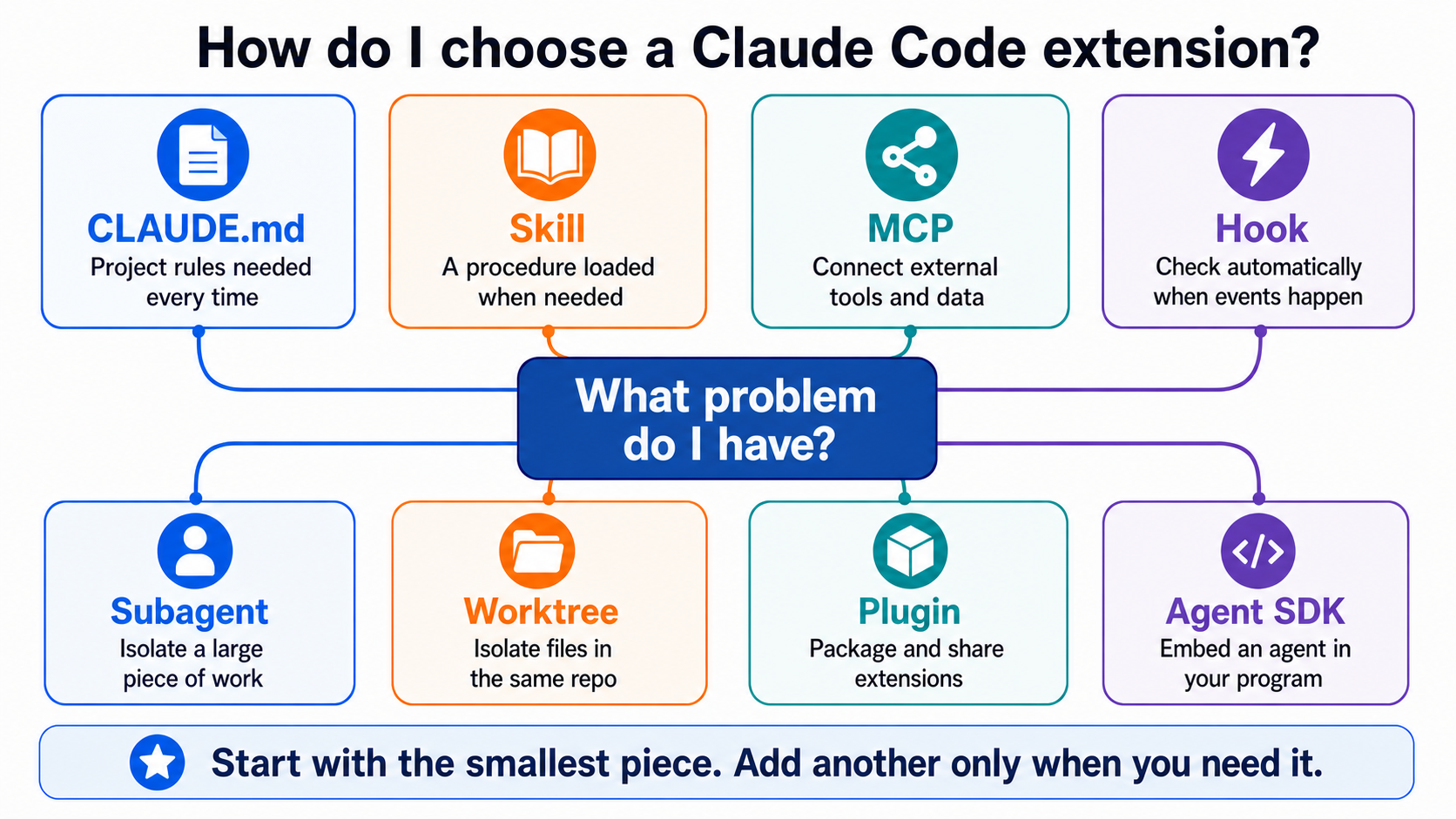
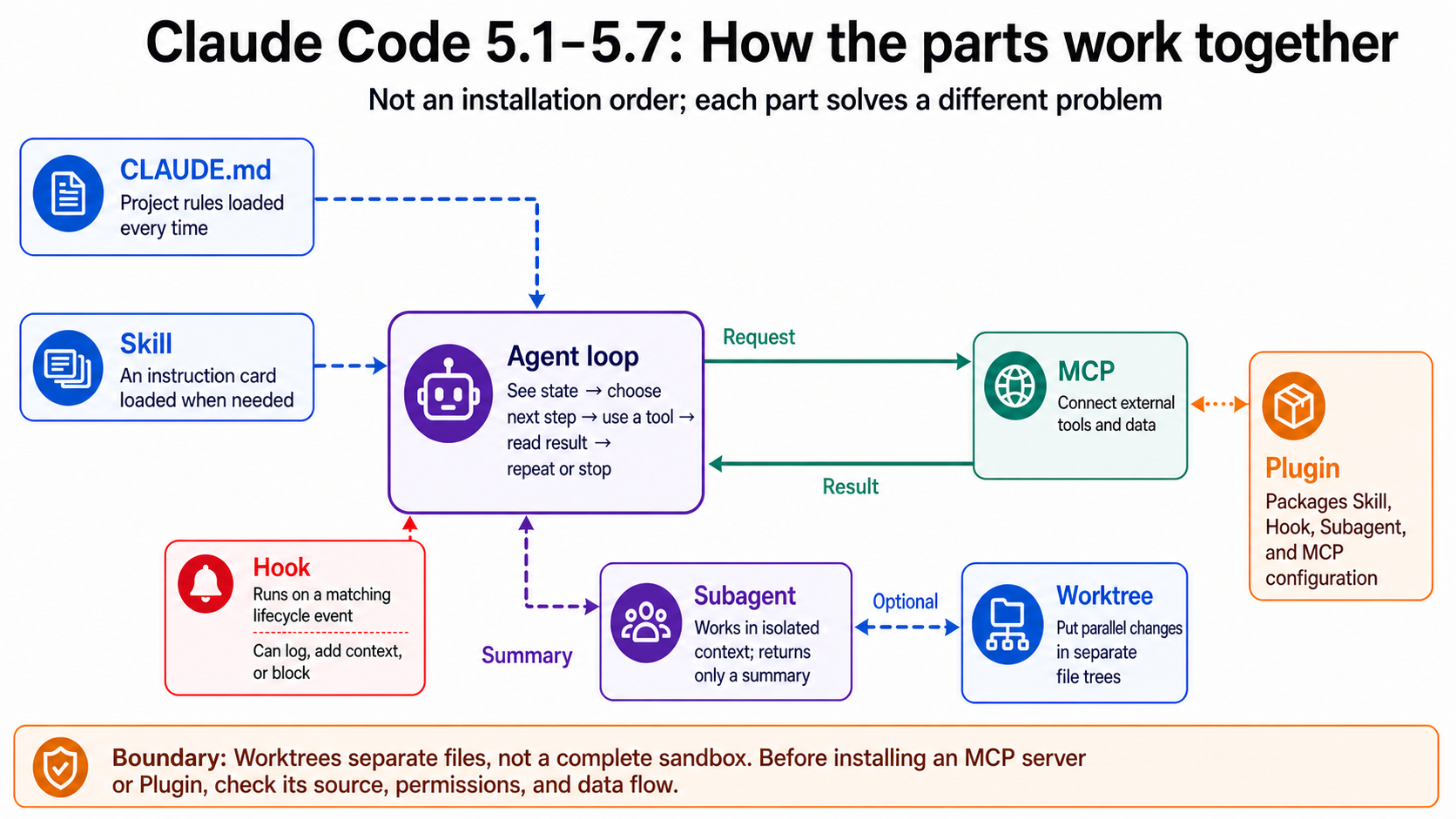
Stage 5 — Claude Code Ecosystem ⭐⭐¶
⏱ Time estimate: 3-4 weeks (~15-25 hours)
🚪 Entry condition (shared hub — differs by track): Track A (CLI Power User) arrives from A1-A2 — knowing Python + having run a basic CLI is enough; start from 5.1/5.2. Track B (Agent Builder) should first complete Stage 3 (tool use) + Stage 4 (agent frameworks), then read this whole stage as "how Claude Code works internally". Not sure which track? → see the 📌 two-track note below.
💡 This entire stage revolves around 4 keywords (MCP / Skills / Plugins / Marketplace) → if you're not familiar with them, first check out
resources/glossary.en.md5.
👥 Shared Hub: This stage is used by both Track A (CLI Power User) and Track B (Agent Builder). Stage 5 and Stage 8 — Agent Interfaces are the two central hubs of this curriculum.
📌 This stage is used by both tracks: - Track A (CLI Power User): A2 uses 5.1 (Claude Code Basics); A3 uses 5.2 (MCP) + selectively uses 5.3 (Skills) and 5.4 (Plugins) (A3's Exercise CLI-12 will teach you how to package CLAUDE.md and commands into a plugin). The reading perspective is "how to get work done with Claude Code." - Track B (Agent Builder): Treats the entire stage as a deep dive into "how Claude Code works internally," from 5.1 all the way to 5.4.
🗺️ What kind of agent is Claude Code? → See
resources/agent-paradigms.en.mdType 1 (IDE-coupled) + Type 2 (Terminal pair-programmer); start there for a full comparison of all 5 paradigms.⚠️ Looking to use a local LLM? This stage is not that path. Claude Code requires the Anthropic API / OAuth and cannot be directly pointed to Ollama or a local endpoint. For offline work, sensitive data, or to avoid using API quota, please see
resources/cookbook.en.mdRecipe 6 and use a CLI agent that supports BYO LLM, like OpenCode / goose / Aider / Hermes.📋 Structure of this chapter: 6 sub-chapters (5.1 Basics / 5.2 MCP / 5.3 Skills / 5.4 Plugins / 5.5 Subagents / 5.6 Dissecting Claude Code Source), each with "Learning Goals → Required Reading → Hands-on Exercises → Curated Projects" → followed by a self-check at the end of the chapter. Note: The discipline-level concept of Harness Engineering (the engineering of an agent's execution system) is systematically covered in Stage 7; 5.6 in this chapter uses Claude Code as a case study, observing how a mature agent tool handles tools, memory, configuration, permissions, and execution flow 🔑 Key Terms: See
resources/glossary.en.md5.
Stack at a Glance¶
From top to bottom, each layer builds on the one below it:

Each layer adds a capability: - API + SDK: Programmatic access to the LLM. - Tool Use: Allows the LLM to call functions you define. - MCP: A standardized protocol that lets any LLM host use any tool server. - Skills: Behavior bundles for Claude Code that can wrap MCP tools. - Plugins: Package and distribute Skills, hooks, commands, and MCP settings as a single unit.
This stage has 4 sub-sections. Please do them in order—each one builds on the last.
5.1 Claude Code Basics 3-5 days (installation, slash commands, CLAUDE.md)
5.2 MCP — Protocol Layer 5-7 days (write your first MCP server)
5.3 Skills — Behavior Layer 5-7 days (write your first SKILL.md)
5.4 Plugins & Marketplaces 5-7 days (package and publish)
After completing this stage, you will be able to extend Claude Code, write your own MCP server, and publish a plugin marketplace.
🗺️ 7-Layer Architecture Map (read this first, then 5.1-5.6)¶
📋 What this section is: maps Claude Code's 7 primitives (MCP / Skills / Plugins / Subagents / Hooks / Slash commands / CLI) to 7 architecture layers + 3 engineering disciplines. Read it once before 5.1-5.6 to know which layer each sub-chapter teaches; read it again afterward as synthesis. The layering is a teaching choice, not an absolute truth.

📊 Above: Claude Code 7 architecture layers + 3 engineering disciplines integrated view.
One sentence per layer + Claude's primitive¶
| Layer | What it is | Claude's version | Owner | Learn in |
|---|---|---|---|---|
| L7 Interface | Where the user talks to the agent | claude-code CLI / Desktop | Harness Engineering | Stage 5.1 |
| L6 Workflow | Fixed reusable workflow templates | Skills (SKILL.md) + Slash commands + Plugins (package Skills / hooks / commands; packaging layer) | Prompt Engineering | Stage 5.3 / 5.4 |
| L5 Coordination | Multi-agent division of labor | Subagents + Agent team + Background | Harness Engineering | Stage 5.5 |
| L4 Memory / Context | Remembering things across conversations / sessions | History / /compact / Memory hooks |
Context Engineering | Stage 6 |
| L3 Control Plane | Intercepting / validating / blocking before and after tool execution | Hooks (PreToolUse / PostToolUse, etc.) | Harness Engineering | Stage 5.1 hooks section |
| L2 Tool Use | Protocol for an LLM to call external functions | Anthropic Tool Use (input_schema) |
Tool design | Stage 3 |
| L2.5 Tool Provider | Wraps external APIs as tools for Layer 2 | MCP servers (Notion / Gmail / Slack) | Context Engineering + Tool | Stage 5.2 |
| L1 Foundation | The LLM itself (the system prompt is delivered directly to this layer) | Anthropic API | Prompt Engineering | Stage 1 + Stage 2 |
3 Engineering Disciplines Overlay (key insight)¶
Prompt / Context / Harness are disciplines for different layers. Learning one does not automatically teach the others:
| Discipline | Which layers it owns | One sentence | Learn in |
|---|---|---|---|
| Prompt Engineering | L1 + L6 | "How to design the strings sent into the LLM" | Stage 2 |
| Context Engineering | L4 + L2.5 | "What information to load into the context window" | Stage 6 |
| Harness Engineering | L3 + L5 + L7 | "The runtime scaffolding around the LLM" | Stage 7 §Harness Engineering |
💡 MCP's special position: strictly speaking, MCP spans Context Engineering (feed context sources) + Tool design (protocol specification), so it does not belong purely to one discipline. That is why it is marked as Layer 2.5 in the diagram.
Cross-CLI vendor mini-comparison (2026-05 snapshot)¶
Only Claude Code has the full 7-layer stack; most other CLIs stop at single-agent plus simplified variants:
| Layer | Claude Code | OpenAI Codex | Gemini CLI |
|---|---|---|---|
| L5 Coordination (multi-agent) | ✅ Subagents | ❌ single-agent | ❌ |
| L3 Control Plane (hooks) | ✅ Hooks | ❌ | ❌ |
| L2.5 Tool Provider (MCP) | ✅ | ✅ (MCP supported) | ✅ (requires manual MCP server install) |
| L6 Workflow (Skills) | ✅ SKILL.md | AGENTS.md (context only) | GEMINI.md (context only) |
→ See resources/cli-agents-guide.en.md
5.1 — Claude Code Basics¶
What is Claude Code (Positioning First)¶
Claude Code = a Claude agent that runs inside your terminal—with full access to the file system, shell, git, and subprocesses, capable of autonomously completing multi-step tasks (read file → modify file → run tests → commit → create PR).
Differences from other Claude interfaces:
| Interface | Runs Where | Capabilities | Use Case |
|---|---|---|---|
| claude.ai (web) | Browser | Pure chat + file uploads, no file system operations | Occasional chats, asking a single question |
| Claude API (programmatic) | Your server / script | LLM calls, you build the agent loop | Building production systems |
| Claude Agent SDK | Your Python / TS environment | Full agent runtime + tool use + multiple sessions | Building production agent systems |
| Claude Code (This Section) | Your terminal | Full OS-level agent (file / shell / git / subprocess) + skill / plugin / subagent ecosystem | Primary daily work tool |
Before moving on to 5.2-5.6, you will learn about 4 core structures of Claude Code in this section: CLAUDE.md (memory layer) / slash commands (control layer) / the ~/.claude/ directory (configuration layer) / settings.json (behavior layer).
Learning Goals¶
After completing this section, you will be able to:
- Explain the respective roles of Claude Code, claude.ai, the API, and the SDK ("why use the CLI instead of the web")
- Install Claude Code, configure authentication, and run your first session with file access
- Use 8-10 common slash commands to control Claude Code's behavior
- Write a project-level CLAUDE.md to set baseline behavior
- Recognize the ~/.claude/ directory structure (where skills / agents / plugins / settings.json are located)
Required Reading¶
- Anthropic — Claude Code Quickstart — Official installation guide
- Anthropic — CLAUDE.md best practices — How to write project memory
- Anthropic — Slash Commands — Official full list of slash commands
- Anthropic — Settings — Full
settings.jsonschema + env vars - KimYx0207/Claude-Code-x-OpenClaw-Guide-Zh — A beginner's guide in Simplified Chinese
🛠️ Writing a good CLAUDE.md? First read Stage 7.5 Core Harness Engineering Principles (multi-source synthesis) to build the mental model, then use the 2 prompts below.
📋 CLAUDE.md design prompts (using the 5 principles)¶
Copy these directly when writing or revising CLAUDE.md:
Prompt 1 — Audit your existing CLAUDE.md¶
I have a CLAUDE.md at [paste path]. Audit it against these 5 harness engineering principles:
1. Legibility — Markdown headers for sections? Conventions written concretely ("2-space indent") or vaguely ("format properly")?
2. Progressive Disclosure — Under 200 lines? Are `@-import` or `.claude/rules/<topic>.md` used to split content?
3. System of Record — Does CLAUDE.md act as an entry map pointing to `docs/` + `.coord/`, or does it cram all rules in one file?
4. Taste Invariants — Verifiable rules ("run `make lint` before commit") or unverifiable phrases ("follow best practices")?
5. Transparency — Does it require the agent to show planning steps, or does it expect silent execution?
For each: PASS / FAIL / PARTIAL + reason + fix suggestion. Total X/5 + first thing to fix.
Prompt 2 — Generate a new CLAUDE.md (using the 5 principles)¶
I want to write CLAUDE.md for a [describe project — e.g. Python data-analysis monorepo / academic paper repo / Next.js app] following these 5 harness engineering principles:
- **Under 200 lines**
- Acts as an **entry map** — use `@-import` to pull in external docs or `.claude/rules/<topic>.md`
- Every rule must be **verifiable** (avoid "follow best practices" hand-waving)
- Include **1-2 transparency rules** (e.g. "show the plan before any edit > 50 lines")
- Mark which content belongs in CLAUDE.md vs `.claude/rules/<topic>.md`
Output:
1. Full CLAUDE.md content
2. Suggested `.claude/rules/` directory split (topic list)
3. One example `.claude/rules/<topic>.md` (pick one topic)
→ Suggested workflow: use Prompt 2 to generate a draft before writing CLAUDE.md, then use Prompt 1 to audit the finished file.
Common Slash Commands (10 to learn)¶
| Command | Purpose | When to Use |
|---|---|---|
/help |
List all available commands | When you don't know what commands are available |
/clear |
Clear conversation history (retains system context) | When the session is too long and you want to restart the logic |
/compact |
Automatically summarize the conversation to free up the context window | When the context is nearly full |
/plan |
Enter plan mode (read-only, plan before acting) | Before a major change, let Claude list the plan first |
/model |
Switch models (Sonnet / Haiku / Opus) | Switch to a cheaper model to save tokens |
/agents |
List / manage subagents (5.5) | To see which subagents are available, for debugging |
/plugin install <name>@<marketplace> |
Install a plugin (5.4) | To add new functionality |
/permissions |
View / change current session permissions | When there are too many permission prompts and you want to streamline them |
/resume |
Resume the previous session | To continue yesterday's work |
/bg |
Background the current session (moves to agent view) | When you want to run multiple tasks simultaneously, see 5.5 |
For a complete list, see the official Slash Commands documentation linked above.
~/.claude/ Directory Structure (Get a mental map first)¶
~/.claude/ ← Global user-level
├── settings.json ← Global behavior (env / hooks / permissions / model defaults)
├── settings.local.json ← Machine-specific (not checked into git)
├── CLAUDE.md ← Global baseline (loaded in every session)
├── skills/<name>/SKILL.md ← User-level skills (5.3)
├── agents/<name>.md ← User-level subagents (5.5)
├── plugins/ ← Installed plugins (5.4)
├── hooks/ ← User-level hook scripts
└── jobs/<id>/ ← Background session states (5.5 background agent)
<project-root>/.claude/ ← Project-level (with the repo)
├── settings.local.json ← Project behavior (including permissions)
├── skills/<name>/SKILL.md ← Project-level skills (higher priority than user-level)
├── agents/<name>.md ← Project-level subagents
├── commands/<name>.md ← Project-level slash commands
└── hooks/ ← Project-level hooks
<project-root>/CLAUDE.md ← Project baseline (loaded in every session)
Priority Order (who wins in a conflict): project > user > built-in default.
Hands-on Exercises¶
- Exercise 1: First Session — Install, authenticate,
cdto a repo, runclaude→ ask "summarize this codebase" → observe how it reads files. - Exercise 2: CLAUDE.md — Write a
CLAUDE.mdin the repo root (role / context / what not to do / how to do things / common commands), and compare the behavior with and without theCLAUDE.md. - Exercise 3: 5 Slash Commands — In one session, use
/help,/plan,/compact,/model, and/agentsin order, and observe what each one does. - Exercise 4: Directory Exploration — Run
ls ~/.claude/+cat ~/.claude/settings.jsonto see what your user-level settings look like.
Curated Projects¶
| Project | ⭐ | Best for | Why it's recommended / Notes |
|---|---|---|---|
| anthropics/claude-code ⭐ Official | ⭐⭐⭐⭐⭐ | Tracking new versions / reading release notes / reporting bugs | The official Claude Code repo, with issues, releases, and inline examples. |
| Anthropic — Claude Code Official Docs | ⭐⭐⭐⭐⭐ | Any reference query | The true canonical reference—the 5 required readings above all come from here. |
| hesreallyhim/awesome-claude-code | ⭐⭐⭐⭐ | Seeing what the community has to offer (slash command / skill / hook examples) | A broader list of resources (currently being reorganized). |
| KimYx0207/Claude-Code-x-OpenClaw-Guide-Zh | ⭐⭐⭐⭐ | Chinese readers who want a step-by-step tutorial | A beginner's guide in Simplified Chinese. |
5.2 — MCP (Model Context Protocol) ⭐ Foundation¶
What is MCP (Positioning First)¶
MCP = an open protocol for "letting an LLM use any external tool or data." Before MCP, every LLM vendor had to define their own tool specification, and every tool provider had to write a separate integration for each LLM. MCP standardizes this layer—write an MCP server once, and Claude / Codex / Cursor / any MCP-enabled host can use it.
MCP's Three Abstractions:
| Abstraction | What it is | Example |
|---|---|---|
| Tools | Functions the LLM can call | read_file(path) / query_db(sql) / send_slack(channel, msg) |
| Resources | Data sources the LLM can read | file:///path/file.md / postgres://db/users |
| Prompts | Pre-defined prompt templates on the server | A prompt template for "code review" |
Most MCP servers primarily use the Tools abstraction—Resources and Prompts are used less often.
MCP vs Tool Use vs Skill vs Plugin:
- Tool Use (Stage 3): In-process functions you write for the LLM to call.
- MCP (This Section): Standardizes tools into a server/client protocol, usable across hosts and LLMs.
- Skill (5.3): The behavior layer—teaches Claude "when to use which MCP tool."
- Plugin (5.4): Packages MCP, Skills, and other components for distribution.
→ Core Distinction: MCP is the "capability" (what the LLM can do), while a Skill is the "behavior" (when to use which capability).
Learning Goals¶
- Explain MCP's three abstractions (Tools, Resources, Prompts)
- Connect an existing MCP server to Claude Desktop or Claude Code
- Write a minimal MCP server in Python that provides 1-2 tools
- Distinguish between an MCP server, Tool Use, Skills, and Plugins
Required Reading¶
- Anthropic — Introducing MCP — The original announcement, a conceptual overview
- MCP Specification — The actual protocol specification
- Complete Guide to MCP in 2026 — An implementation guide
Hands-on Exercises¶
- Exercise: MCP client — Install
modelcontextprotocol/servers/filesystemand connect to it from Claude Desktop. Watch Claude read your files. - Exercise: MCP server — Write a Python MCP server that provides one tool (e.g., "convert temperature"). Connect to it from Claude Code. For step-by-step instructions → see
resources/cookbook.en.md2. - Exercise: MCP in production — In the same Claude session, connect to 2-3 MCP servers simultaneously and watch them coordinate.
Curated Projects (for spec / SDK / template reference)¶
💡 Looking for MCP servers for everyday tools (Notion / Obsidian / Excel / Postgres / Playwright / Figma, etc.)? Check out
resources/mcp-skills-catalog.en.md—it organizes 62 common MCP servers / Skills into 14 categories, each with stars / license / intended audience. The table below retains official servers / SDKs that serve as a "reference for writing your own MCP server."
| Project | ⭐ | Best for | Why it's recommended / Notes |
|---|---|---|---|
| modelcontextprotocol/servers ⭐ Official | ⭐⭐⭐⭐⭐ | Exercise 1 server, and as a reference thereafter | 20+ official MCP servers (filesystem / git / github / sqlite / time / fetch / memory / sequential-thinking), ★ 85k+, MIT, TS+Python. Read the everything and filesystem source to understand how the protocol works. Install with: npx -y @modelcontextprotocol/server-filesystem /path or pip install mcp-server-fetch |
| modelcontextprotocol/python-sdk | ⭐⭐⭐⭐⭐ | Exercise 2, writing your own MCP server | Official Python SDK, install with pip install mcp, MIT. Follow the official quickstart. |
| modelcontextprotocol/typescript-sdk | ⭐⭐⭐⭐ | Those who prefer TS | The TypeScript version of the Python SDK, MIT. |
| wong2/awesome-mcp-servers ⭐ Catalog | ⭐⭐⭐⭐⭐ | Finding an existing server before writing your own | A catalog of 150+ community MCP servers, categorized by search / code / cloud / communication / finance. Submissions go through mcpservers.org. |
| punkpeye/awesome-mcp-servers | ⭐⭐⭐⭐ | Cross-referencing with wong2's list | Another MCP server catalog, organized differently and often updated more frequently. |
| github/github-mcp-server | ⭐⭐⭐⭐ | Seeing production-grade MCP server source | Maintained by GitHub, a real example running in production. |
| 21st-dev/magic-mcp | ⭐⭐⭐ | Finding inspiration after Exercise 2 | A non-trivial MCP server that generates UI components, ★ 4.8k+, NOASSERTION. Shows that MCP can do more than just data fetching. |
| yamadashy/repomix | ⭐⭐⭐⭐⭐ | Feeding an entire codebase to an LLM | ★ 24k+, MIT. Packs a repo into a single AI-friendly file, with MCP server mode + tree-sitter compression (~70% token savings) + secretlint to filter secrets. Daily-driver tool to pair with Claude Code / Codex. |
5.3 — Skills (Claude Code's Behavior Layer) ⭐ The most critical layer of the Claude Code ecosystem¶
What is a Skill (Positioning First)¶
A Skill = a markdown file (.claude/skills/<name>/SKILL.md) that tells Claude "when you encounter a certain situation → follow a certain process." Before each inference, Claude scans the description frontmatter of all available skills, checks if they match the current situation, and if there's a match, automatically loads the SKILL.md into the context.
🛠️ Writing a good SKILL.md? There are two paths: - Path A: use Anthropic's official
skill-creatorskill to generate the skeleton (the installation section later in 5.3.x shows this). It gives you the frontmatter and subdirectory structure automatically and is Anthropic's canonical tool. - Path B: write it yourself with the SKILL.md design prompts below — first read Stage 7.5 Core Harness Engineering Principles for the concepts, then use the prompts to build the file.The two paths are complementary:
skill-creatorgives you structure, while the 5-principle prompts check content quality.
📋 SKILL.md design prompts (including skill-creator as the alternative)¶
Copy these directly when writing or revising SKILL.md:
Prompt 1 — Audit your existing SKILL.md¶
I have a SKILL.md at [paste path]. Audit it against the 5 harness engineering principles below. For each, return "PASS / FAIL / PARTIAL" + a 1-line reason + a 1-line fix suggestion:
1. Legibility — Does the description clearly state "when to trigger"? Are tool param names consistent?
2. Progressive Disclosure — Is SKILL.md under 200 lines? Are details placed in `references/` rather than stuffed into the main file?
3. System of Record — Is `references/` the single source? Does the main file avoid duplicating that content?
4. Taste Invariants — Are success criteria hard and verifiable, not subjective phrasing like "as good as possible"?
5. Throughput / Merge — Is there an acceptance check (lint / test / preset YAML) attached?
End with: total score X/5, which principle to fix first, and why.
Prompt 2 — Generate a new SKILL.md (using the 5 principles)¶
I want to write a skill that handles [describe task — e.g. converting PDFs to markdown / running a banned-word audit on academic papers]. Generate SKILL.md following these 5 harness engineering principles:
- **description** must clearly state "when to trigger" (so Claude can match the situation)
- **Main file under 200 lines** — push examples / edge cases / detailed rules into `references/<topic>.md`
- Propose a `references/` directory structure (1-3 topic files)
- Include a **success-criteria table** (verifiable, not subjective)
- Include an **acceptance-check section**: which lints / unit tests / preset YAMLs to run
Output:
1. Full SKILL.md content
2. references/ directory structure suggestion
3. Which acceptance-gate preset to use (e.g. multi-locale-mirror-sync / catalog-entry-add)
→ Suggested workflow: start with /skill skill-creator for a clean skeleton → use Prompt 2 to fill it in → finish with Prompt 1 to audit it.
Core mental model: If you find yourself "typing the same prompt every time to teach Claude how to do something" → write it as a skill, and you won't have to next time. In the Claude Code ecosystem, skills are the dividing line between power users and regular users—those proficient in writing skills can compress an hour of work into 5 minutes.
Skill vs CLAUDE.md vs MCP vs Plugin vs Subagent — A Comparison Table¶
These layers are often confused. A one-line comparison:
| Component | What it is | When to Use | Trigger | Example |
|---|---|---|---|---|
| CLAUDE.md (5.1) | Baseline behavior for a repo / project | Repo-wide conventions ("use type hints," "commit message format") | Loaded in every session, regardless of context | The CLAUDE.md in your repo root |
| MCP server (5.2) | A protocol server that provides tools / data | When you want Claude to access external resources (APIs / DBs / file systems) | After the server starts, can be called anytime | github MCP / postgres MCP |
| Skill (This Section) | A behavior package for a specific situation | When you want to set "in situation X → follow process Y" | Auto-loaded on description match | skill-vetter (checks before installing a skill) / pdf (handles PDFs) |
| Plugin (5.4) | A distributable package of skills + commands + MCP + hooks | When you want to share / install a whole set of configurations | /plugin install <name>@<marketplace> |
engineering bundle / finance bundle |
| Subagent (5.5) | A sub-Claude session with an independent context | When you want to delegate a large-context task and get the result back in the main session | Auto-delegated on description match | code-reviewer subagent / researcher subagent |
How to choose:
- A single-line setting → put it in
CLAUDE.md - A multi-step process, used only in a specific situation → write a Skill (the topic of this section)
- Need to access external resources (API / DB) → write an MCP server
- The skill is too large and consumes the entire main session window → turn it into a Subagent
- Want to package a Skill / command / MCP / hook to share → package it as a Plugin
→ Core Distinction: MCP is the "capability," a Skill is the "behavior," a Plugin is for "distribution," and a Subagent is an "independent worker."
Learning Goals¶
- The structure of
SKILL.md(YAML frontmatter + body) - When a skill will auto-load (description matching)
- How to write a
SKILL.mdthat solves a daily work task - The purpose of the
references/,scripts/, andevals/subdirectories
Required Reading¶
- Anthropic — Claude Skills Documentation
- A few example SKILL.md files—from
anthropics/claude-codeor community marketplaces - Hello-Agents — Extra08 How to Write Good Skills — The most complete guide to Skill best practices in Chinese
- Hello-Agents — Extra05 A Comparative Interpretation of Agent Skills and MCP — A conceptual comparison of Skills vs MCP
Hands-on Exercises¶
- Exercise: SKILL.md — Write a 200-word skill that solves one of your daily work tasks. For step-by-step instructions → see
resources/cookbook.en.md1. - Exercise: SKILL with references — Add a
references/markdown file that the skill can reference. - Exercise: SKILL eval — Add
evals/evals.jsonwith 3-5 self-tests.
📦 This repo includes a meta-example:
examples/stage-5/tool-calling-tutor/is the corresponding skill template for this stage—with complete frontmatter (including trigger phrases + "Do NOT use for"), 3references/files, and 5 test cases inevals/evals.json. Fork it directly to create your own skill. It serves a dual purpose: (a) for learners to use themselves, auto-loading to help debug when stuck on tool calling; (b) as a reference template for writing a SKILL.md in Stage 5 5.3.
Recommended Skills (by category)¶
Not sure where to start? Below are the commonly used official + community skills as of late 2025. How to install: (a) Most come from a plugin; installing the corresponding plugin will give you the skill; (b) or clone from anthropics/skills and place them in
~/.claude/skills/or.claude/skills/.
| Use Case | Skill | Source | Why it's recommended |
|---|---|---|---|
| 🛡️ Security check before installing skills (must-have) | skill-vetter |
anthropics/skills | Must-run before installing any external skill—checks for red flags, permission scope, suspicious patterns. It's like SAST for marketplace skills. |
| 🔍 Find / install skills | find-skills |
anthropics/skills | Natural language query, automatic installation. "I want to do X" will return the corresponding skill. |
skill-lookup |
claude-plugins-official | Complements find-skills, a helper for exploration / search. | |
| ✍️ Write your own skill | skill-creator |
anthropics/skills + claude-plugins-official | Automatically generates frontmatter + subdirectory structure, a must-have for writing skills. |
| 📄 Office docs processing | pdf / docx / xlsx / pptx |
anthropics/skills | Read and write PDF / Word / Excel / PowerPoint. A must-have set—essential for any office workflow. |
| 🔧 Code review | code-reviewer / code-review-excellence |
claude-plugins-official | Security / style / test review for staged diffs. |
| 🐛 Debugging | debugger / systematic-debugging |
claude-plugins-official | Systematic root cause analysis, avoids quick fixes. |
| 🎓 Academic writing | academic-writing-skills |
community | findings-first / mechanism / banned word audit. |
| 🔌 MCP integration / server writing | mcp-builder / mcp-integration |
claude-plugins-official | Scaffolding for writing MCP servers and integrating existing ones. |
| 💻 Frontend / fullstack | frontend-developer / fullstack-developer |
claude-plugins-official | Assistance with React components / full-stack architecture. |
| 📊 Data analysis | data-analyst / visualization-expert |
community | SQL / pandas / chart type selection. |
| ⚙️ Permissions / settings management | update-config / fewer-permission-prompts |
claude-plugins-official | Management of hooks / permissions / env vars. |
| 🔁 Self-improvement | self-improving-agent |
community | Captures learning / errors / corrections for continuous agent improvement. |
| 🌐 General / fallback | general-purpose |
Built into Claude Code | The default entry point for complex, open-ended tasks and uncovered scenarios. |
Suggested adoption order:
1. First must-install: skill-vetter (use it to check other skills before installing them).
2. Second batch of must-installs: skill-creator + find-skills (for writing / finding skills).
3. By work domain: Add pdf/docx/xlsx for Office workflows, code-reviewer/debugger for development, academic-writing-skills for academic writing.
4. Want to see more?: Browse obra/superpowers or wshobson/agents for production templates.
Curated Projects (for spec / template reference)¶
💡 Looking for everyday Skills (NotebookLM, Excalidraw, Office docs, etc.)? See
resources/mcp-skills-catalog.en.md—categorized by use case, including both official Anthropic + community Skills. The table below is reserved for "spec / showcase reference material for writing your own Skill."
| Project | ⭐ | Best for | Why it's recommended / Notes |
|---|---|---|---|
| anthropics/skills ⭐ Official spec | ⭐⭐⭐⭐⭐ | Reading before writing your own SKILL.md | Anthropic's official Skills repo: spec/ (frontmatter standard) + template/ (starter template) + skills/ containing reference implementations like pdf / docx / xlsx / pptx / skill-creator / skill-vetter. ★ 128k+. The top choice for SKILL.md structure reference. For the broader Agent Skills standard, see agentskills.io. |
| anthropics/claude-code | ⭐⭐⭐⭐ | Tracking new features, reading release notes | The main Claude Code repo, including issues / releases / inline skill examples. For learning Skills, this repo is secondary to the one above. |
| mattpocock/skills | ⭐⭐⭐⭐ | Seeing "real-world engineer daily SKILL.mds" | Matt Pocock (a well-known educator in the TypeScript community) has open-sourced his actual .claude/ directory. Each SKILL.md is extremely short (10-50 lines) and not over-engineered. A valuable reference against over-engineered 200-line skills (★ 85k+, MIT). |
| obra/superpowers | ⭐⭐⭐⭐ | Power user setup, learning advanced patterns | 20+ battle-tested skills (TDD, debugging, collaboration patterns) + /brainstorm / /write-plan / /execute-plan commands + a skills-search tool. |
| wshobson/agents | ⭐⭐⭐⭐ | Intermediate: learning skill + subagent combinations | Composes skills + subagents for multi-agent orchestration. An example of evolving from a single SKILL.md to an agent-as-skill composition pattern (★ 35k+, MIT). |
| travisvn/awesome-claude-skills | ⭐⭐⭐⭐ | Finding an existing skill before writing your own | A curated list of community Claude Skills. |
| VoltAgent/awesome-agent-skills | ⭐⭐⭐ | A cross-tool perspective | 1000+ agent skills, compatible with Claude Code / Codex / Gemini CLI / Cursor (★ 22k+, MIT). |
| alirezarezvani/claude-skills | ⭐⭐⭐ | Finding domain-specific skill examples | 232+ Claude Code skills across engineering / marketing / product / compliance. |
5.4 — Plugins & Marketplaces¶
What is a Plugin (Positioning First)¶
A Plugin = a combination package of MCP + Skills + slash commands + hooks—it bundles the components from 5.2 / 5.3 into a single unit that can be installed at once with /plugin install.
Plugin
├── .mcp.json ← MCP server config from 5.2 (provides tools / data)
├── skills/<name>/SKILL.md ← Skill from 5.3 (behavior package)
├── commands/<name>.md ← Slash command from 5.1 (custom prompt entry point)
├── hooks/ ← Trigger point hooks (e.g., PreToolUse, SessionStart)
├── agents/<name>.md ← Subagent from 5.5 (if any)
└── .claude-plugin/plugin.json ← Packaging metadata
Why plugins?: You've written a useful skill and want to share it → a single git clone is cumbersome and setup is error-prone. Package it as a plugin, push it to a marketplace, and others on your team can install it with a single command: /plugin install foo@your-marketplace.
What's the difference between a plugin and a marketplace?: A plugin is a single packaged unit, while a marketplace is a directory of multiple plugins (e.g., anthropics/claude-plugins-official is a marketplace containing 35 plugins).
Learning Goals¶
- The
plugin.jsonschema (name, version, skills array, configuration) - The
marketplace.jsonschema (plugins array, source, metadata) - The
claude plugin marketplace addworkflow - Distinguish between a single-plugin bundle and a multi-plugin marketplace
- Publish your own marketplace
Required Reading¶
- Anthropic — Plugins Documentation
- Read the
plugin.jsonandmarketplace.jsonof 2-3 of the marketplaces below.
Hands-on Exercises¶
- Exercise: plugin install — Install one of the marketplaces below and watch it load.
- Exercise: plugin.json — Package the SKILL.md you wrote in 5.3 into a plugin.
- Exercise: marketplace publish — Push it to GitHub and install it using
claude plugin marketplace add.
Recommended Plugins (by category)¶
Not sure which plugins to install? Below are the highly-rated official Anthropic + community choices as of late 2025. The installation command format is consistent:
/plugin install <plugin-name>@<marketplace-name>(e.g.,/plugin install code-review@claude-plugins-official).
| Use Case Category | Plugin (with direct link) | Marketplace | Why it's recommended |
|---|---|---|---|
| Development Workflow (must-haves for most developers) |
code-review |
claude-plugins-official | The official collection of code review skills, including staged diff review + security checks. |
pr-review-toolkit |
claude-plugins-official | The complete PR review workflow (comment, suggest, approve). | |
commit-commands |
claude-plugins-official | Git commit message conventions + branching workflows. | |
feature-dev |
claude-plugins-official | The complete feature development cycle (spec → plan → implement → test). | |
frontend-design |
claude-plugins-official | Assistance with UI design + responsive layouts. | |
| Language Tools (choose based on the language you use) |
typescript-lsp / pyright-lsp / rust-analyzer-lsp / gopls-lsp etc. |
claude-plugins-official | Integrations with various language LSPs. All 35 language plugins are here. |
| Plugin / Skill Creation | skill-creator |
claude-plugins-official | Automatically generates frontmatter + structure when writing your own skills. |
plugin-dev |
claude-plugins-official | Automatically generates the .claude-plugin/ structure when writing your own plugins. |
|
mcp-server-dev |
claude-plugins-official | Scaffolding for writing your own MCP servers. | |
hookify |
claude-plugins-official | A tool for writing hook rules. | |
| Domain-Specific — Engineering Teams | engineering bundle |
knowledge-work-plugins | 10 skills: architecture / code-review / debug / deploy-checklist / documentation / incident-response / standup / system-design / tech-debt / testing-strategy. |
| Domain-Specific — Finance Teams | finance bundle |
knowledge-work-plugins | 8 skills: audit-support / close-management / financial-statements / journal-entry-prep / reconciliation / sox-testing / variance-analysis. |
| Domain-Specific — Others (same marketplace) |
sales / marketing / legal / human-resources / customer-support / data / design / operations / product-management / productivity / bio-research etc. |
knowledge-work-plugins | The knowledge-work-plugins marketplace has 18 vertical bundles—pick the one that corresponds to your work domain. |
| External Integrations (third-party services) |
asana / github / gitlab / linear / firebase / playwright / terraform / discord / imessage / telegram etc. |
claude-plugins-official (external) | Integrations with common SaaS / development tools. |
| Community Breadth | (pick skills that interest you) | rohitg00/awesome-claude-code-toolkit | The largest community catalog of agents / skills / hooks / templates. |
Suggested adoption order:
1. Must-haves for developers (5): code-review + pr-review-toolkit + commit-commands + feature-dev + an *-lsp for your language.
2. Add a bundle based on your work domain: engineering for engineering teams, finance for finance, and so on.
3. If you want to write your own skills / plugins → install skill-creator + plugin-dev.
4. To see more → browse awesome-claude-code-toolkit or resources/mcp-skills-catalog.en.md.
Curated Projects (for marketplace template reference)¶
💡 The list above is about "which plugins to install"; the table below is about "how to write a marketplace"—only those who want to build their own marketplace need to look at this.
| Marketplace | ⭐ | Best for | Why it's recommended / Notes |
|---|---|---|---|
| anthropics/claude-plugins-official | ⭐⭐⭐⭐⭐ | The official template to reference before writing your own marketplace | 35 internal plugins + 15 external, the standard .claude-plugin/marketplace.json schema, with plugins/ for the plugin bodies + external_plugins/ for referencing external repos. If you want to know what marketplace.json should look like, look at this (★ 18k+). |
| anthropics/knowledge-work-plugins | ⭐⭐⭐⭐⭐ | Seeing a "multi-vertical bundle" type of marketplace | 18 domain-specific plugin bundles (finance / engineering / sales / legal / marketing / HR / customer-support / data / design / operations / product / productivity / bio-research / enterprise-search / pdf-viewer / small-business / cowork-plugin-management / partner-built). Anthropic's own template for knowledge worker scenarios. |
| obra/superpowers-marketplace | ⭐⭐⭐⭐ | Those who want to create a "I curate, others write" type of marketplace | The most minimal marketplace template—the repo only contains marketplace.json + README, with the plugin bodies in external repos. The minimal template for the curator-only pattern (★ 900+, MIT). |
| trailofbits/skills-curated | ⭐⭐⭐ | Reviewers / teams concerned about supply chain security | A security-vetted marketplace maintained by Trail of Bits. Every skill is reviewed, and the README clearly states the criteria. Demonstrates that a marketplace is not just a list, but also a trust mechanism (★ 388, CC-BY-SA-4.0). |
| rohitg00/awesome-claude-code-toolkit | ⭐⭐⭐ | Those who want to browse what the community has to offer | The largest community catalog of Claude Code agents / skills / hooks / templates. Covers a wide range of use cases. |
| anthropics/life-sciences | ⭐⭐⭐ | Those creating a domain-specific marketplace (medical, financial, legal, educational, etc.) | Anthropic's own domain-specific marketplace example (for biology / health sciences), demonstrating how to tailor marketplace.json for a single vertical. The payload is bio-sci MCP servers, but the structure of marketplace.json is the main lesson (★ 375). |
| anthropics/claude-for-legal | ⭐⭐⭐⭐ | Want to see a full vertical plugin suite (skills + agents + MCP + scheduled agents) | Anthropic's official legal vertical reference (★ 7k+, Apache-2.0) — 10 legal plugins (commercial / corporate / litigation / privacy / employment / IP / law-student) + 100+ skills + 20+ MCP connectors + scheduled agents + subagent delegation. You don't need to know law — this is the best teaching material for "how to design a vertical plugin suite": system prompt patterns, accountability surfaces, and the orchestrate.py event loop. |
💡 A walkthrough on "how to publish your own marketplace": Currently, the most reliable resource is the official Anthropic plugin documentation. If you know of a good blog post / repo, feel free to open a PR to add it.
5.5 — Subagents (Claude Code's native multi-agent mechanism) ⭐ 2025 new feature¶
Up to this point, you've learned about MCP (the tool layer), Skills (the behavior layer), and Plugins (the distribution layer). Subagents are the orchestration layer—they allow the main Claude session to spawn child agents with independent contexts to run specific tasks and report back the results.

📊 The diagram above shows the 4 stages — Definition → Discovery → Dispatch → Execution. Read this first, then dive into the details below.
A comparison with framework-based multi-agent systems from Stage 4 (LangGraph / CrewAI / AutoGen):
| Dimension | Framework path (Stage 4) | Claude Subagent path (This Section) |
|---|---|---|
| Activation | pip install crewai + Python code |
Simply write a .claude/agents/<name>.md file |
| Runtime | Your own Python process | Claude Code's built-in Task tool |
| Context isolation | Managed by the framework | Innate, each subagent has an independent window |
| Provider lock-in | Medium (many frameworks support multi-LLM) | Strong (tied to Claude Code) |
| Best for | Production systems that span LLM providers | Engineering teams already committed to Claude Code |
| Learning curve | High (framework abstractions + async) | Low (writing markdown) |
Current state of multi-agent mechanisms in various CLIs / SDKs (late 2025)¶
Many people assume that multi-agent CLIs are a standard feature for Anthropic / OpenAI / Google—but in reality, only Claude Code currently has a complete native multi-agent stack. Codex CLI / Gemini CLI / Cursor are still single-agent; to get multi-agent functionality, you have to write it yourself using an SDK or framework.
| Platform | Subagent | Agent team | Background agent | Mechanism |
|---|---|---|---|---|
| Claude Code (CLI) | ✅ | ✅ | ✅ | .claude/agents/<name>.md + Task tool (subagent) + agent teams + agent view / background |
| OpenAI Codex CLI | ❌ | ❌ | ❌ | AGENTS.md is just a single-agent context file (similar to CLAUDE.md), not a subagent system |
| Google Gemini CLI | ❌ | ❌ | ❌ | GEMINI.md is just for context; no subagent / multi-agent features |
| Cursor (IDE-coupled) | ❌ | ❌ | ❌ | A single Cursor Agent; queued messages are sequential, not parallel |
| OpenAI Agents SDK (programmatic, not CLI) |
⚠️ Handoffs + agents-as-tools | ❌ | ❌ | A pure Python SDK, not a CLI; the handoff pattern is close to Claude's subagents but requires writing code |
| Framework path (Stage 4) |
LangGraph / CrewAI / AutoGen | ✅ You wire it | Partially | Cross-LLM provider, Python orchestration, see Stage 4 |
Interpreting the current state:
- If you want to play with multi-agent systems in a CLI → currently, only Claude Code has native support (the topic of this section)
- If you want to go cross-provider / cross-LLM → take the Stage 4 framework path
- If you want OpenAI ecosystem + multiple agents → use the OpenAI Agents SDK to write a handoff pattern (programmatic, not CLI)
- If you want complete control → go to Stage 5.6 Dissecting Claude Code Source (read the SDK source, wire the multi-agent system yourself)
→ The rest of this section focuses on Claude Code subagents. For developments on other platforms, please follow their respective changelogs (Codex / Gemini / Cursor are still in the single-agent + MCP phase, and will likely follow suit in late 2026).
How to dispatch Claude Code's 3 multi-agent mechanisms (specific syntax)¶
| Mechanism | When to Use | Dispatch Method |
|---|---|---|
| Subagent (stable) |
Delegate large-context tasks (reading an entire codebase / organizing logs) to an isolated context worker, with the result returned to the main session | (1) Write .claude/agents/<name>.md (frontmatter with name + description + tools + optional model)(2) Claude auto-delegates based on the description; or list manually with /agents |
| Agent team (officially documented, but still requires opt-in flag) |
When multiple workers need to communicate with each other and challenge one another (debate / peer review / multi-perspective exploration) | (1) Enable (still requires opt-in): add "env": {"CLAUDE_CODE_EXPERIMENTAL_AGENT_TEAMS": "1"} to settings.json, requires Claude Code v2.1.32+(2) Dispatch with natural language: Create an agent team to explore X from different angles: one on UX, one on architecture, one playing devil's advocate(3) Converse with teammates: use Shift+Down to switch, type messages directly(4) Clean up: Clean up the team |
| Background agent (research preview) |
Run multiple independent tasks in the background, monitored from a single interface (e.g., 3 PR reviews at the same time) | (1) Dispatch from shell: claude --bg "investigate the flaky test" (requires v2.1.139+)(2) Background an existing session: /bg(3) Monitor: claude agents (the agent view interface)(4) Operate: claude attach <id> / claude logs <id> / claude stop <id> |
How to choose between the 3 mechanisms:
- The task is independent, workers don't interact, and the result just needs to be returned to the main session → Subagent (simplest, most token-efficient)
- Workers need to communicate / debate / share a task list → Agent team (officially documented, but still requires an opt-in env var; uses 3-5x the tokens, suitable for research / debugging competing hypotheses)
- Multiple independent tasks running, and you want to monitor them all from one interface → Background agent (research preview, suitable for long-running parallel tasks)
Which subagents can you dispatch?¶
💡 First, a quick term explanation: a subagent is a “child Claude” spawned from the main Claude session. It has its own context window (the amount of conversation it can remember at once, with a limit) and reports its result back when done. Dispatch means asking a subagent to do work, like assigning a task to a teammate.
Many people assume they have to write a subagent themselves before they can use one. In practice, Claude Code ships with a set of built-in subagents you can use immediately. The table below shows the three sources:
| Source | Example subagents | When to use | What you need to do |
|---|---|---|---|
| Built into Claude Code | general-purpose / code-reviewer / Explore / Plan / frontend-developer / claude-code-guide / statusline-setup |
Check these first for general tasks | Nothing; invoke them directly |
| plugin / marketplace | Skill agents inside obra/superpowers, multi-subagent packs from wshobson/agents |
When the built-ins are not enough | Install a plugin / marketplace item (Stage 5.4) |
| Custom | A reviewer / domain expert specific to your company workflow | When neither of the above fits | Write .claude/agents/<name>.md (see the details block below for an example) |
🔍 Want to know which subagents your Claude Code currently has? Run
/agentsin the terminal to list them all: built-in, plugin-provided, and custom.
How do you choose a subagent? (decision table)¶
For the 7 built-in Claude Code subagents above, this table maps “when you need to do X, use Y subagent” (this is a decision table: a quick “X → Y” lookup so you do not have to reason from scratch):
| What you want to do | Built-in subagent to use | Why |
|---|---|---|
| Find code / explore an unfamiliar codebase structure | Explore |
Built for read-only search; will not randomly edit |
| Design an implementation plan without writing code directly | Plan |
Produces a step-by-step plan, useful before breaking down a large task |
| Review staged diff / security audit / pre-commit check | code-reviewer |
Structured PASS/FAIL output + concrete fixes |
| Write / modify UI components / handle accessibility | frontend-developer |
React / responsive design / a11y (shorthand for accessibility — designing for screen-reader and keyboard-only users) domain knowledge |
| Multi-step research, or you are unsure which category fits | general-purpose |
General-purpose, can web search, good fallback |
| Ask how to use a Claude Code feature | claude-code-guide |
Questions about hooks (scripts that intercept tool calls before / after they run — see Gotcha #5 below) / slash commands (commands starting with /) / MCP |
| None of the above fits | Write .claude/agents/<name>.md yourself |
Custom or company-specific workflow |
Mini cookbook for 5 common scenarios (see the full 15 recipes below):
| Scenario | Use |
|---|---|
| You wrote ≥ 50 lines of new code and are about to commit | code-reviewer |
| You cloned a new repo and do not know where to start reading | Explore |
| 4 stages / branches need the same review | general-purpose (spawn several in parallel) |
| You want to refactor a module and review the architecture first | Plan |
| You need to compare multiple sources and decide which paper is right | general-purpose for deep research |
📋 Full 15 recipes (each includes scenario + subagent + copy-paste prompt template + when not to use it) →
resources/subagent-cookbook.en.md
Clarifying Commonly Confused Concepts (read if the tables above still feel hazy)¶
The 3 concept pairs students confuse most often, plus 5 gotchas veterans learn the hard way. Skim the parts you need:
Subagent vs Skill — 5 Key Differences¶
Many people treat Subagents and Skills as the same thing. They are actually completely different layers:

| Dimension | Subagent | Skill |
|---|---|---|
| Execution environment | A new independent context window (under the hood, a new subprocess) | Inside the main session, same context |
| Tool permissions | Its own tools: list (can restrict it to Read / Grep only) |
Main session tools (open by default; a skill can narrow this with allowed-tools:) |
| Return value | One final message summarized back to the main session | No return value; it changes behavior (rules / persona) |
| Best for | Long tasks / parallel work / context isolation | Knowledge injection / rules / changing Claude behavior |
| Examples | code-reviewer / Explore / Plan |
codex-delegate / pdf (anthropics/skills) |
Quick test: do you need a new context window? Yes → subagent; no → skill.
Subagent vs Slash Command — One is a Task, the Other is a Command¶
| Thing | How it triggers | Example |
|---|---|---|
| Subagent | Type ordinary conversation text; Claude reads the description and dispatches automatically | You type "Review my staged changes" → Claude dispatches code-reviewer |
| Slash command | Type a command starting with / |
/agents (list subagents) / /compact (compress context) / /help |
⚠️ Common misconception: /agents does not invoke a subagent. It is the command for "listing currently available subagents." Dispatch happens through ordinary prompt text, and Claude chooses the subagent.
Description is the Routing Key (How You Write It Decides Whether Claude Selects It)¶
How does the main session know which subagent to dispatch? It reads the description field in .claude/agents/<name>.md. How you write it affects trigger behavior:
| How Description is written | Trigger mode | Example |
|---|---|---|
...use **PROACTIVELY** when X... |
Proactive trigger: when X appears, Claude dispatches it on its own | "use PROACTIVELY when reviewing diffs ≥ 50 lines" |
...use when user asks Y... |
Passive trigger: the user has to ask clearly | "use when user asks for code review" |
| Empty description | Invisible: it will not be selected autonomously | (can only be forced from code with Agent(subagent_type=...)) |
💡 Write the description like ad copy: make "what problem I solve" specific, and Claude is more likely to choose it at the right time.
PROACTIVELYis a strong signal word: when it appears, Claude is much more likely to infer "this is suitable for proactive dispatch"; without it, dispatch more often happens only when the user clearly asks. (It influences Claude's judgment; it is not a code-level if-then switch.)
5 Gotchas Veterans Learn the Hard Way¶
| # | Gotcha | Why it matters |
|---|---|---|
| 1 | A focused Description is enough | There is no official character limit, but an overly long description uses context budget; write the "trigger condition + applicable scenario" concretely and avoid repetition |
| 2 | Empty tools: = inherit all main-session tools |
If you want to limit a subagent, you must write the tool list explicitly; an empty field ≠ no tools |
| 3 | No model: = same model as the main session |
If the main session is Opus and the subagent does not specify a model, it is Opus too (expensive). To save cost, set model: sonnet or model: haiku |
| 4 | A subagent has no "I said X earlier" memory | Every dispatch starts with a fresh context and cannot see the main session conversation. The prompt must be self-contained; do not reference "the Y we just discussed" |
| 5 | Subagents also consume hooks | PreToolUse / PostToolUse (intercept scripts before / after tool execution) also fire inside subagents. Account for this when setting hooks |
Subagent Overall Pros & Cons (read after the tables above for a summary)¶
5 pros (why they exist):
| Pro | How it helps |
|---|---|
| Context isolation | Keeps the main session window clean; a subagent can scan large files or long logs without pushing the main session's working memory out |
| Tool allowlist | Limit the subagent to Read / Grep only (no file writes / no Bash) = safer sandbox |
| Model override | Use Haiku for simple tasks and Opus for hard ones; mix models to save cost. Even if the main session is Opus, a subagent can use Haiku |
| Parallel spawn | Spawn N subagents from one prompt and run them in parallel; wall-clock time ÷ N (useful for auditing 4 files at once) |
| Specialized prompt | code-reviewer always reviews code, with a description fixed to "Use PROACTIVELY when commit"; small talk does not drift it |
5 cons (when it is not worth it):
| Con | Impact |
|---|---|
| Spawn has overhead | For tasks < 5 minutes, doing it yourself is faster; subagent startup costs time and tokens too |
| No cross-call memory | Every spawn starts a fresh context and cannot see "the X we just discussed"; the prompt must be self-contained |
| Only one return message | A subagent is "send it out, then get one report back"; it cannot have a back-and-forth with you, so it is a poor fit for tasks needing step-by-step feedback |
| Token cost N × | Spawning 4 = 4x tokens; calculate the ROI of parallelism (less time, more money) |
| Debug has one more layer | When something fails, it is unclear whether to blame the main-session description, the subagent system prompt, or the prompt itself. See advanced §3 debug 5 entry points |
📌 1-line judgement: Use a subagent when the task is ≥ 5 minutes + can be fully specified in one brief (no back-and-forth needed) + one final result is enough (no step-by-step feedback needed); otherwise run it yourself.
👉 Concrete subagent file example (the easiest to start with)
`.claude/agents/code-reviewer.md`:---
name: code-reviewer
description: Review staged git changes for security issues, style violations, and missing tests. Use when user asks "review my changes" or runs /review.
tools:
- Read
- Grep
- Bash
model: claude-haiku-4-5 # Optional, use to route to a cheaper model to save costs
---
You are a senior code reviewer. When invoked:
1. Run `git diff --cached` to get staged changes
2. Check for: hard-coded secrets, SQL injection patterns, missing error handling, missing tests
3. Output: PASS / list of specific issues with file:line references
📚 Official Complete Documentation: - Subagent spec (frontmatter fields, project vs user scope, Task tool interface) - Complete guide to Agent teams (display modes, task list, advanced subagent-as-teammate) - Agent view / background (v2.1.139+, quick start + dispatch workflow)
Learning Goals¶
- Explain the difference between a subagent and a skill / MCP server (subagent ≠ skill: a skill is a behavioral prompt, a subagent is another Claude instance with an isolated context)
- Write a custom subagent in a
.claude/agents/<name>.mdfile (frontmatter + system prompt + atools:allowlist that explicitly lists permitted tools) - Invoke a subagent from the main session using the Task tool and observe the context isolation (the parent can't see the subagent's intermediate steps, only the final result)
- Know when to use a subagent (parallel research / large-context isolated tasks / specialized reviews) and when not to (small queries can be handled by skills)
Required Reading¶
- Anthropic — Claude Code Subagents Official Documentation ⭐ —
.claude/agents/structure, Task tool interface, best practices - Anthropic — Building Effective Agents orchestrator-workers — Anthropic's own view on the orchestrator pattern (theory + examples)
- Anthropic Cookbook —
customer_service_agent— The canonical multi-agent orchestration example (a chapter-length deep dive; notebook is attool_use/customer_service_agent.ipynb)
Hands-on Exercises¶
- Exercise: First subagent — Write
.claude/agents/code-reviewer.md(with frontmatter including adescriptionthat clearly states when it should trigger, andtoolslimited to Read+Grep) + a system prompt to run a staged diff review. From the main Claude session, run/agents listto confirm it's loaded, then use the prompt "review staged changes" to observe how the Task tool spawns the subagent. - Exercise: Parallel subagent crew — Write 3 subagents (
researcher.md/writer.md/critic.md) to create a "research a topic → write a blog draft → review the draft" pipeline, and chain them together in the main session using the Task tool. Compare withexamples/stage-4/02-multi-agent-roles/(the same task in a CrewAI framework version) to see the code differences between the "framework path vs Claude native path." - Exercise: Skill vs subagent decision practice — Take 5 common tasks from your daily workflow and for each, decide whether it should be a skill (behavior layer) or a subagent (independent context layer). Write it up as a 1-page decision table.
📚 Want a chapter-length deep dive?: For advanced subagent patterns (agent-as-skill composition, parallel-spawn, handoff between subagents) → see the entire structure of the
wshobson/agentsrepo + the subagent usage inobra/superpowers.
Curated Projects¶
A single table to cover 4 projects. Pick an entry point by looking at "Best for," and if you want to go deeper, follow the link to the repo.
| Project | ⭐ | Best for | Why it's recommended / Notes |
|---|---|---|---|
| anthropics/claude-cookbooks ⭐ Official | ⭐⭐⭐⭐⭐ | Those who finish 5.5 and want to see "what production-grade looks like" | Anthropic's official chapter-length examples. tool_use/customer_service_agent.ipynb = the orchestrator-workers canonical example (multi-agent routing + handoff). Python / Jupyter notebook, MIT. Note: The full version of computer_use_demo is in another repo, claude-quickstarts/computer-use-demo. |
| wshobson/agents ⭐ Subagent canonical | ⭐⭐⭐⭐⭐ | Those who have written 1-2 subagents and want to see a real team's templates | A collection of 50+ subagent definitions in a production workflow pattern. Look at the .claude/agents/ directory structure + naming conventions + how cross-agent handoffs are written. |
| obra/superpowers | ⭐⭐⭐⭐ | Those who want to see a mixed implementation of skills + subagents | Already introduced in Stage 5.3. Focus on the "which tasks go to skills, which go to subagents" decision—a production template. |
| anthropics/claude-plugins-official Official | ⭐⭐⭐⭐ | Seeing how a plugin packages a subagent | Already introduced in Stage 5.4. The agents/ subdirectory inside each plugin is the subagent definition; look at how it's packaged. |
💡 Subagents are powerful, but don't use them blindly: Every subagent invocation is a new Claude inference call, with token cost + latency. Simple queries can be handled by a skill (a behavioral prompt), no need to spawn a subagent. The sweet spot for subagents is when: (1) the task context is large and would consume the main session's window (e.g., reading an entire codebase), (2) the task is logically independent of the main session, and isolating the context helps the main flow, (3) multiple subagents running in parallel (research / write / critic) can save wall-clock time.
🔗 Related advanced mechanisms (official Claude Code, not covered in depth in this stage): - Agent teams — Multiple sessions communicating with each other (e.g., a reviewer agent ↔ implementer agent back-and-forth) - Background agents / agent view — Multiple sessions running in the background, monitored from a single interface (e.g., spawning N PR reviews to run simultaneously)
Subagents are the entry point to these two. After you've finished this section, you can explore the official documentation to expand further.
5.6 — Dissecting Claude Code Source (reference harness implementation) ⭐ A must-read for Track B¶
Positioning of this section: This section is not a discipline-level tutorial on harness engineering—the definition, the 8 components, and the three-layer lineage of prompt→context→harness are covered in Stage 7 Harness Engineering. This section is a case study—we're dissecting the source code of Claude Code (a production-grade reference harness) to find the corresponding locations in the implementation for the first 6 runtime-internal components of the 8 components listed in Stage 7 (the other two, Eval and Cost-Latency, are cross-cutting and not in the main source loop).
Learning Goals¶
After completing this section, you will be able to:
- Understand the main loop of the claude-agent-sdk-python source (not line-by-line, but grasping the main structure)
- Pinpoint in the source the file:line for the first 6 runtime-internal harness components from the 8 components listed in Stage 7 (agent loop / tool registry / context manager / safety layer / retry / telemetry). The 7th, Eval, is a plugin, and the 8th, Cost / Latency, is cross-cutting; they are not in the main source loop and are outside the scope of this exercise.
- Explain the difference between Claude Code's agent loop and the from-scratch ReAct from Stage 3, Exercise 3—what extra components make it production-grade.
Where are the discipline-level concepts?: What harness engineering is / the difference between a framework and a harness / the three-layer lineage of prompt→context→harness → all covered in Stage 7 Harness Engineering. This section is only responsible for the case study of the Claude Code source.
📚 Required Reading¶
- Anthropic — Building Effective Agents ⭐ — The canonical reference for orchestrator / worker / handoff / reflection and other patterns.
- anthropics/claude-agent-sdk-python — The source of Claude Code's official Python SDK; key files:
src/claude_agent_sdk/_internal/client.py(where the main loop is) +query.py(for single-turn API calls). - ai-boost/awesome-harness-engineering ⭐ (★ 940) — A community curation: harness patterns / eval / memory / observability integrations.
- ZhangHanDong/harness-engineering-from-cc-to-ai-coding — The most complete interpretation of Claude Code's internals in the Chinese community.
🛠 Hands-on Exercise — Dissecting the agent loop (a reading exercise, not a coding one)¶
This section is a reading exercise, not a coding one—a production harness can't be learned by copying a 200-line example; it's what you still don't understand after copying it that matters. So this exercise requires you to open the source and trace it yourself.
Steps:
1. Clone: git clone https://github.com/anthropics/claude-agent-sdk-python
2. Locate the agent loop: Find the core loop in _internal/client.py that actually makes the LLM call, receives the tool_use response, and dispatches to the tool runner. Hint: look for the keywords async def and tool_use_id.
3. Pinpoint the first 6 runtime-internal harness components in the source (file name + line number)—corresponding to the first 6 of the 8 components listed in Stage 7 (the 7th, Eval, is a plugin / the 8th, Cost-Latency, is cross-cutting and not in the main source loop):
- (a) Agent loop: Where is the loop that actually makes the LLM call + receives the response?
- (b) Tool registry / dispatch: When the LLM returns a tool_use, how is it routed to the corresponding tool implementation?
- (c) Context manager: How are tool results written back to the message history, and how is the context window controlled / auto-compacted?
- (d) Safety layer: Is there a permission gate / sandboxing before a tool is executed?
- (e) Retry / recovery: How are tool failures handled (exception vs the LLM reflecting on the error itself)?
- (f) Telemetry: Where are metrics / logging / token counting integrated?
4. Write an 80-150 word summary: "What's the difference between Claude Code's agent loop and your from-scratch ReAct from Stage 3, Exercise 3?" The point is not a trivial observation like "Claude Code is more complex," but to be able to articulate what extra components are there and why they are necessary for production-grade software.
Deliverable: A set of notes (in your own Obsidian / Notion / .md is fine), no submission required. But if you can't articulate it, you don't understand it yet—this is a necessary mental model before moving on to production deployment in Stage 7.
→ Basic starter template: This exercise has no examples folder—it's a source-reading exercise, not a code-writing exercise. Illustrative, with deep dives in the 📚 above.
🎯 Curated Projects¶
A single table to cover 4 projects. Pick an entry point by looking at "Best for," and if you want to go deeper, follow the link to the repo.
| Project | ⭐ | Best for | Why it's recommended / Notes |
|---|---|---|---|
| anthropics/claude-agent-sdk-python | ⭐⭐⭐⭐⭐ | All Track B learners who want to figure out "how Claude Code runs internally" | The canonical Python harness, this is the repo you'll be reading for this section's exercise. It will also be imported in the Stage 7 deployment. |
| ZhangHanDong/harness-engineering-from-cc-to-ai-coding | ⭐⭐⭐⭐ | Chinese readers who want to understand "why Claude Code was designed this way" | The most complete interpretation of CC's internals in the Chinese community (harness concepts → CC implementation → comparison with other AI coding tools). Use it as a complement to the SDK source—one tells you "how," the other tells you "why." |
| ai-boost/awesome-harness-engineering | ⭐⭐⭐⭐ | Those who finish 5.6 and want to broaden their horizons | A community curation: 30+ harness / eval / memory / observability / MCP projects (★ 940). A breadth resource library, not a tutorial—pick a sub-topic of interest and dive in. |
| wshobson/agents | ⭐⭐⭐⭐ | Those who have written their own subagent in 5.5 and want to see a production-grade template | The ergonomic design of 50+ subagent definitions (description / tool list / system prompt layers). You'll learn more from reading the source than from reading the docs. Already introduced in 5.5, cross-referenced here. |
💡 The difference between this section and Stage 7: This section teaches "how this specific harness, Claude Code, works" (a concrete reference); Stage 7 teaches "what a production harness should generally have" (an abstract pattern). Go from concrete to abstract—it will be much easier to get into Stage 7 after you've finished this section.
✅ Self-Check Before Stage 6¶
Can you:
- [ ] Install Claude Code and use 5 different slash commands?
- [ ] Connect 2 MCP servers in the same Claude session?
- [ ] Write your own MCP server in Python that provides 1 usable tool?
- [ ] Write a SKILL.md that auto-loads on a specific trigger phrase?
- [ ] Package a skill into a plugin and publish it via marketplace.json?
- [ ] Write a custom subagent in .claude/agents/ and invoke it from the Task tool?
- [ ] Read the main loop of claude-agent-sdk-python and pinpoint in the source where the first 6 runtime-internal components of the 8 harness components listed in Stage 7 are? (5.6 exercise)
- [ ] Explain the respective roles of MCP, Skills, Plugins, Subagents, and the SDK?
If yes to all → proceed to Stage 6 — Memory & RAG.
💡 Stage 5 is the first of two hubs—both Track A and Track B use it. The second hub is Stage 8 — Agent Interfaces (Computer Use / Browser Use / Sandbox), which you can do after the main path, or preview early if you're interested in Computer Use / Browser MCP.
💡 Bonus: After Completing This Stage¶
- Submit a PR to
anthropics/claude-cookbooks(a small fix, a documentation update). - Submit your own plugin to a community marketplace.
- Write a blog post comparing your hello-MCP server with one from the official
modelcontextprotocol/serverscollection.