Stage 1 — LLM Basics
LLM (Large Language Model): a model that reads and writes language.
Purpose: first see how a model moves from data to an Agent, then use a repeatable local-to-cloud path to call an LLM through an API (application programming interface). You will understand Token, Context Window, and Temperature, and explain model choices using cost and latency.
📌 Learning Goals
By the end of this stage, you can:
- Make your first API call with a local Ollama model, then compare it with Anthropic.
- Explain the order from Pre-training and Post-training to Inference.
- Explain token, context window, and temperature with simple examples.
- Read input and output token counts from a response's
usagefield. - Explain a model choice using input/output price, latency, and data sensitivity.
Three Core Terms
1. Token
A Token is a unit a model reads and writes; APIs often charge by token. Think of a sentence cut into small blocks: a word may be one block or several, and one Chinese character is not always one block. In Exercise 2, read actual input/output token counts to estimate cost. Character counts are not exact because tokenizers differ.
2. Context Window
A Context Window is the token space for one request. Think of a desk: your prompt and chat history take space, and the model needs room for its answer. The maximum-output limit may be smaller, so check both numbers. Use them to decide when to trim, summarize, or split a long document.
3. Temperature
Temperature controls how much sampling varies. Imagine choosing the next block from several candidates: a low value favors the most likely candidate, which suits classification and fixed formats; a high value tries less likely candidates more often, which can help brainstorming but may be less stable. This stage treats it as a knob for output stability; it does not add knowledge or guarantee exact reproducibility.
How a Model Moves from Data to an Agent
Keep this main path in mind:
Data → Pre-training → Base Model → Post-training → Instruct Model → Inference → Agent system
- Pre-training: the model learns patterns from large amounts of text, images, or code. This changes the model weights.
- Post-training: demonstrations, preferences, or feedback teach the model to follow instructions and act more safely. This also changes weights. Common methods include:
- SFT (Supervised Fine-Tuning): teach the model to imitate good inputs and answers.
- DPO (Direct Preference Optimization): teach preferences using pairs of better and worse answers.
- RLHF (Reinforcement Learning from Human Feedback): use human feedback in reinforcement learning.
- RL (Reinforcement Learning): learn from rewards, which can also come from rules.
- Fine-tuning: smaller, specialized data is used to continue changing model weights. Post-training is the broad later-training stage; Fine-tuning is one common kind of it.
- Inference: after training, the model receives one input and produces one result. This uses the model; it does not retrain it.
RAG (Retrieval-Augmented Generation): retrieve relevant material, then answer using it.
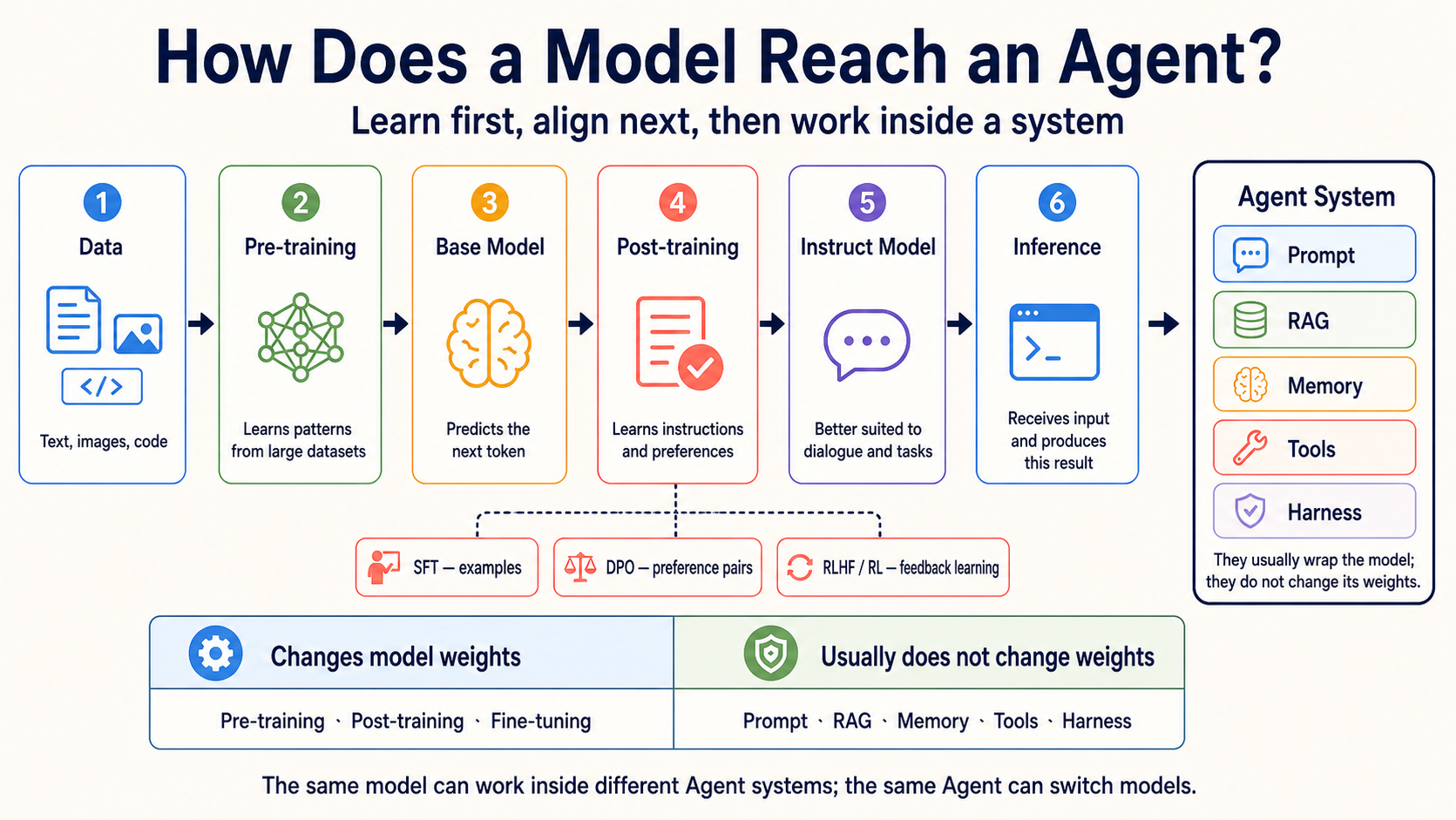
Agent is not the next model checkpoint in the training process. It is a system that connects a model with Prompt, RAG, Memory, Tools, and Harness. These parts usually work outside the model and do not change its weights.
- GRPO (Group Relative Policy Optimization): compare several answers to the same question and learn from their relative results.
- LoRA (Low-Rank Adaptation): freeze the original weights and train added low-rank matrices.
- PEFT (Parameter-Efficient Fine-Tuning): a group of methods that trains fewer parameters.
For comparisons with Distillation and Quantization, open the optional model training and adaptation guide. Beginners do not need to train a model in this stage.
Scene-Based Model Picker
Start with the task's constraints, then choose a model; you do not need to memorize a leaderboard.
Not every AI model writes text. A Typed Decision Model chooses from answers you define and returns a choice, score, or probability. TypeSafe AI's Jev does this; it cannot replace an LLM for chat, summaries, or code.
| Your situation | Start with | Why |
|---|---|---|
| Learning the API and iterating at zero cost | Ollama + gemma4:e4b |
Runs locally, so each API call costs $0 and the example can be repeated freely. |
| Comparing cloud quality when data may be sent out | Claude Haiku 4.5 / Sonnet 5.5 | The Anthropic SDK (Software Development Kit, a toolkit of developer tools and libraries) path is simple; pricing is based on input and output tokens. |
| OpenAI Agent API | GPT-6.1 Sol / GPT-6 Luna | Sol for harder work; Luna for simpler, repeated work. Test your task and check pricing. |
| Very long documents with images or video | Gemini 3.8 Flash or Kimi K3 | Check the model's context and multimodal support, then test with your own document. |
| Chinese-language API work with usage control | DeepSeek V4.1 Flash or GLM-5.3 | Compare official prices, output limits, and availability; do not choose by name alone. |
| Classification, scoring, or routing with fixed choices that code will use directly | Jev 1.13 (service in early access) | Returns probabilities for Choice, Score, or Noul questions; send low-confidence or high-risk actions to a person or another model. |
| Privacy, offline use, or self-hosting | Llama 4, Qwen 3.8, Gemma 4, and other open weights | Estimate hardware and license requirements, then measure real speed with Ollama or another runtime. |
🚪 Entry Conditions
The main path uses local Ollama; before starting, check only your time, tools, and budget.
🧭 Expand time, prerequisites, environment, and budget
Time and prerequisites
Allow about one week and 5–8 hours. You should be able to run a Python script and understand HTTP/REST at a basic level. An API key is not required for the main path because the exercises use local Ollama. If Python or the command line is still unfamiliar, return to Stage 0.
Environment
Path A needs Ollama, pip install openai, and ollama pull gemma4:e4b. On a low-memory machine, use gemma4:e2b. Tool-use exercises from Stage 3 onward use qwen2.5:3b; do not mix that tag into the chat examples here. Path B needs pip install anthropic and ANTHROPIC_API_KEY.
Budget
The local path costs $0 per call (though it uses electricity and time). For 3–5 runs per exercise, cloud totals vary with prompt length and model; calculate each call from its usage, then multiply by the planned count. Each exercise below gives both a per-call reminder and a stage-budget method; these are teaching estimates, not billing guarantees.
📚 Required Reading
Know where these seven official entry points are; open them when needed instead of reading everything first.
Read 1–3 before starting the exercises; consult 4–7 when you need model, tokenizer, or local-runtime details:
- OpenAI: how models are developed — the relationship between data, training, and models.
- Google Machine Learning: LLM tuning — the boundary between Prompt Engineering, Fine-tuning, and Distillation.
- Anthropic Claude model overview — model names, context, and pricing entry point.
- OpenAI API models — model and pricing fields.
- Google Gemini models — GA/Preview status and context.
- Hugging Face LLM Course: Tokenizers — how tokenizers split text.
- Ollama — installing and serving local models.
🛠 Hands-On Exercises
Exercise 1: LLM API (hello world)
Outcome: Make a short core call, receive a response, and read output tokens from usage. Per-call budget: Ollama $0; Anthropic Haiku: calculate from this call's input/output usage and the official $1/$5 rates. Stage budget: local runs remain $0; add the actual usage from 3–5 cloud runs.
📋 Starter — Path A (local Ollama gemma4:e4b, default) (copy to practice_1.py and run python practice_1.py)
# Requires: pip install openai      (use the OpenAI-compatible SDK with Ollama)
# Before running: ollama pull gemma4:e4b && ollama serve
import sys
if hasattr(sys.stdout, "reconfigure"):
    sys.stdout.reconfigure(encoding="utf-8", errors="replace")

from openai import OpenAI

client = OpenAI(
    base_url="http://localhost:11434/v1",
    api_key="ollama",  # Ollama does not validate this placeholder
)

r = client.chat.completions.create(
    model="gemma4:e4b",   # qwen2.5:3b or llama3.2:3b also works if installed
    max_tokens=100,
    messages=[{"role": "user", "content": "Introduce yourself in one sentence."}],
)

# === Self-check ===
text = r.choices[0].message.content
print("Response:", text)
print("usage:", r.usage)

assert r.choices[0].finish_reason in ("stop", "length"), f"Unexpected finish_reason: {r.choices[0].finish_reason}"
assert len(text) > 0, "The response must not be empty"
assert r.usage.completion_tokens > 0, "Output tokens must be greater than zero"
print("✅ Exercise 1 passed — Ollama gemma4:e4b answered locally at $0 per call")
📋 Starter — Path B (Anthropic API, optional) (copy to practice_1_anthropic.py)
# Requires: pip install anthropic
# Environment variable: export ANTHROPIC_API_KEY=sk-ant-...
import sys
if hasattr(sys.stdout, "reconfigure"):
    sys.stdout.reconfigure(encoding="utf-8", errors="replace")

import anthropic

client = anthropic.Anthropic()
msg = client.messages.create(
    model="claude-haiku-4-5",  # Haiku is cheapest; change this line to use Sonnet
    max_tokens=100,
    messages=[{"role": "user", "content": "Introduce yourself in one sentence."}],
)

# === Self-check ===
text = msg.content[0].text
print("Response:", text)
print("usage:", msg.usage)

assert msg.stop_reason in ("end_turn", "max_tokens"), f"Unexpected stop_reason: {msg.stop_reason}"
assert len(text) > 0, "The response must not be empty"
assert msg.usage.input_tokens > 0 and msg.usage.output_tokens > 0, "Token counts must be greater than zero"
print("✅ Exercise 1 passed — the Anthropic API call succeeded")
Exercise 2: Tokens
Outcome: Repeat one prompt and observe how language, temperature, and output length affect token use. Per-call budget: Ollama $0; Anthropic Haiku: calculate from that call's input/output usage and official rates. Stage budget: local is $0; add the actual usage from 3–5 repeated Path B tests.
📋 Starter — Path A (local Ollama gemma4:e4b, default) (copy to practice_2.py)
# Requires: pip install openai     (use the OpenAI-compatible SDK with Ollama)
# Before running: ollama pull gemma4:e4b && ollama serve
import sys, statistics
if hasattr(sys.stdout, "reconfigure"):
    sys.stdout.reconfigure(encoding="utf-8", errors="replace")

from openai import OpenAI

client = OpenAI(base_url="http://localhost:11434/v1", api_key="ollama")

PROMPTS = {
    "Chinese": "用一句話描述一隻貓在做什麼。",
    "English": "Describe in one sentence what a cat is doing.",
}

N = 10  # Keep N small on a slow computer; increase it after this works
for label, prompt in PROMPTS.items():
    output_tokens = []
    for _ in range(N):
        r = client.chat.completions.create(
            model="gemma4:e4b",
            max_tokens=80,
            temperature=1.0,  # Raise temperature to observe variation
            messages=[{"role": "user", "content": prompt}],
        )
        output_tokens.append(r.usage.completion_tokens)
    print(f"\n[{label}] prompt: {prompt}")
    print(f"  input tokens: {r.usage.prompt_tokens}")
    print(f"  output tokens — min={min(output_tokens)} max={max(output_tokens)} mean={statistics.mean(output_tokens):.1f} stdev={statistics.stdev(output_tokens):.1f}")

# === Self-check ===
assert len(output_tokens) == N and all(n > 0 for n in output_tokens), "Every output token count must be nonzero"
print("\n✅ Exercise 2 passed — output tokens were observed for two languages at $0 locally")
print("💡 Token counts depend on the tokenizer and actual content. Do not estimate them only from character counts or assume one language always uses more.")
📋 Starter — Path B (Anthropic API, optional) (copy to practice_2_anthropic.py)
# Requires: pip install anthropic
import sys, statistics
if hasattr(sys.stdout, "reconfigure"):
    sys.stdout.reconfigure(encoding="utf-8", errors="replace")

import anthropic

client = anthropic.Anthropic()
PROMPTS = {"Chinese": "用一句話描述一隻貓在做什麼。", "English": "Describe in one sentence what a cat is doing."}

for label, prompt in PROMPTS.items():
    output_tokens = []
    for _ in range(20):
        msg = client.messages.create(model="claude-haiku-4-5", max_tokens=80, temperature=1.0,
                                     messages=[{"role": "user", "content": prompt}])
        output_tokens.append(msg.usage.output_tokens)
    print(f"[{label}] input={msg.usage.input_tokens} output min/max/mean={min(output_tokens)}/{max(output_tokens)}/{sum(output_tokens)/len(output_tokens):.1f}")
The Anthropic call uses client.messages.create(), usage.input_tokens, and content blocks, which differ from the OpenAI-compatible fields in Ollama. Calculate the call's cost from its returned token counts.
Exercise 3: Pricing / Latency
Outcome: Measure token cost and waiting time separately for the same small task. Per-call budget: Ollama $0; Anthropic Haiku: calculate from this call's input/output usage and official rates. Stage budget: local is $0; for Path B, run once to get actual counts, then multiply by your planned count.
📋 Starter — Path A (local Ollama gemma4:e4b, measure latency) (copy to practice_3.py)
# Requires: pip install openai
# Before running: ollama pull gemma4:e4b && ollama serve
import sys, time
if hasattr(sys.stdout, "reconfigure"):
    sys.stdout.reconfigure(encoding="utf-8", errors="replace")

from openai import OpenAI

client = OpenAI(base_url="http://localhost:11434/v1", api_key="ollama")

# Measure latency and output tokens five times
latencies = []
output_tokens = []
for _ in range(5):
    t0 = time.time()
    r = client.chat.completions.create(
        model="gemma4:e4b",
        max_tokens=200,
        messages=[{"role": "user", "content": "Hello! Please introduce yourself."}],
    )
    latencies.append(time.time() - t0)
    output_tokens.append(r.usage.completion_tokens)

# Summary statistics
avg_latency = sum(latencies) / len(latencies)
out_tok_avg = sum(output_tokens) / len(output_tokens)  # five-run average
tps = out_tok_avg / avg_latency if avg_latency > 0 else 0

print(f"model: gemma4:e4b (local)")
print(f"5-run latency (sec): min={min(latencies):.2f} max={max(latencies):.2f} mean={avg_latency:.2f}")
print(f"avg output: {out_tok_avg} tokens, about {tps:.1f} tokens/sec")
print(f"\n1000-call cost: $0 (local); estimated time: {avg_latency * 1000 / 60:.1f} minutes")

# === Self-check ===
assert avg_latency > 0, "Latency must be greater than zero"
assert out_tok_avg > 0, "Output tokens must be greater than zero"
print(f"\n✅ Exercise 3 passed — the local model costs $0 per call but needs about {avg_latency * 1000 / 60:.0f} minutes for 1000 calls")
print("💡 For Anthropic Path B, estimate 1000-call cost from actual input/output usage and official rates, then compare it with local waiting time.")
📋 Starter — Path B (Anthropic API, calculate cost) (copy to practice_3_anthropic.py)
# Requires: pip install anthropic
import sys
if hasattr(sys.stdout, "reconfigure"):
    sys.stdout.reconfigure(encoding="utf-8", errors="replace")

import anthropic

# Anthropic public pricing (USD per 1M tokens) — recheck before running: https://www.anthropic.com/pricing
PRICING = {
    "claude-haiku-4-5":   {"input": 1.00, "output":  5.00},
    "claude-sonnet-5-5":  {"input": 2.00, "output": 10.00},
    "claude-opus-5-5":    {"input": 4.00, "output": 20.00},
    "claude-fable-5-1":   {"input": 10.00, "output": 50.00},
}

client = anthropic.Anthropic()
MODEL = "claude-haiku-4-5"

msg = client.messages.create(model=MODEL, max_tokens=200,
                             messages=[{"role": "user", "content": "Hello! Please introduce yourself."}])
in_tok, out_tok = msg.usage.input_tokens, msg.usage.output_tokens
rates = PRICING[MODEL]
cost_one = (in_tok * rates["input"] + out_tok * rates["output"]) / 1_000_000

print(f"model: {MODEL}")
print(f"single: input={in_tok} output={out_tok} → ${cost_one:.6f}")
print(f"1000 calls cost across model tiers:")
for name, r in PRICING.items():
    c = (in_tok * r["input"] + out_tok * r["output"]) / 1_000_000 * 1000
    print(f"  {name:<22} ${c:.4f}")

# === Self-check ===
assert cost_one > 0, "A cloud LLM call must have a positive cost"
print(f"\n✅ Exercise 3 passed (Anthropic) — 1000-call costs for Haiku, Sonnet, Opus, and Fable were calculated from actual tokens")
🎯 Curated Projects
Recommended Capstone: Personal document-summary cost/quality comparer
Build a small command-line tool that reads 3–5 text passages you are allowed to use, summarizes them with Ollama and one Anthropic model, records input/output tokens, latency, and estimated cost, and uses a fixed checklist to mark omitted facts. It connects this stage's three core terms and model picker without requiring RAG or an agent.
📦 Capstone acceptance checklist and other project entries
The finished project should show:
- Both paths and model names for the same input.
- Input/output tokens, latency, and per-call cost for each call.
- A fixed quality checklist rather than a purely subjective choice.
- When to use local versus cloud, and how to batch when context is insufficient.
The table below keeps the 17 original extension entries. They are optional, not required work. A recommendation is an editorial judgment, not GitHub popularity: ⭐⭐⭐⭐⭐ means skipping it would block the stage. Because every entry here is supplementary, the table honestly uses ⭐⭐⭐⭐, ⭐⭐⭐, or ⭐⭐ for historical reference and omits volatile star counts.
| Category | Resource | Link | Recommendation | Use / status |
|---|---|---|---|---|
| Official API intro | Anthropic Cookbook | GitHub | ⭐⭐⭐⭐ | Claude API notebooks for tool use, batch, and prompt cache. |
| Anthropic Courses | GitHub | ⭐⭐⭐⭐ | Archived official courses: read older examples, then check the current API Quickstart below before building. | |
| OpenAI Cookbook | GitHub | ⭐⭐⭐⭐ | OpenAI API, structured output, and function-calling examples. | |
| Anthropic Claude API Quickstart | Docs | ⭐⭐⭐ | Quick path to a first Claude API call. | |
| Chinese learning | datawhalechina/happy-llm | GitHub | ⭐⭐⭐⭐ | Understand LLM principles and training in Chinese. |
| datawhalechina/llm-universe | GitHub | ⭐⭐⭐⭐ | Extends from API basics to knowledge bases and RAG. | |
| datawhalechina/llm-cookbook | GitHub | ⭐⭐⭐ | Chinese adaptation of an Andrew Ng course; updates are slower. | |
| jingyaogong/minimind | GitHub | ⭐⭐⭐ | Implement a small model from scratch; Apache-2.0. | |
| English course | Hugging Face — LLM Course | Course | ⭐⭐⭐⭐ | Transformers, tokenizers, and the Hugging Face ecosystem. |
| LangChain Academy | Course | ⭐⭐⭐ | Official free course including RAG and agents. | |
| Local runtime | ollama/ollama | GitHub | ⭐⭐⭐⭐ | Local runtime used by this stage's Path A. |
| ggml-org/llama.cpp | GitHub | ⭐⭐⭐⭐ | Understand quantization and the local inference layer. | |
| mudler/LocalAI | GitHub | ⭐⭐⭐ | OpenAI-compatible self-hosted service. | |
| ml-explore/mlx | GitHub | ⭐⭐⭐ | Machine-learning framework for Apple Silicon. | |
| From-scratch | Karpathy — Let's build GPT from scratch | Video | ⭐⭐⭐⭐ | Build a GPT from scratch with PyTorch. |
| rasbt/LLMs-from-scratch | GitHub | ⭐⭐⭐⭐ | Work through tokenizers, attention, and training with code. | |
| karpathy/LLM101n | GitHub | ⭐⭐ | Archived course outline; historical reference, not current teaching. |
Other projects (by difficulty)
- Beginner: multilingual token counter, one-sentence summarizer, temperature comparison sheet.
- Intermediate: cross-provider prompt evaluator, retry wrapper, local-model latency dashboard.
- Extension: batched document summarizer, configurable model router, privacy-focused local inference service.
Exercise 4: Cross-Provider Comparison
Outcome: Compare providers on one prompt and record differences without treating one run as a ranking. Per-call budget: Path A Ollama $0; Path B uses each provider's actual token pricing. Stage budget: local is $0; run one cloud call per provider first, then estimate 3–5 evaluation sets.
🔬 Exercise 4 details (optional)
- Path A (Ollama, main practice): Use the Ollama call in
examples/stage-1/04-cross-provider/as the local baseline. - Path B (Anthropic, optional): Add the Anthropic SDK to the same dataset; if you add OpenAI or Google too, record model, parameters, tokens, and failures for each.
- Compare style, length, format adherence, and omitted facts. Treat this as a small task evaluation, not an official specification or universal ranking.
The starter runs three SDKs in parallel and skips providers without keys. It is illustrative, not a chapter-length tutorial.
Exercise 5: Error Handling
Outcome: Write a testable flow for classifying errors, retrying, and stopping. Per-call budget: Path A Ollama $0; Path B costs nothing when it uses mocks. Stage budget: local and mock tests are $0; if you add a cloud integration test, limit it to 1–2 calls and add actual token costs.
🧰 Exercise 5 details (optional)
- Path A (Ollama, main practice): Run the mock-based tests in
examples/stage-1/05-error-handling/first, then observe recoverable network errors against the local endpoint. - Path B (Anthropic, optional): Attach Anthropic exception types to the same retry wrapper; invalid keys and overlong contexts must not retry forever.
- Cover an invalid key, an overlong prompt, and a network interruption. Give exponential backoff a cap and a clear maximum attempt count.
The starter verifies retry logic without actually disconnecting the network. It is illustrative, not a chapter-length tutorial.
Exercise 6: Local LLM
Outcome: Start Ollama locally and call a local model through an OpenAI-compatible API. Per-call budget: Ollama $0 (plus hardware electricity); Path B uses actual cloud token pricing. Stage budget: local is $0; if you make one Anthropic quality comparison, limit it to 1–3 calls and record usage.
🦙 Exercise 6 details (optional)
Path A (Ollama, main runnable path):
# 1. Install Ollama: https://ollama.com
ollama pull qwen2.5:3b
ollama serve  # default port: 11434
# Requires: pip install openai
# Before running: Ollama is serving and qwen2.5:3b is installed
import sys
if hasattr(sys.stdout, "reconfigure"):
    sys.stdout.reconfigure(encoding="utf-8", errors="replace")

from openai import OpenAI

client = OpenAI(
    base_url="http://localhost:11434/v1",
    api_key="ollama",  # Ollama does not validate this placeholder
)

r = client.chat.completions.create(
    model="qwen2.5:3b",
    messages=[{"role": "user", "content": "Explain ReAct in three sentences."}],
)

text = r.choices[0].message.content
print("Response:", text)

# === Self-check ===
assert len(text) > 10, "The response is too short; Ollama may not be running"
print("✅ Exercise 6 passed — local Ollama responded through an OpenAI-compatible API")
print("💡 This call cost $0, apart from your electricity")
Path B (Anthropic, optional): Send the same ReAct prompt to claude-haiku-4-5, save the response and msg.usage, then compare format adherence, latency, and cost with Path A. Do not treat the cloud result as a specification guarantee for the local model.
Without Ollama, replace base_url with LM Studio (http://localhost:1234/v1) or a vLLM endpoint. The interface is similar, but model tags and hardware requirements must be checked again.
🌐 Complete 18-family table (official specification entries)
Full table checked: 2026-09-22 UTC. GPT row updated: 2026-10-02 UTC. Claude row updated: 2026-09-28 UTC. Gemini row updated: 2026-10-02 UTC.
If an official source gives no reliable public number, the table says “Not published by the official source.” Prices use USD per 1M tokens unless the provider uses another unit. Cache is like reusing a note you already read: reading old content and writing new content may have different prices.
| Family | Current recommended models | Status | Context | Price or license | Good for | Limitations | Official source |
|---|---|---|---|---|---|---|---|
| Claude | Fable 5.1 (claude-fable-5-1); Mythos 5.1 (claude-mythos-5-1); Opus 5.5 (claude-opus-5-5); Sonnet 5.5 (claude-sonnet-5-5); Haiku 4.5 |
Fable/Opus/Sonnet/Haiku: generally available; Mythos: vetted access only | Mostly 1M context / 128K max output; Haiku 200K / 64K | Claude API: Fable/Mythos US$10/$50, Opus US$4/$20, Sonnet US$2/$10, Haiku US$1/$5 per million input/output tokens; Sonnet/Opus cache read US$0.20, Fable/Mythos US$0.25 | Long-form, coding, long-running agent workflows | Mythos 5.1 is limited to vetted cybersecurity and life-science users; Sonnet 5.5 changes forced tool choice and temperature settings, so read the migration guide before upgrading existing code; cloud-partner prices differ | Claude model overview · Opus 5.5 · Sonnet 5.5 · Migration guide · Claude API pricing |
| GPT | GPT-6 Astra (gpt-6-astra); GPT-6.1 Sol (gpt-6.1-sol); GPT-6 Luna (gpt-6-luna) |
Generally available API models; the Free tier is not supported | 1.05M context / 128K max output | Standard API, US$ per 1M tokens, input/cache read/cache write/output. Astra $10/$1/$12.50/$50. Sol 6.1 $2/$0.10/$2.50/$10. Luna $0.10/$0.01/$0.125/$0.50 | Sol 6.1 for coding and multi-step Agent work; Luna for focused, repeated tasks; evaluate Astra's cost-quality tradeoff on your own tasks | Sol 6.1 tool calling requires Responses API; Chat Completions has no tool calling. Above 272K input, the full request uses 2× input/cache and 1.5× output rates. Batch/Flex are half-price, Fast is 2×. Tools may cost extra | GPT-6 Astra · GPT-6.1 Sol · GPT-6 Luna · OpenAI API pricing |
| Jev (TypeSafe AI) | TypeSafe direct: Jev 1.13 (jev-1.13.0), stable alias jev-latest; Cloudflare route: typesafe/jev |
Official model; service remains in early access | TypeSafe direct: 64K per request, 32K for state plus the longest question; Cloudflare route: 32K |
TypeSafe direct: $0.042 per million input tokens, output is unmetered; Cloudflare route: see the Cloudflare dashboard | Fixed-choice classification, routing, rubric scoring, and guardrail judgments | Does not generate free-form text; probability is not correctness, so your code and Eval must set thresholds, permissions, and fallbacks | TypeSafe model specs · Jev introduction · Early-access announcement · Cloudflare route |
| Gemini | Gemini 3.8 Flash; Gemini 4 Argon (release reference; restricted access) | Flash: generally available; Argon: trusted cyber defenders through Fairwind only | Flash: 1,048,576 context / 65,536 max output. Argon: announced 1M output limit, public API context specification not announced | Flash: introductory $0.75/$3.75 (input/output) through 2026-12-31. Argon: announced future introductory $2/$10, then $4/$20; per 1M tokens | Flash for runnable multimodal and Agent exercises; Argon as an official long-horizon model release reference | Broad Argon API / Google AI Ultra access is still forthcoming; no public API model ID has been announced. It is not this chapter's runnable default | Gemini 3.8 Flash · Gemini API pricing · Gemini 4 Argon announcement |
| DeepSeek | V4.1 Flash (deepseek-flash); V4 Pro (deepseek-v4-pro) |
Both APIs available; old V4 Flash retired | 1M context / 384K max output | Per million tokens, peak/off-peak: Flash input US$0.30/$0.15, output US$1.20/$0.60, cache hit US$0.006/$0.003; Pro input US$1.32/$0.66, output US$3.96/$1.98, cache hit US$0.044/$0.022 | Reasoning, coding, high-token workloads | Old deepseek-v4-flash name temporarily routes to V4.1 Flash; peak is Mon–Fri UTC 01–04 and 06–10 |
DeepSeek models and pricing · Changelog |
| Kimi | kimi-k3 |
Generally available | 1M | API: CNY 2/20/100 per million tokens for cache hit/input/output | Chinese long-form, vision input, long context | 2.8T parameters; deployment and quotas depend on the platform | Kimi overview · Kimi API pricing |
| Hunyuan | Hy3 (TokenHub) |
Generally available | 256K | API: CNY 0.25/1/4 per million tokens for cache hit/input/output | Chinese reasoning and Tencent Cloud integration | hy3-preview shut down on 2026-08-31; Hy4 remains Preview |
TokenHub model list · TokenHub pricing · Hy3 migration notice |
| MiniMax | MiniMax M3 | Open weights | 1M | MiniMax API promotional price per million input/cache-read/output tokens: ≤512K US$0.30/$0.06/$1.20; 512K–1M US$0.60/$0.12/$2.40; MiniMax Community License | Text, vision, coding, and self-hosting work | Promotions and reseller prices may change; not Apache/MIT | MiniMax M3 model card · MiniMax API pricing |
| Qwen | qwen3.8-max (API); Qwen3.8 open-weight variants | Generally available | 1M | API pricing varies by region; for example, Beijing is CNY 12/36 per million input/output tokens; open-weight variants use their own licenses | Chinese tasks, multimodal work, self-hosted workflows | API models and open-weight variants must be checked separately for availability and license | Qwen 3.8 Max |
| GLM | GLM-5.3 | Generally available | 1M (128K output) | API: US$1.40/$0.26/$4.40 per million tokens for input/cache hit/output | Chinese agents, tool use, reasoning | Text-only; reasoning is always enabled | GLM-5.3 docs · GLM API pricing |
| Yi | Yi-34B / Yi-9B and 200K variants | Frozen / historical | 200K (some older models) | Repository license; current API price not published | Reproducing existing Yi experiments and historical self-hosted baselines | Repository does not establish current maintenance or a frontier successor | 01.AI Yi repository |
| Llama | Llama 4 Scout / Maverick; Llama 3.3 70B (more practical older baseline) | Open weights | Scout 10M | Llama Community License | Self-hosting, fine-tuning, ecosystem integration | Scout needs H100-class hardware; license is not Apache/MIT | Meta Llama docs |
| Muse | Muse Spark 1.3 (Standard: muse-spark-1.3; Contributor: muse-spark-1.3-contributor); Muse Glimmer 30B |
Spark: Meta Model API public preview; Glimmer: open weights | Spark about 1M; Glimmer 131K | Spark Standard: US$1.25/$0.15/$4.25 per million input/cache-hit/output tokens; Contributor: US$0.10/$0.002/$0.20, allowing Meta to train on inputs/outputs. Glimmer: Apache 2.0 | Spark for cloud agents and coding; Glimmer for local agents | Product Muse, API model Spark, and open-weight Glimmer are different; Spark 1.3 audio understanding is incomplete | Meta Model API models · Pricing and data plans · Muse Glimmer |
| Grok | Grok 4.7 (grok-4.7) |
Generally available | 500K | xAI API: US$2/$0.50/$6 per million input/cache-hit/output tokens; when the prompt reaches 200K, the entire request uses US$4/$1/$12 | Coding, tool calls, and multi-step agents | US regional endpoints add 10%; server-side tool calls may cost extra | Grok 4.7 specs · xAI pricing |
| MiMo | MiMo V2.6 Pro (mimo-v2.6-pro) |
Generally available API | 1M context / 128K max output | Xiaomi API: US$0.435/$0.0036/$0.87 per million input/cache-hit/output; also listed as CNY 3/0.025/6 | Long tasks, tool calls, and multimodal agent input | Confirm account region, quota, and billing; vendor benchmarks are not cross-model rankings | MiMo V2.6 Pro specs and pricing · MiMo API models |
| Gemma | Gemma 4: E2B, E4B, 12B, 26B A4B, 31B | Open weights | 128K for small models; 256K for medium models | Gemma 4 Terms/license; not Apache 2.0 | Edge, local use, constrained-hardware experiments | Read the license terms; hardware needs vary by model | Gemma core docs · Gemma Terms |
| Mistral | Mistral Small 4; Large 3; Ministral 3 | Generally available | Small 4: 256K | Small 4 $0.15/$0.60; open-weight licenses vary by model, including Apache 2.0 versions | Reasoning, vision, coding, self-hosting | API and license terms differ by model | Mistral Small 4 |
| Phi | Phi-4 14B; Phi-4 mini / multimodal | Open weights | Phi-4 multimodal 128K | Phi-4 multimodal MIT; check each model's license | Small-model reasoning, multimodal work, edge use | Do not assume fixed RAM; quantization changes hardware needs | Microsoft Phi · Phi-4 multimodal |
For an agent that listens and answers immediately by voice, optionally read Gemini 3.8 Live. It is a separate stable voice API model, not the Gemini 3.8 Flash listed above; check the Gemini API pricing page for cost and features.
🧪 Supplementary explanation, troubleshooting, and personal evaluation tools
Why temperature changes output
At each step an LLM predicts a probability distribution for the next token, then chooses a candidate using its settings. Low temperature concentrates the distribution; high temperature gives less common candidates more chance. max_tokens is an output ceiling, not a promised length. This is a simplified mental model; behavior still depends on the provider's implementation.
Common problems
Connection refused: make sureollama serveis running and thebase_urlport is 11434.- Model not found: run
ollama list, then install withollama pull gemma4:e4b; do not guess a tag. - Truncated response: shorten the prompt or lower
max_tokens, and check the model's context window. - API failure: save the model, status code, and request id. Retry only temporary network/service errors; fix authentication and context errors first.
- Cost mismatch: multiply input and output separately; cache hits, batches, and plans can change the actual price.
Third-party benchmarks
Artificial Analysis, Arena AI, Vellum leaderboard, Hugging Face Open LLM Leaderboard, and SuperCLUE are tools for evaluating your task. They are not official provider specifications and cannot replace tests with your own data, prompts, and latency.
Self-Check
Before Stage 2, confirm that you can:
- Explain what API, token, and context window each do.
- Run Exercise 1's Ollama Path A and read output tokens from
usage. - Calculate one cloud-call cost from measured input/output tokens.
- Explain why you chose local or cloud for one scenario and name one limitation.
If yes, continue to Stage 2 — Prompt Engineering. If not, rerun Exercises 1–3 on Path A, then open the reading or troubleshooting sections as needed.
✅ Stage 1 complete? Stage 2 — Prompt Engineering will help you write reusable structured prompts and quantify improvements with evals.