Stage 6 — RAG and Memory: find the source first, then remember what matters
RAG (Retrieval-Augmented Generation): retrieve relevant material, then answer using it.
Models do not know everything. RAG asks a model to consult a book before it answers; Memory gives it a notebook for things it will need next time. This stage separates the two and then builds both step by step.
📌 Learning goals
By the end of this stage, you can:
- State the difference between RAG and Memory in one sentence.
- Explain how data becomes chunks and embeddings, then gets retrieved.
- Build a minimal RAG pipeline whose answers include sources.
- Know what data is worth remembering and what should not be stored.
- Compare two approaches with a small test instead of relying on “it feels better.”
🧩 Meet seven core terms first
| Core term | Plain-language picture | Precise meaning |
|---|---|---|
| Retrieval | Find pages that may contain an answer | Find relevant content from external data after receiving a question. |
| RAG (Retrieval-Augmented Generation) | Look in a book, then answer | Retrieve first, then give the found content to the model to generate an answer. |
| Embedding | A coordinate card for a sentence’s meaning | A sequence of numbers that places semantically similar text near each other in vector space. |
| Vector Store / Vector Database | A drawer that finds cards by meaning | Stores embeddings and retrieves related data by similarity. |
| Chunk | A small card cut from a large book | A smaller piece of a long document for search and for fitting into context. |
| Reranking | Reorder first-pass cards | Score candidates again so more useful chunks rank first. |
| Memory | The assistant’s notebook | State needed across messages or sessions; it is not another name for chat history. |
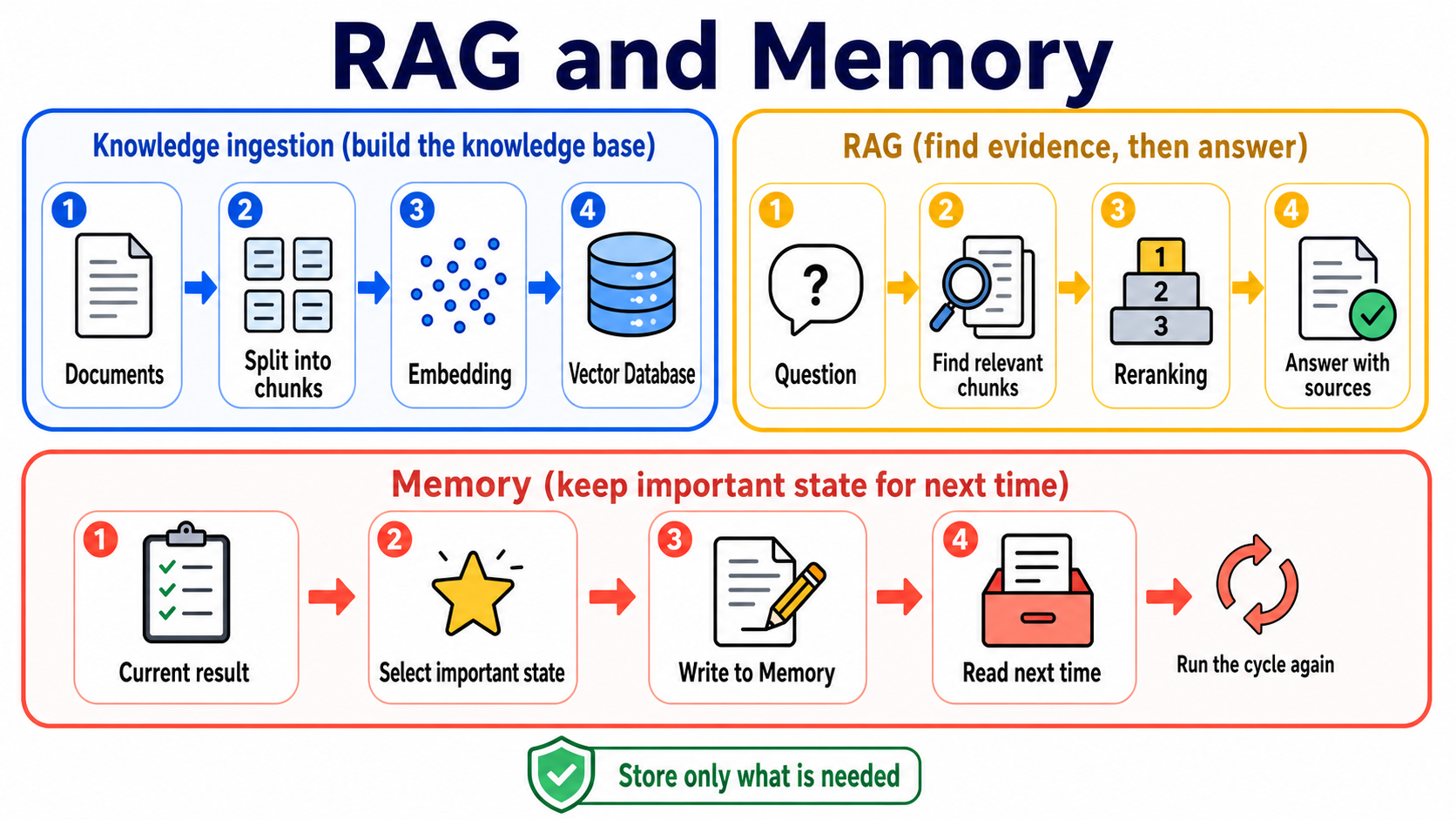
Choose the right method with one table
| Problem | Consider first | Why |
|---|---|---|
| The data is short and needed only for this answer | Long context | Put it directly in this request for the shortest flow. |
| There are many documents and you only know which passages matter after the question arrives | RAG | Retrieve relevant passages instead of sending every document every time. |
| The assistant must remember preferences, task state, or results next time | Memory | Write reusable information to a storage layer that can be read again. |
| You want to consistently change model behavior or a capability | Fine-tuning | It adjusts model weights and behavior; it does not automatically provide current documents. |
No option is always best. Evaluate using your own data, questions, and success criteria.
🚪 Entry requirements and reading paths
- First time learning: read the seven terms, complete Exercises 1–4, then do the short self-check.
- Building a long-term assistant: complete Exercise 5, then open the Memory design path.
- Researching or deploying: finally explore advanced RAG, chunking, evaluation, and research entry points.
Time, environment, cost, and data safety
- Plan two or three sessions; complete one runnable exercise each time.
- You need Python, Git, and a terminal. Follow each exercise README for installation.
- Path A uses OpenAI-compatible examples; Path B uses Anthropic. Model and embedding calls can cost money.
- Test with small documents. Do not send passwords, tokens, medical data, or unauthorized company documents to external services.
- Keep API keys in environment variables, never in code or commits.
📚 Required reading
- LangChain Retrieval — see how loaders, splitters, embeddings, vector stores, and retrievers work together.
- LlamaIndex concepts — understand indexing and querying from a document-oriented view.
- Chroma getting started — see the smallest local vector-database workflow.
- LangGraph Agentic RAG — after basic RAG, see how an agent decides whether to retrieve.
🛠 Hands-on exercises
Each exercise has a starter. Copy the commands and run them; you do not need to write an empty answer from scratch.
Exercise 1: Turn two sentences into embeddings
Result: semantically similar sentences appear closer than unrelated ones.
cd examples/stage-6/01-embeddings
python starter.py
python starter_anthropic.py
Open the full instructions and checks. Start with only a few sentences to avoid unnecessary API costs.
Exercise 2: Put embeddings in a vector database
Result: store text in Chroma, then retrieve a relevant chunk with one question.
cd examples/stage-6/02-vector-db
python starter.py
python starter_anthropic.py
Open the full instructions and checks. Exercise data must not contain secrets or personal information.
Exercise 3: Compare three chunking methods
Result: see what happens when chunks are too large, too small, or overlap too much.
cd examples/stage-6/03-chunking-comparison
python starter.py
python starter_anthropic.py
Open the full instructions and checks. Do not memorize a “standard size”; begin with document structure and test results.
Exercise 4: Connect a complete RAG pipeline
Result: the program retrieves information, answers, and shows the source chunks it used.
cd examples/stage-6/04-full-rag-pipeline
python starter.py
python starter_anthropic.py
Open the full instructions and checks. Start with a small dataset; “the program runs” does not mean the answer is correct.
Exercise 5: Remember a preference
Result: This exercise only adds, searches, and reads one preference while the program is running; temporary storage is not long-term persistence.
cd examples/stage-6/05-long-term-memory
python starter.py
python starter_anthropic.py
Open the full instructions and checks. Save only data needed to finish a task and provide ways to view, change, and delete it.
Recommended mini-project: an assistant that retrieves and remembers
Choose three to five small documents you are allowed to use. Have the assistant list sources when it answers, then remember one non-sensitive preference, such as “give the short answer first.” It succeeds when it says it does not know without evidence, reads the preference after a restart, and lets you delete it.
🌐 Basic RAG pipeline
Basic RAG pipeline: how data goes in and answers come out
RAG has two paths: one prepares the data, and the other retrieves it when a question arrives.
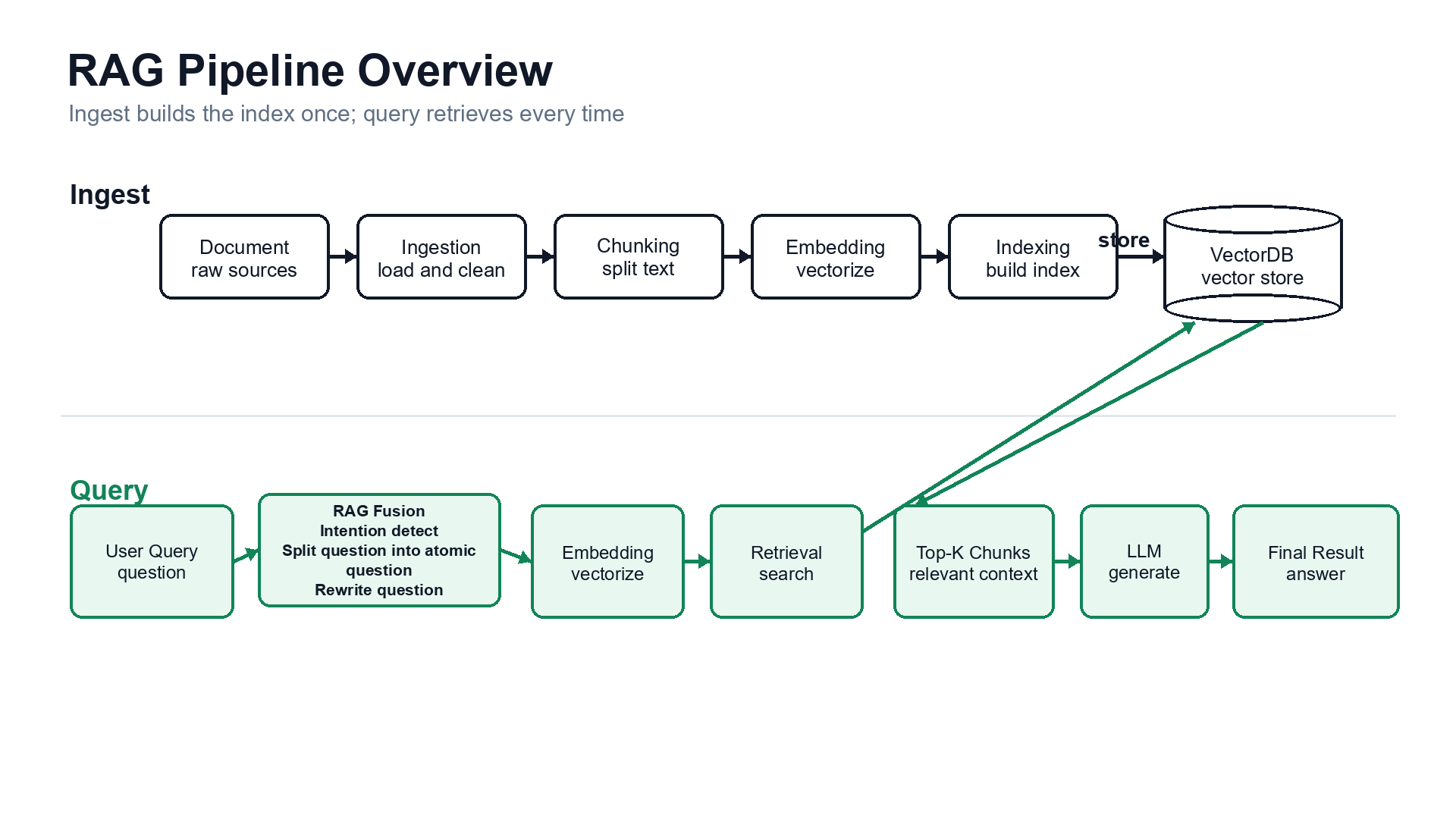
Start with 2-step RAG: every question retrieves first and answers second, so it is easiest to test. Agentic RAG lets the model decide whether to retrieve, rewrite a question, or search again. Hybrid RAG combines fixed steps with agent decisions. It differs from Hybrid Search, which only combines candidate sets during retrieval.
| Stage | What it does | Plain-language picture |
|---|---|---|
| Load | Read PDFs, web pages, or database content | Bring books to the table |
| Split | Divide into chunks | Cut books into cards |
| Embed | Turn each card into a vector | Give meanings coordinates |
| Store | Save vectors and source metadata | Put labelled cards in drawers |
| Retrieve | Find candidate chunks for a question | Take out cards that may answer it |
| Rerank (optional) | Reorder candidates | Check which card is most useful |
| Generate | Give the model the question and evidence | Answer while looking at the cards |
| Cite/Evaluate | Show sources and inspect results | Tell people where the answer came from |
A Retriever returns related documents for a question. It need not use a vector database: BM25, SQL, web search, and hybrid search can also be retrievers. Citations show which sources support the answer.
🧭 Want to go deeper? Learn RAG and Memory separately
These are advanced Stage 6 branches, not new prerequisites. Complete the basic exercises above, then choose the path that fits your problem.
Advanced RAG: find the broken step before adding new techniques
For people who have built a minimal RAG system but face missed documents, bad ranking, or hard cross-document relationships. It explains Hybrid Search, Reranking, HyDE, Multi-Query, RAG Fusion, Contextual Retrieval, GraphRAG, Self-RAG, CRAG (Corrective Retrieval Augmented Generation, correct the query or source when retrieval is inadequate), Adaptive RAG, Agentic RAG, RAPTOR, and DSPy, with required reading and the rated resource table kept visible.
Agent Memory: save only what is useful, permitted, and removable
For cross-session assistants, personalization, or long-running tasks. It explains short-term/long-term memory plus Semantic, Episodic, and Procedural Memory, then covers write, search, update, deletion, expiry, and user isolation; Mem0, Letta Code, LangMem, Graphiti, and research resources stay directly visible.
How to choose: if an answer needs better external evidence, take the Advanced RAG path; if an assistant must read its own state next time, take the Agent Memory path. When you need both, test them separately before connecting them.
🎯 Curated projects and learning resources
This table keeps only the tools needed for a Stage 6 baseline. Advanced techniques and memory projects have moved to the two separate pages above so one table does not mix them.
Verified: 2026-08-30 UTC
| Category | Project | Editorial rating | Best for | What you can learn | Status/limits |
|---|---|---|---|---|---|
| RAG framework | LlamaIndex | ⭐⭐⭐⭐⭐ | Beginners building document applications | indexes, retrievers, query engines | MIT; use the official starter first |
| Haystack | ⭐⭐⭐⭐ | People comparing modular pipelines | components, pipelines, routing | Apache-2.0; choose one framework to practice first | |
| RAGFlow | ⭐⭐⭐⭐ | Teams studying a complete web product | document parsing, retrieval, UI | Apache-2.0; heavier than a teaching example | |
| Vector data | Chroma | ⭐⭐⭐⭐⭐ | First local vector search | collections, add, query | Apache-2.0; practice and production settings differ |
| Qdrant | ⭐⭐⭐⭐⭐ | Teams needing self-hosted or managed service | dense, sparse, hybrid queries | Apache-2.0; plan service operation and backups | |
| Weaviate | ⭐⭐⭐⭐ | Teams needing schema and hybrid search | BM25 + vector search | BSD-3-Clause; start with a small baseline | |
| pgvector | ⭐⭐⭐⭐ | Teams already using PostgreSQL | SQL and vectors in one database | PostgreSQL extension; still needs indexes and tuning | |
| Evaluation and complete products | Ragas | ⭐⭐⭐⭐⭐ | Teams building rerunnable evaluations | datasets, metrics, experiments | Apache-2.0; metrics still need human calibration |
| Onyx | ⭐⭐⭐⭐ | People studying a complete AI assistant architecture | ingest, retrieval, chat, administration | Large product; use as an architecture reference, not a starter |
✅ Self-check before Stage 7
- I can state what Retrieval, RAG, and Memory each do.
- I can explain how chunks, embeddings, and a vector database fit together.
- My RAG answers show sources and say they do not know when no evidence exists.
- I can compare changes with a small question set instead of one attractive answer.
- Memory saves only necessary, permitted data and lets users view, change, and delete it.
When you can do these, go to Stage 7 — Agent Production Engineering: Testable, Observable, Stoppable, and Recoverable.