Advanced subagent usage — Description Patterns / Composition / Debug¶
📋 Who this is for: You already know how to use built-in subagents (you have gone through Stage 5.5 + the cookbook), and you are ready to: (1) write your own subagent, (2) compose multiple subagents, or (3) debug a broken subagent.
⚠️ Prerequisite: Read Stage 5.5’s “Common confusing concepts clarified” section and the 15 cookbook recipes first. If you jump into this without the cookbook, you will get stuck at the “what is a subagent?” layer.
How to Read This Doc¶
Three independent advanced topics. Jump to the section you need:
| Your question | Read |
|---|---|
| I wrote a subagent, but Claude never dispatches it proactively. Why? | §1 How to Write a Description That Triggers Proactive Dispatch |
| I want to run 2-3 subagents as a pipeline or in parallel. How should I design that? | §2 How to Design Composition Patterns |
| A subagent fails, errors, or behaves differently from its settings. How do I debug it? | §3 Debugging Tools for Custom Subagents |
Each section stands alone; skim or jump around as needed.
§1 How to Write a Description That Triggers Proactive Dispatch¶
How does the main session decide which subagent to dispatch? It reads the frontmatter at the top of .claude/agents/<name>.md (frontmatter = the YAML settings block at the very top of the file, wrapped in ---) and specifically the description field. The wording affects dispatch probability. Below are 4 common bugs and fixes:
Bug 1: The description is too abstract, so Claude does not know when to dispatch it¶
❌ Bad pattern:
description: A helpful code reviewer.
✅ Better (specific trigger condition + scope):
description: Use PROACTIVELY when the user has staged ≥ 50 lines of changes and is about to commit. Reviews staged diff for security issues, style violations, missing error handling, and test gaps. Returns per-category PASS/FAIL + concrete fix list.
PROACTIVELY is a strong signal word, (2) the trigger is explicit: “staged ≥ 50 lines + about to commit,” (3) it lists the 4 things the subagent checks, and (4) it states the return format.
Bug 2: PROACTIVELY is present, but the condition is too broad¶
❌ Bad pattern:
description: Use PROACTIVELY for all code-related tasks.
✅ Better (narrow the condition):
description: Use PROACTIVELY when a commit is about to land that modifies authentication, database queries, or API routes — these are high-risk surface areas needing extra review.
Bug 3: PROACTIVELY is missing, so the subagent can only wait passively¶
❌ Bad pattern:
description: Reviews code when asked.
PROACTIVELY, Claude only dispatches it when the user explicitly says “review this.” If the user does not think to ask for a review, the review never happens.
✅ Better (add PROACTIVELY + a trigger scenario):
description: Code reviewer. Use PROACTIVELY when staged changes touch test files but the test count didn't increase — likely missing test coverage for new logic.
💡 Passive vs proactive: - Need an always-on safety net (for example, security review) → use
PROACTIVELY+ a clear trigger - Run only when the user explicitly asks (for example, token-heavy deep research) → skipPROACTIVELYand useuse when user asks for ...
Bug 4: The description is too long for the picker’s preferences¶
❌ Bad pattern (500+ words and too many irrelevant details):
description: This subagent performs comprehensive code review including security analysis, performance profiling, style enforcement, type checking, dependency auditing, license compliance, documentation completeness verification, test coverage assessment, accessibility validation, internationalization checks... (continues for paragraphs)
✅ Better (compress to 2-3 sentences with the most important trigger + scope):
description: Use PROACTIVELY before commits touching auth or payment code. Checks: hardcoded secrets, missing input validation, SQL injection risk. Returns issue list with file:line.
📌 Description cheatsheet: 1. Start with
Use PROACTIVELY when XorUse when user asks for Y2. List 2-4 specific things it does (not empty words like “helpful” or “comprehensive”) 3. State the return format so the main session knows what shape it will receive 4. 2-3 sentences is enough: precise > complete 5. Description matching is semantic, not exact keyword matching. Keywords help, but the trigger condition still has to be clear.💡 Language choice: the
descriptionfield is best written in English. Claude is trained heavily on English, and English trigger keywords such asPROACTIVELYare the most reliable.
§2 How to Design Composition Patterns¶
When you want to run 2+ subagents together, how should you compose them? The 3 patterns below are common community patterns:
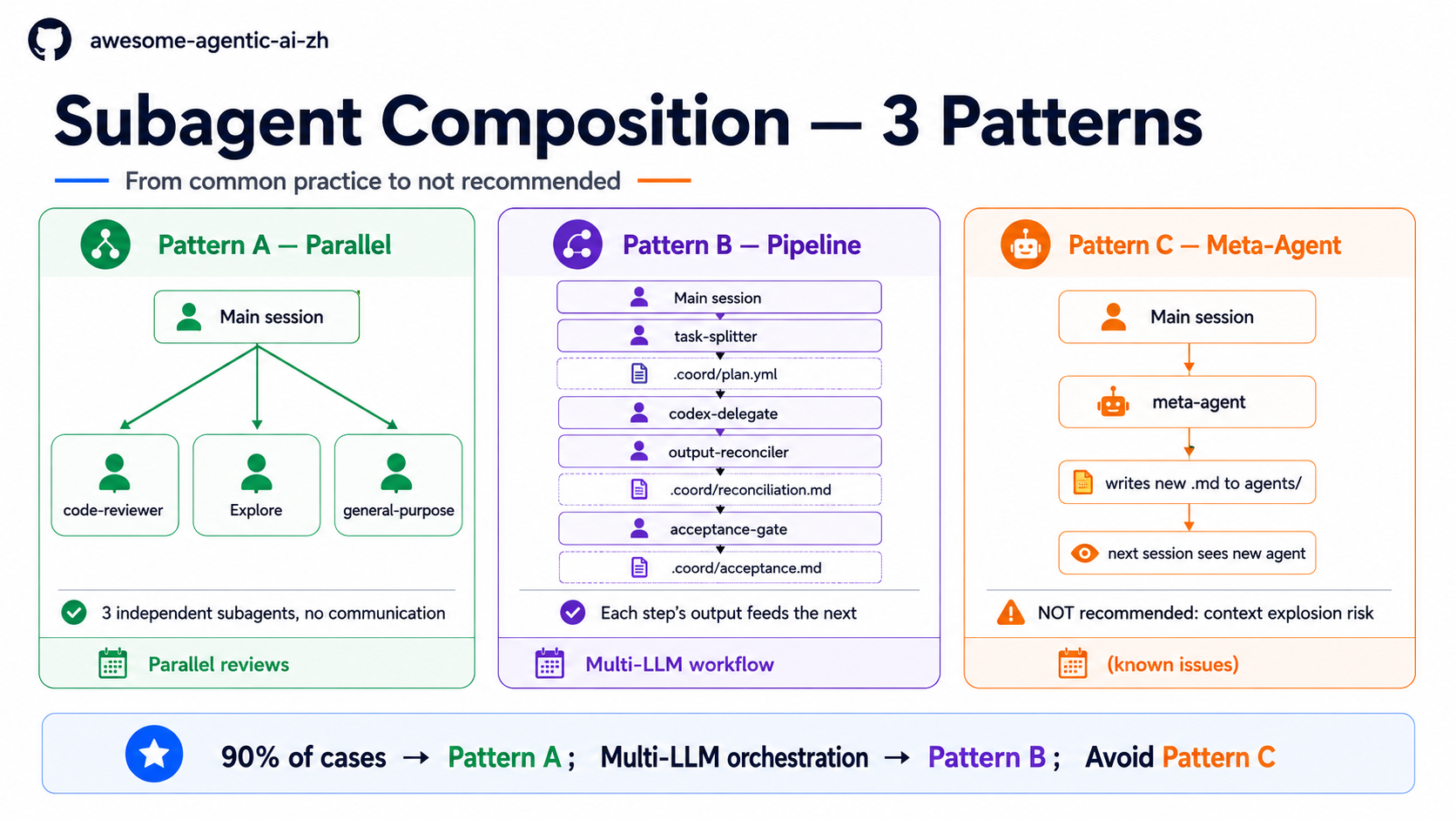
📊 The diagram above: A — Parallel (most common) / B — Pipeline (multi-LLM orchestration) / C — Meta-Agent (NOT recommended, listed to avoid). See the full picture first, then read the details.
Pattern A — Parallel Isolation (most common and simplest)¶
When to use it: 3 tasks are independent and do not need to communicate. Examples:
- 4 files need the same audit (spawn 4
general-purposesubagents) - Run “code review” + “find related papers” + “write a changelog” as 3 independent tasks
How to run it: list N independent tasks in a single prompt (for example, “Audit these 4 files at the same time: A.md / B.md / C.md / D.md”). Claude will call the Agent tool multiple times within one turn and run them in parallel automatically. This is not the same as entering N prompts one after another; that is sequential and waits for the previous one to finish. For long-running independent background work, use /bg.
Cost: Low (no coordination needed)
Trap: The 3 subagents cannot see each other’s results. If there is a dependency, use Pattern B. Also, do not let multiple subagents write to the same file at the same time; that can cause write conflicts or file corruption.
Pattern B — Pipeline Chaining (multi-step collaboration)¶
When to use it: The task needs a step order, and the previous step’s output is the next step’s input. Examples:
- Multi-LLM workflow: Claude planner → Codex implementer → Gemini reviewer
- Literature-research pipeline: splitter divides the topic → multiple researchers run sub-queries → reconciler merges the draft
How to run it: write a skill / orchestrator, such as the agent-collab-workspace plugin, and let it dispatch subagents in order. Having the main session call each one manually is tedious and error-prone.
Cost: Medium (requires coordination logic and .coord/ intermediate files)
Trap: (1) Every added step increases the failure surface, and (2) one subagent failure can block the whole pipeline, so every step needs acceptance criteria.
Pattern C — Meta-Agent (not recommended, included as a pitfall)¶
Why it exists: In theory, “one subagent writes more subagents” sounds elegant.
Why it is not recommended:
- Context explosion risk: a subagent writes a subagent that writes a subagent... and it gets out of control
- No one audits the newly created agent: it may create a dangerous tools allowlist
- Anthropic’s official examples do not use this pattern: the community has not developed a reliable pattern either
- Debugging nightmare: when something fails, it is unclear whether the original prompt, the meta-agent, or the generated agent is at fault
What to do instead: When you notice a repeated task and think “I should write a meta-agent,” use a skill or template instead. Do not take the meta-agent route.
How to choose among the 3 patterns¶
| Your situation | Use |
|---|---|
| 3 independent tasks, each returning to the main session | Pattern A |
| Multi-step collaboration with input → output dependencies | Pattern B |
| You want to “automatically generate subagents” | Do not do this (ask why; usually a skill / template is a better fit) |
90% of use cases are Pattern A. Before moving to Pattern B, confirm that you really need coordination and are not over-engineering.
§3 Debugging Tools for Custom Subagents¶
📌 Different angle from Stage 5.5 §Clarifying 5 Gotchas: Stage 5.5 Gotchas are best-practice-oriented: things to pay attention to when writing a subagent This section's 5 entry points are debug-oriented: where to look after a subagent has already broken 3 topics overlap (tools / model / memory), but the angle differs; read both for full coverage
You wrote .claude/agents/<name>.md, but the result is not what you expected. Here are 5 debug entry points:
Debug entry point 1: Confirm Claude Code can see your agent¶
# Run inside the Claude Code conversation:
/agents
- The file is in the wrong location (it should be in
~/.claude/agents/<name>.mdfor global or<repo>/.claude/agents/<name>.mdfor project-level; when names collide, project-level overrides global) - YAML frontmatter syntax is invalid (for example,
---is not wrapped correctly or thename:field is misspelled) - There is a name conflict (an agent with the same name was overridden)
Debug entry point 2: Confirm the description can be selected¶
Run this prompt to test whether Claude dispatches the subagent on its own:
Describe one scenario that should trigger your subagent (without explicitly naming it), and see which agent Claude dispatches.
Claude did not dispatch your agent: the description does not make Claude see “I should dispatch this.”
- Missing the
PROACTIVELYkeyword → add it - Condition is too abstract → rewrite it as a concrete trigger
- Overlaps with another agent’s description → write the distinctive part
Debug entry point 3: Confirm tool permissions are correct¶
The subagent is dispatched, then reports “I don't have access to X tool” — the tools: allowlist is missing an entry.
# Commonly forgotten tools:
tools:
  - Read
  - Grep
  - Glob       # Find files
  - Bash       # Run git / pytest
  - WebFetch   # Read external URLs
  - WebSearch  # Search the web
⚠️ Trap: Writing
tools:as an empty string (tools: "") or omitting the field entirely does not mean “no tools.” In both cases, the subagent inherits every tool from the main session. To restrict tools, write the allowlist explicitly.
Debug entry point 4: Confirm the model is not silently burning money¶
If a subagent does not specify model:, it uses the same model as the main session. If the main session is Opus, the subagent is also Opus, and token cost can burn 4x faster.
# sonnet is enough for most tasks:
model: sonnet

# Use haiku for simple tasks (finding files, running grep):
model: haiku

# Use opus only when strong reasoning is truly needed (your call):
# model: opus
Check the token statistics Claude Code shows after the session ends (in the lower-right status bar or session summary), or use /clear and compare usage before and after.
Debug entry point 5: Confirm the prompt is self-contained¶
A subagent cannot see the main session conversation. Every dispatch starts with a fresh context.
❌ Wrong prompt:
Review the changes we discussed.
✅ Correct prompt:
Review the staged changes in this repo (git diff --cached). Focus: security
issues, error handling gaps. Per-issue: file:line + suggested fix.
5-Point Quick Check¶
| Symptom | Debug entry point |
|---|---|
/agents does not show it |
Entry point 1 (file location / YAML syntax) |
| Claude does not dispatch it proactively | Entry point 2 (description wording) |
| The subagent reports “no access to X tool” | Entry point 3 (tools: allowlist) |
| Token bill spikes | Entry point 4 (model: not specified) |
| The subagent behaves strangely or goes off track | Entry point 5 (prompt is not self-contained) |
Next Steps¶
- More dispatch recipes →
subagent-cookbook.en.md(15 copy-paste dispatch prompts) - Understand how subagents relate to skills / MCP → Stage 5.5
- Run multi-agent coordination (Pattern B) → the agent-collab-skills plugin
- Vocabulary quick lookup →
glossary.en.md§ 5. Claude Code ecosystem